Fences 6 beta 1

Rules bug

Hello,

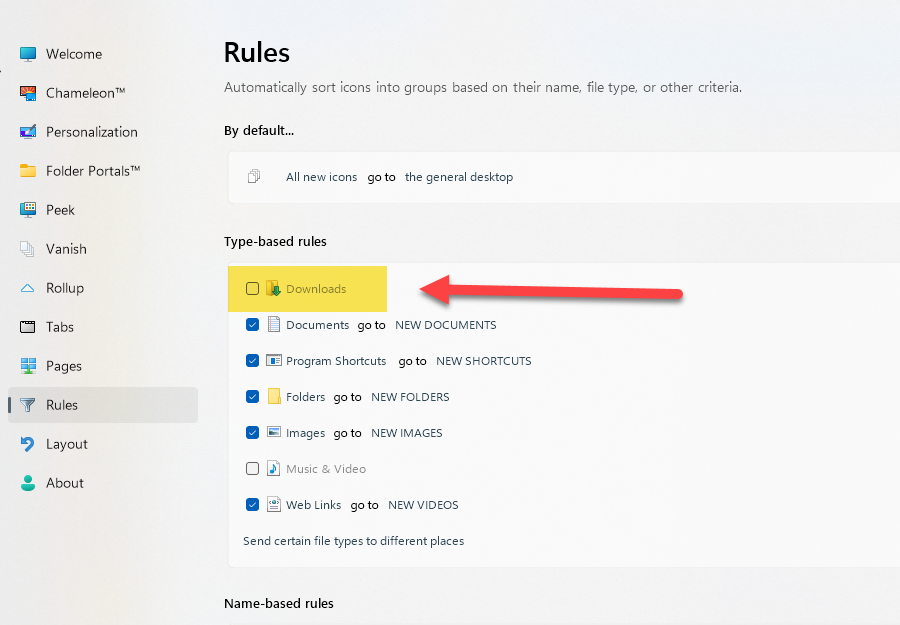
I've found a bug in the version, the rule for moving files arriving in the "download" directory are never put in a "fence" that I've created on the desktop.

Am I the only one?

Thanks for your feedback
5,766 views 11 replies
Reply #1 Top

I don't know if it's a bug or if it is intended, but when you lock your fences, if one fence have multiple tabs, you can't no longer switch tabs. (you have to disable "Lock Fences" to be able to switch tabs again)

It does the same thing with normal fence and folder portal, when a fence have 2 or more tabs.

Reply #2 Top

My English is not good, sorry. What I mean is that if I have the original rule created, and I activate it. Files downloaded to the Windows default directory “Downloas”, are not visible in the “fence” created for this purpose on my desktop.

The other rules (the ones I've set) work.


Reply #3 Top

I also found a display problem ...


Reply #4 Top

Another bug

This is really a "beta" version ... and I bought it instead of waiting ...

How do you set this up? Is there a limit to the number of “fences” I can choose? I can't choose the last one I just created (number 1).

Reply #5 Top

Hello,
Sorry to hear you are having issues. And we appreciate your report, but, do know there is a "Fences 6 Public Beta 1 Feedback" thread available for such of reports. Please use it, it is where Support and Dev look at first for issues on these released.

Thank you,
Basj,
Stardock Community Assistant.

Reply #6 Top

Ah, I can't post in this topic ... so I wish you a good development and I'll wait for the final version which I hope will be without these problems.

"Additional replies would exceed the limit for new accounts. If you have an issue regarding a product that you purchased and need assistance, please contact support@stardock.com."

How do I get back to version 5? ... Also, I didn't get a discount for buying this version 6 beta 1 ... why, given the problems I'm experiencing!?


Reply #7 Top

Quoting Midas68, reply 6

How do I get back to version 5? ... Also, I didn't get a discount for buying this version 6 beta 1 ... why, given the problems I'm experiencing!?

If you have version 5, you could just uninstall v6 reboot immediately, and reinstall version v5.

For that discount price, when you purchased version 6 did you click on "upgrade" button?

Thank you,

Basj,
Stardock Community Assistant

Reply #8 Top

I don't know anymore... can you look?

Reply #9 Top

I can't check into others user account. But, you can raise support ticket using the link below, use the "Ask a Question" option. Include all information details. Remember to record down the ticket number for future reference if needed. Do not raise multiple ticket, that will make your ticket back to the end of the line. Send once and wait. Ticket will be answer by the order they send in.

https://stardock.atlassian.net/servicedesk/customer/portal/4/group/13

Thanks
Basj,
Stardock Community Assistant

Reply #11 Top

--- moved to official thread