windows calculator starts as windows explorer

Windows 11 Version 24H2 for x64-based Systems (KB5050009)

Startup v2.51

I have windows calculator pinned on taskbar. When I click on it windows

explorer opens. I have to right click on the calculator icon to start it. 

thanks 

1,578 views 7 replies
Reply #1 Top

Hello,
Sorry to hear you are having issues. Please try these steps, unpin calculator from taskbar. Launch Calculator from your Start panel. Once it open. Right click on calculator's taskbar button and select "Pin to taskbar". Close calculator. If you now click on the pinned calculator button on taskbar, does it open correctly?

Thank you,
Basj,
Stardock Community Assistant.

Reply #4 Top

No. Just getting windows file explorer still. running start11 v2.5.5.4

just wondered if their has been any progress 


Reply #5 Top

We can not reproduce this issue and we don't see this specific issue reported by others. Is this still happening in your system? Make a video showing us how you pin the Calculator to your taskbar and open calculator via taskbar and show us it open Explorer. Post the video to any sharing site, set it public and post its link here. This will help us understand your issue better.

Thank you,

Basj,
Stardock Community Assistant

Reply #6 Top

Hello,

I just saw this post and have been having the same issue for some time. Besides Calculator, the same issue has occurred for me with Snipping Tool when pinned to the taskbar. 

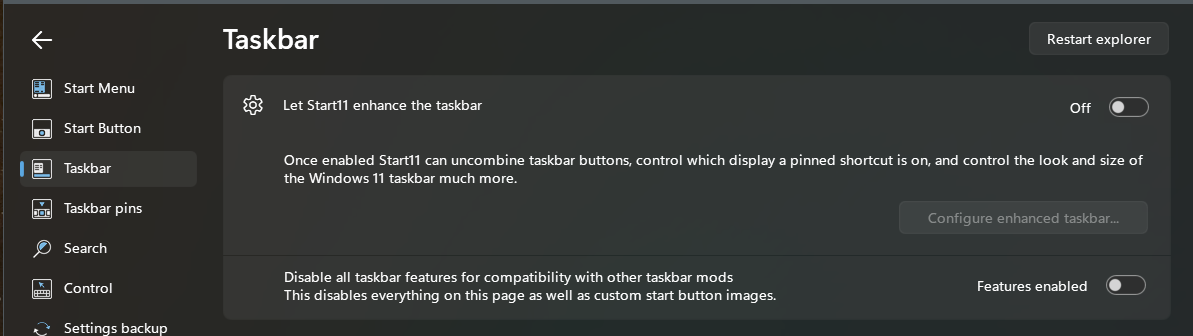
After trying many different things, it seems for me that the issue occurs when I switch "Let Start11 enhance the taskbar" to On. When I switch that option Off, the pinned apps work fine.


Reply #7 Top
Quoting jsfura, reply 3994316

Hello,

I just saw this post and have been having the same issue for some time. Besides Calculator, the same issue has occurred for me with Snipping Tool when pinned to the taskbar. 

After trying many different things, it seems for me that the issue occurs when I switch "Let Start11 enhance the taskbar" to On. When I switch that option Off, the pinned apps work fine.

End of jsfura's quote

Hello,

Sorry to hear you are having issues.  Please try, uninstall Start11, reboot immediately (important), download latest version available in your account product download page: https://store.stardock.com/myaccount/products. Install it, reboot immediately again. Retest it and report back.

If the issue still appear, we need more information.

  1. Windows 10 or 11? Also need its full version and OS Build number. Use Winver.exe.
  2. Do you have any other 3rd party software that might interfere with Start11 installed?

Thank you,

Basj,

Stardock Community  Assistant.