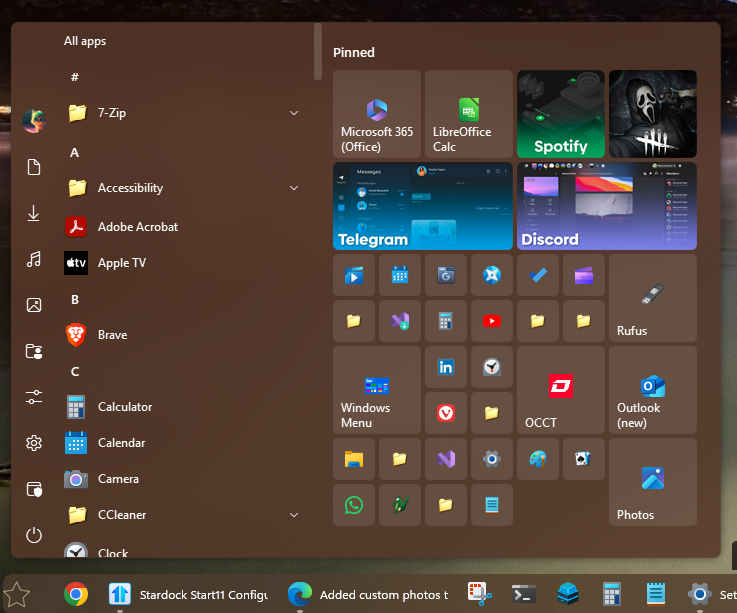
Added custom photos to apps in start menu and they turned white

Windows 11, Start 11 ver.2.11

I added photos to certain applications, and then they turned white, information about them is displayed, the application opens, I tried to restart, it did not help, I can reset the icon, but the essence remains the same, why did this happen? And also in case of unforeseen circumstances, is it possible to return funds for product activation?

Moved to Start Menu Product area

3,131 views 4 replies
Reply #1 Top

Hello,
Sorry to hear you are having issues. Need more information on your system and issue.

  1. Windows full version and OS Build number.
  2. Start11 full version number.
  3. Can I have a copy on one of the issue picture so I can test it myself and see if I can reproduce the issue on my side.
  4. Write steps on how you actually change those icons to your custom picture. We will see if there is any issue on how you did it.

Refer here for Refund/Return Policy : https://support.stardock.com/space/SHC/1339883584/Returns#Stardock-Return-Policy

Thank you.
Basj,
Stardock Community Assistant.

Reply #2 Top

A copy of some of the images you used would be helpful as it may be something about their format.

Reply #3 Top

Hello, I apologize for taking so long to reply.

Windows version: 24H2

OS build number: 26100.2454

Start11 version 2.11, I don't know how to write it more precisely, I installed it from the official website, a couple of days ago, most likely the latest version.

The order of their installation: first, I pinned the application to the start11 menu, then I right-clicked - the icon - select my image - the explorer opens with my folder in which there are .png and .jpg photos for specific applications.

I provide copies of the photos below.

Thank you for your help

Reply #4 Top

This is what I get when I download and use your images. Do know that when I saved the images you posted above, it were saved in .PNG format, are they in the same format in your system?

Thank you,

Basj,
Stardock Community Assistant