Fix explorer based "apps" from displaying the explorer icon and not their own icon (Control panel, run etc.)

Hi, it appears that when using the start11 enhanced taskbar all the "apps" that are based on explorer get the explorer icon and not their own one. For example: Control panel and run.

Is one of the settings responsible for this?
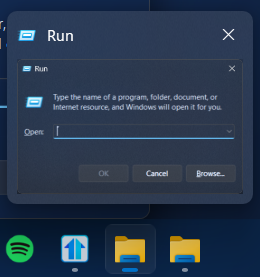
  

3,125 views 11 replies
Reply #1 Top

Are you using the Enhanced Taskbar?


Reply #2 Top

Yeah thanks that fixed the problem but I DO want to combine buttons from applications because it's more organized. 
In previous versions it wasn't like this...

Reply #3 Top

The previous version (Start11v1) did not include the Enhanced Taskbar. Unfortunately, I think you're stuck with the app icon with uncombined buttons or the Explorer icon with combined buttons.

Reply #4 Top

Hello,
Sorry to hear you are having issues. Just to confirm, the icons does appear if you change the the Taskbar combining to something other than "Always combine taskbar buttons", yes?

If you select, for example,  "Sometimes combine taskbar buttons" and since you don't like those buttons text you can turn it off. Refer screenshot below. Do you see something like the screenshot below?

Thank you.
Basj,
Stardock Community Assistant.

Reply #5 Top

yeah thanks I did that but as I said earlier, I do prefer ALL buttons to group to keep taskbar organized. I remember in previous version it wasn't like that. Is it a recent change or a bug?
I am using windows 24H2 build 26100.1150 which is basically the full 24H2 version that is upcoming.

Reply #6 Top

Quoting Yoad6655, reply 2

Yeah thanks that fixed the problem but I DO want to combine buttons from applications because it's more organized. 
In previous versions it wasn't like this...
End of Yoad6655's quote

The previous version (Start11v1) did not include the Enhanced Taskbar. Unfortunately, I think you're stuck with the app icon with uncombined buttons or the Explorer icon with combined buttons.

Reply #8 Top

Quoting Yoad6655, reply 7

I didn't mean v1. I meant the one of the previous releases of v2.
End of Yoad6655's quote

I’m pretty sure it’s always been this way if you’re using the Enhanced Taskbar. If you turn off the Enhanced Taskbar, you can get the look you’re wanting. I use a lot of custom icons for folders, files, and apps, so l don’t use the Enhanced Taskbar. It doesn’t really offer anything I need. 

Reply #9 Top

Hello,
I have forwarded your problem/question to Stardock Support Team for their assistance. Please keep an eye on this thread for any updates. We appreciate your feedback and patience.

Basj,
Stardock Community Assistant

Reply #11 Top

Hi Yoad6655,

Thanks for spotting this.  I've reproduced and logged the findings.

Internal ref: ODNT-8481

Thanks again to everyone for the helpful posting.

Adam McGuinness
Stardock Customer Support Specialist