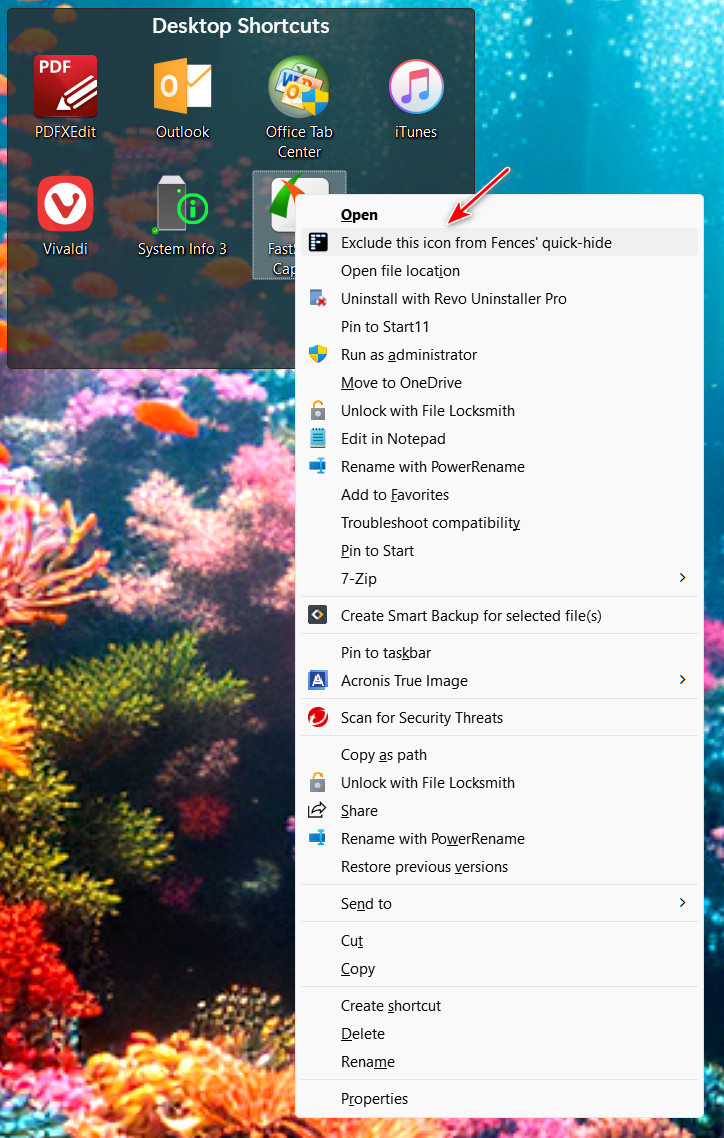
Icons cannot be excluded from hiding

In Fences 5 there is no option to exclude an icon from being hidden. Has the feature been removed, please? "Exclude from hiding" does not appear in Context Menu. This was very practical. You could keep only one or two icons on your desktop with that option.
Could someone lend a helping hand?
Thank you in advance.

6,612 views 8 replies
Reply #1 Top

Right click the icon>Show more options>Exclude this icon from Fences' quick-hide

Reply #2 Top

Quoting pelaird, reply 1

Right click the icon>Show more options>Exclude this icon from Fences' quick-hide
End of pelaird's quote

Many thanks for responding.
I do not have this option now. It was there in Fences 4.

Reply #3 Top

This is for Windows 11. Make sure you select "Show more options" at the bottom of the context menu.


Reply #5 Top

Not sure why you are not able to see this in the context menu as it is a feature of Fences 5.

Reply #6 Top

Hello,
Sorry to hear you are having issues. Need to know more on your system.

  1. Windows 11, yes? Need to know your Windows full build number. Please use Winver.exe.
  2. Do you have any other application installed that changed your Context menu such as, NileSoft Shell or StartAllBack.
  3. Post screenshot of what you see, you context menu, when you right click on the icon you don't wish to hide.

Thank you.
Basj,
Stardock Community Assistant.

Reply #7 Top

Many thanks for your support.
As I heard StartAllBack, which is installed on my laptop, I disabled it and reinstalled Fences. Maybe just reinstalling one more time would solve the issue… but when I restarted my laptop, the option was there, and I can exclude icons from quick-hide now.
Thank you again to all of you who responded.
Keep it up.

Reply #8 Top

Great, glad to hear you resolved it.

Thank you,

Basj,
Stardock Community Assistant