Windows 11 Menu Diarrhea

Universal Applications duopoly

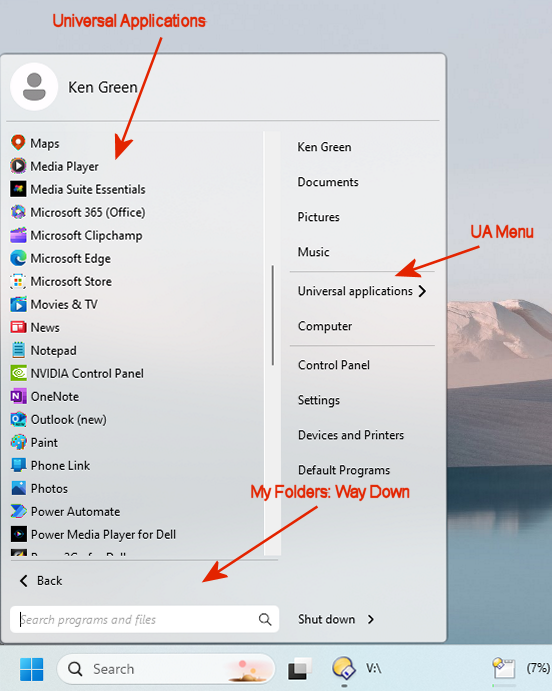
I install A LOT of programs and therefore, customized my Start10 menu with folders for various categories of program links. Start11, using the Modern Windows 7 style has a link for Universal Applications AND lists all Universal Applications in the All Programs area where my menu folders exist. Is there any way to delete all of that duplication?

1,532 views 5 replies
Reply #1 Top

Hello,
Sorry to hear you are having issues. I don't really actually understand what your did and what you have setup on your system without any screenshot. I can't really imagine things. But, what I know you can turn on this option.

Thanks
Basj,
Stardock Community Assistant.

Reply #2 Top

Here's what my "All Programs" menu looks like. BTW, neither the "All Users" start menu and my user start menu has these files.


Thanks, Ken


Reply #3 Top

Have you tried turning that "Show Universal application in their own folder" option" on? That should move all the Universal application into a folder and if you turn off the option "Place folders at the bottom of the list" that should bring those folder up among those none universal application apps. Sorted in alphabetical order.

Thank you,

Basj,
Stardock Community Assistant

Reply #5 Top

Great, glad to hear that.

Thank you,

Basj,
Stardock Community Assistant