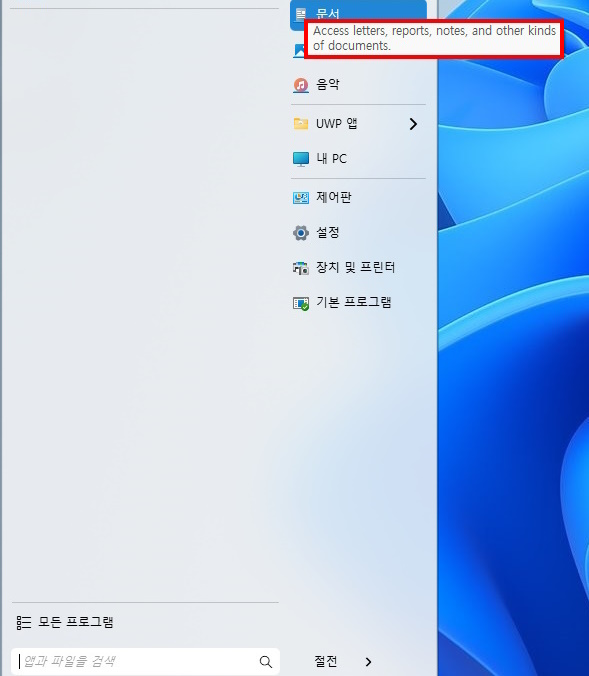
The above items are not included in the ko.lng or en.lng files, so I can't even translate them.
I'm using them by adding them manually to the ko.lng file.
End of clock75's quote
You actually can and it would be helpful to know if you do, that they then render.
For example, if you added your block
"Open your personal folder."="개인 폴더를 엽니다."
"Access letters, reports, notes, and other kinds of documents."="편지, 보고서, 메모 및 기타 종류의 문서에 액세스하세요."
"View and organize digital pictures."="디지털 사진을 보고 정리합니다."
"Play music and other audio files."="음악 및 기타 오디오 파일을 재생합니다."
"See the disk drives and other hardware connected to your computer."="컴퓨터에 연결된 디스크 드라이브 및 기타 하드웨어를 확인하세요."
"Change settings and customize the functionality of your computer."="설정을 변경하고 컴퓨터 기능을 사용자 정의합니다."
"See installed printers and add new ones."="설치된 프린터를 확인하고 새 프린터를 추가하세요."
"Choose default programs for web browsing, e-mail, playing music and other activities."="웹 탐색, 이메일, 음악 재생 및 기타 활동을 위한 기본 프로그램을 선택합니다."
"Find internet downloads and links to favorite websites."="인터넷 다운로드와 즐겨찾는 웹사이트 링크를 찾아보세요."
"Open a program, folder, document or web site."="프로그램, 폴더, 문서 또는 웹사이트를 엽니다."
End of clock75's quote
To the end of the ko.lng file, log off \ on Windows, does it indeed show... or no, nothing shows still?
If that works, are you comfortable working with us here to update ko?
https://github.com/StardockCorp/Stardock-Software-Localization
Adam McGuinness
Stardock Customer Support Specialist

 Stardock Forums