Force Main app shortcut to top in Search Results

Tired of accidentally launching uninstall

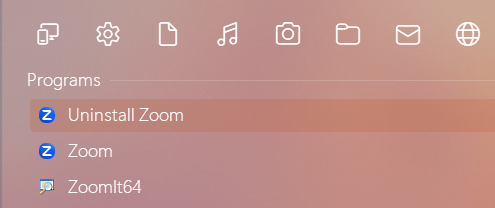
Using Start11 search to pull up an app shortcut, I very frequently run into the problem of the app's uninstaller jumping to the top of search results, leading to launching that uninstaller when hitting enter before registering it mentally. This behavior is likely due to the alphabetical order of shortcuts in the menu folders, but it doesn't make that much sense given the actual app is a much better/more direct match for what's been typed in search. Also, the native Windows start menu search only returns the actual application for the same characters searched, so it understands how to differentiate.

Start 11 should force the main application to the top of the search returns so that it is easier to launch those apps quickly. I don't have a technical approach to suggest to make this happen; I'm not the expert on how this works. I just know that the user experience is frustrating and inferior to the native Windows one. Perhaps, Start11 could allow users to manually set the order of their program shortcuts within menu folders such that the main app is always at the top.

2,519 views 7 replies
Reply #1 Top

Hello,
Sorry to hear you are having issues. Can you suggest to me few applications that I can try to search for and see your issue happening on my system.

Thank you.
Basj,
Stardock Community Assistant.

Reply #2 Top

I believe it would be any application that comes after "Uninstaller" alphabetically. Zoom and Windscribe are ones I specifically have issues with. Anything starting with "Video" as well.

Reply #3 Top

Hello,
I have forwarded your request to the Stardock Support Team for their review and recommendations. Please keep an eye on this thread for any updates. We really do appreciate your feedback, Thanks

Basj,
Stardock Community Assistant.

Reply #4 Top

The 2.07 beta downweighted anything with uninstall in the name so the priority order should change for you.

Reply #5 Top

Quoting Neil, reply 4

The 2.07 beta downweighted anything with uninstall in the name so the priority order should change for you.
End of Neil's quote

I am not seeing any change in priority order with 2.07 beta (checked both Modern and Pro styles)

Searching Zoom returns this:

Just for full disclosure, I have Everything Search results enabled in Start11, but I don't suspect it has anything to do with what is returned for apps at the top results.

Reply #6 Top

Quoting RealRedJay, reply 5


Quoting Neil Banfield,

The 2.07 beta downweighted anything with uninstall in the name so the priority order should change for you.


I am not seeing any change in priority order with 2.07 beta (checked both Modern and Pro styles)

Searching Zoom returns this:


Just for full disclosure, I have Everything Search results enabled in Start11, but I don't suspect it has anything to do with what is returned for apps at the top results.

End of RealRedJay's quote

Are you using Start10 mode search not Start11?

Reply #7 Top

Quoting Neil, reply 6
Are you using Start10 mode search not Start11?
End of Neil's quote

Yes, I am. When I switch it off, search results do indeed show the expected result for my test cases. I guess it wasn't actually full disclosure after all.

I do prefer the more compact results layout of Start10 search style if it's possible to port the change over to that as well.