Can I Hide these items
from  Stardock Forums
Stardock Forums
Hello there
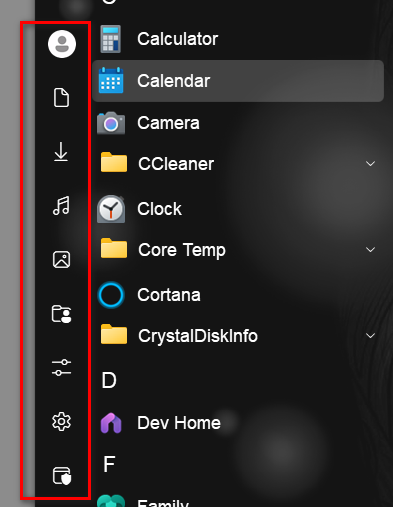
I was wondering if I can hide some of the items in the area boxed in red
Thanks in advance...
 Stardock Forums
Hello there
I was wondering if I can hide some of the items in the area boxed in red
Thanks in advance...
You can delete these in the Start menu>Configuration>Shortcuts list (depending on your menu style). Just select each, one at a time, and click delete. Not sure if you can delete the User or Power buttons.
You can also prevent most of them from showing via the Windows setting:
Personalization -> Start -> Folders
Hiding them this way would make them easier to restore if you change you mind later.

The OP is using Start11v2. Your recommendation is for turning these on/off in the native Windows 11 Start menu only.
Welcome Guest! Please take the time to register with us.
Select a reason for giving karma:
You're about to visit an external site:
Sign up here to get the latest news, updates, and special offers delivered directly to your inbox.