Start11

feedback

I can't find the help I need but am sure I must be missing something.  I thought I had solved all my windows 11 start menu problems with this program but it's just getting worse.  I get it looking really nice then realize I can't even move the shortcut program Icons I have placed in the menu for the windows 10 UI where I want them.  Why wouldn't you be able to move them around?  I've tried adjusting the width and heights to get all of them to fit like I want and that doesn't work either because it just eliminates or hides some of them to where I have to scroll.  There must be an easier way.

1,758 views 5 replies
Reply #1 Top

Please provide the following:

Windows version and build

Start11 full version number

Menu style you are using

Reply #2 Top

MS Windows 11 Home (Unfortunately)

Version    10.0.22631 Build 22631

Start11 2.0.3.0

Was hoping for Windows 8 but had to use Windows 10 style.  I did finally find a unlock button in all those settings, but still doesn't seem to be real configurable like some start menus I recall.  I guess anything is better than 11 though.

Thanks

Reply #3 Top

Start11v2 is very customizable. It will take you some time exploring all the available features to find the setup you would like.

With the windows 10 style, you can set the column width by right clicking the Start menu and selecting "Group widths."

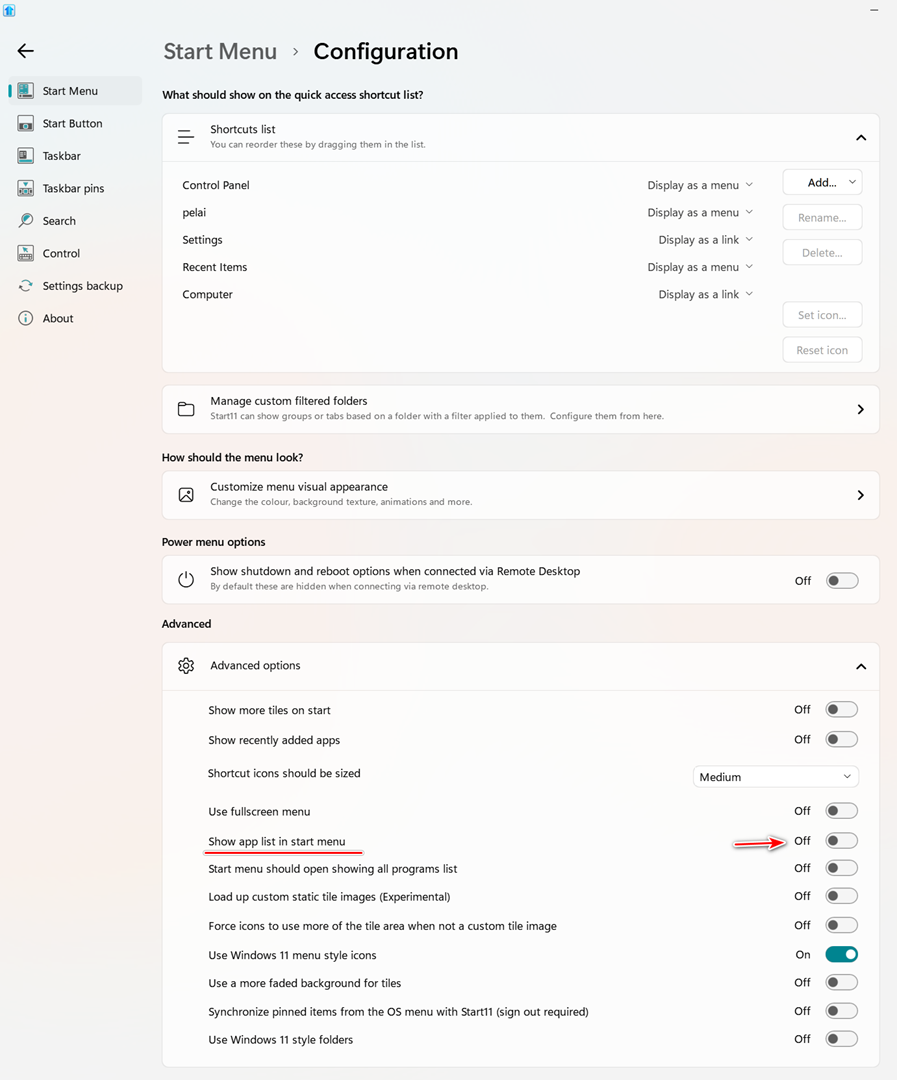
You can also show or hide the "All Apps" section using a setting in the "Advanced settings."

Reply #4 Top

Thanks, that's helpful.  Just got to spend the time.  It's strange, I was noticing that my membership date says 2013.  Not sure how that's possible...  Also keep getting reminders that my 30 day trial is almost over and I've already bought and registered it in January.  I may be losing it!  LOL

Reply #5 Top

Based on your member number, August 2013 sounds about right.