Start11 V2 won't install

Start11 V2 won't install

Hi,

I read I cannot contact stardock for support on this, I have to use the forums.

Running Windows 11.

Just purchased an upgrade to Start11 V2 from start11 V1.

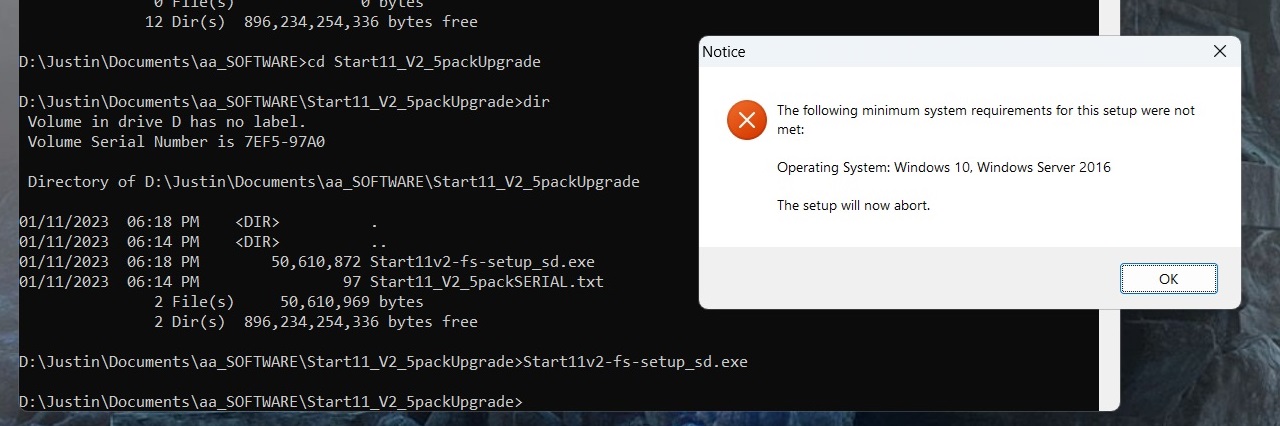
Double clicking on the start11_v2 executable gives an error message "the following minimum system requirements for this setup were not met: Operating System: Windows 10, Windows Server 2016. The setup will now abort"

Tried changing the compatibility of the executable to windows 8, no luck.

Instantiated an elevated cmd prompt shell window, navigated to the location of the start 11 v2 executable and tried running the exe from cmd line, still no luck.
1,797 views 3 replies
Reply #1 Top

1. Why can't you contact Stardock?

2. Run winver and give system specs in addition to Windows version appearing after you run winver.

3. All other customizing software on your system.

Reply #2 Top

Setting compatibility to Win8 will certainly stop it working as it needs Win10/11 to install.

The first thing I would do is download the installer again in case it is corrupted.

Reply #3 Top

Hi all,

thanks for the replies. I was able to get it to run eventually. I really have no idea why it wouldn't install, it is possible that either Windows 11 or my security software interfered with the install process.

I only changed the compatibility after it wouldn't run initially, and only then as someone at microsoft suggested I try running the exe in compatibility mode.

Anyway, no issues, was finally able to get it to work.

Thanks.