"Ghost" Icon

For some time I have a problem. In the taskbar appears an "ghost" (blank) icon that I cannot eliminate in any way.

I attach an image of the taskbar sector where this icon appears (indicated with a yellow circle).

The Windows version is: 22h2 - 22621.2428

Start 11 - Version 1.47

Could someone tell me how to eliminate that icon?

4,251 views 12 replies
Reply #1 Top

Hello,
Sorry to hear you are having issues. Try this uninstall Start11 and reboot immediately after. Check if the icon still there. If it is still there than check this guide and see if it help: https://answers.microsoft.com/en-us/windows/forum/all/strange-icon-appeared-in-taskbar/c55441ba-e8de-408e-847b-5367c2ef91e3. Report back.

Thanks
Basj,
Stardock Community Assistant.

Reply #3 Top

When you uninstalled Start11, does the strange icon goes away? And the strange icon return after you reinstall Start11?

Thank you,

Basj,
Stardock Community Assistant

Reply #5 Top

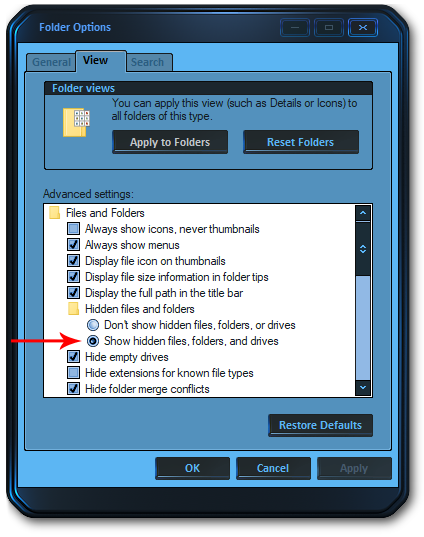
Open "Folder Options" and enable "Show hidden files, folders and drives"

Then go here: C:\Users\YOURUSERNAME\AppData\Roaming\Microsoft\Internet Explorer\Quick Launch\User Pinned\TaskBar
Look for the shortcut(s) that does not belong there and delete it/them.
Remember to disable "Show hidden files, folders and drives" after you're done.

This is the solution for Windows 10, but I think the same applies to Windows 11.

Reply #6 Top

I followed the steps, but in the indicated folder only some of the icons that are in the taskbar are shown and none of them is the strange icon.

Is there any other folder where the other icons of the taskbar that do not appear in this folder can appear?

Reply #7 Top

Quoting mhjanon, reply 6

Is there any other folder where the other icons of the taskbar that do not appear in this folder can appear?
End of mhjanon's quote
Sorry, not that I know of.

Just to be clear: After you uninstalled Start 11, did you try to both left & right click the icon and nothing at all happened?

Reply #9 Top

Might help if you can run Start11 purge from this guide: https://forums.stardock.com/505872/start11-support-faq#reinstalling. Reboot after the purge and check if the icon still there. If it is still there, than it look like something else is causing it. Try the SFC and DISM scan steps below.


-For Win8/10 Users: Open the Start Screen, and type 'cmd'. Right-click on the search result and select 'Run as administrator' from below.

-For 7 Users: click Start, in the start search field type 'cmd'. Right-click on the search result and select 'Run as administrator'.

-Type: sfc /scannow

-Wait for the scan to complete (this can take several minutes)

Some help on how this looks should you need it:

https://support.microsoft.com/en-us/help/929833/use-the-system-file-checker-tool-to-repair-missing-or-corrupted-system

If the SFC finds errors, but cannot fix them, please also run the following command in the same command prompt window:

dism.exe /online /Cleanup-Image /RestoreHealth

Some help on how this looks should you need it:

https://www.windowscentral.com/how-use-dism-command-line-utility-repair-windows-10-image

The above command should assist with replacing any damaged or problematic system files. Please note, however, since it may require restoring certain files, this process can take some time and you will need to be patient until it has completed.

Please let me know whether this resolves your problem or if you have any additional questions.


Thank you,

Basj,
Stardock Community Assistant

Reply #10 Top

I performed all the indicated steps, but unfortunately none corrected the problem.

The only difference is that the strange icon changed position in the taskbar


Reply #11 Top

Quoting mhjanon, reply 10

I performed all the indicated steps, but unfortunately none corrected the problem.

The only difference is that the strange icon changed position in the taskbar

 
End of mhjanon's quote

To me, that would indicate it's coming from a different app...maybe one that didn't uninstall correctly or fully.

Reply #12 Top

I am not sure if that can be the reason.

But since I published my previous answer, turned off the machine for a while and when reopening it a new strange icon appeared (now there are 2).

I am totally baffled.