Start 11 Menu Icon Size for Windows 10 Option

I have installed the trial version on my new Windows 11 system and selected the Windows 10 option. The only thing I notice is that the size of the Start 11 icons are larger as compared to the standard Windows 10 Start Menu icons. I selected the "medium" size, but that size is a lot larger than the medium size that I get on my old Windows 10 system and it takes up a lot more real estate. The "small" option is useless as they are really small and there is no label for the icon unless you put the mouse over the icon. Is there is possibility of having a size between the small and medium? I have each computer connected to separate monitors (both 27") and the settings are identical (1920 x 1200 resolution).

I was concerned when I saw a number of complaints about not being able to uninstall Start 11. Had I seen that before I did install it, I most likely would not have even tried it. I hope you come up with a resolution for that problem

JohnD


5,708 views 13 replies
Reply #1 Top

Reply #2 Top

Hello,
Sorry to hear you are having issues. But, I don't see what you see, please refer screenshot below. Those two Start panel on the same monitor. The bottom is from Windows 10 and its default Windows 10 Start panel. The top is from my Windows 11 VM system. Which is running Start11 with Windows 10 Style and as you can see it look like it at the same size. Just a bit rounded corners on the Windows 11.

As for the issue on uninstall. Have you tried uninstall using the normal uninstall steps as any other application. Yes, I notice there are few having issues uninstalling. But, I believe it not wide spread. More like unique issue on that system. If you have uninstall. Please report here and we will try to help you.

Thanks
Basj,
Stardock Community Assistant.

Reply #3 Top


I have installed the trial version on my new Windows 11 system and selected the Windows 10 option. The only thing I notice is that the size of the Start 11 icons are larger as compared to the standard Windows 10 Start Menu icons. I selected the "medium" size, but that size is a lot larger than the medium size that I get on my old Windows 10 system and it takes up a lot more real estate. The "small" option is useless as they are really small and there is no label for the icon unless you put the mouse over the icon. Is there is possibility of having a size between the small and medium? I have each computer connected to separate monitors (both 27") and the settings are identical (1920 x 1200 resolution).

I was concerned when I saw a number of complaints about not being able to uninstall Start 11. Had I seen that before I did install it, I most likely would not have even tried it. I hope you come up with a resolution for that problem

JohnD


End of quote

The sizes should be identical.  But could you check both computers have the display scaling factor set the same?

Also you may want to check the option to make the menu font bigger in Start11 as that will scale everything up (or down).

I also notice the screenshot of Win10 there is smaller than I would expect.

Reply #4 Top

Ok thanks for all the help. I wandered through all the Start 11 menu settings and found a couple of things. First as Pelaird pointed out, there is a general setting for shortcut setting sizes. If I changed that to "small", it reduced the sizes of the icons to about the size of the Windows 10 Start Menu on my old system. I also had a text size scaling set in Windows Accessibility which Start 11 seemed to have picked up for the menu font. I reset that and both changes made things much better. I still am not sure if I want the general shortcut size as small or medium. As I add more icons I will see how it goes. It looks like I will stick with Start 11 and don't think I will need to uninstall it. It sure beats the abomination that Microsoft handed us.

Thanks again.,

JohnD

Reply #5 Top

Ok you guys did such a good job on my first question, I have two more.

1. I added a few more items to the Start Menu and then started a new group. When I added an item to the new group, the icon was shrunk, much smaller than the icons in the existing groups I set up although the tile was the same size as the others. If I move that new item up to an existing group, the icon increases its size to the same as the rest of that group. Is there some setting to adjust this?

2. I noticed that there is only one line available for the tile name, even if I chose tile size of large. Under Windows 10 you had the ability to use two lines for the tile name. Is there an option for this?

JohnD

Reply #6 Top

Hello,

  1. Please post a video here capturing this happening, would like to see it to understand what is happening.
  2. Note too how you can add second line on Windows 10 default Start panel, but, I can see that in Start11, if I have long name it will wrap itself up into the second line.

Thank you,

Basj,
Stardock Community Assistant

Reply #7 Top

1. Here is a link to a video showing me creating a new group, then moving a tile from the group above to the new group. This happens to be a tile for Powershell. You can see the icons for it and the other tiles in the upper group are of a good size. When I move the Powershell tile to the new group, the icon for it shrinks.

https://drive.google.com/file/d/1JK_OwAlOuZJnUVSO9DdFYo3GaOvwl9cH/view?usp=sharing

2. I cannot get a second line on any of my tiles even if the tile name is short. For instance I have "Control Panel" as one of the tiles. All I see on one line is "Control P...". No second line which could easily hold "Panel" does not show up.

JohnD

Reply #8 Top

Hello,

Look like your Start11 panel different than default Start11 Windows 10 style. Need to know what is your Start11 Setting on icon size and font size. If you look at my first screenshot, those are the default icon size and text size. So, I can't actually reproduce your issue if I do not know what is current setting on your system. Also, need to know what is your Monitor resolutions and scaling (100%,125%,200%)

Thank you,

Basj,
Stardock Community Assistant

Reply #9 Top

This is really weird. Sometimes it does it and sometimes it doesn't. It appears that it is creating a small icon when I set up a new group and then add something to it. If I move the item to an existing group with proper sized icons, the icon then reverts to medium. In some cases icons in new groups "heal" themselves (show as medium size).

Start11 Settings

1. Individual icons are sized "Medium".

2. "Advanced options" setting for Shortcut icon is "Medium".


System Settings

1. Display Resolution: 1920x1200

2. Scale: 100%

3. Text Size (In Accessibility): 125% (Changed it back to 100%, but made no difference)

I don't know what to tell you. There is no really no way to fix this if there is not a regular pattern to it. I will continue to play with it. I am more interested in getting the two line tile name working as it is difficult to determine what some of the icons stand for with only one line available.

JohnD


Reply #10 Top

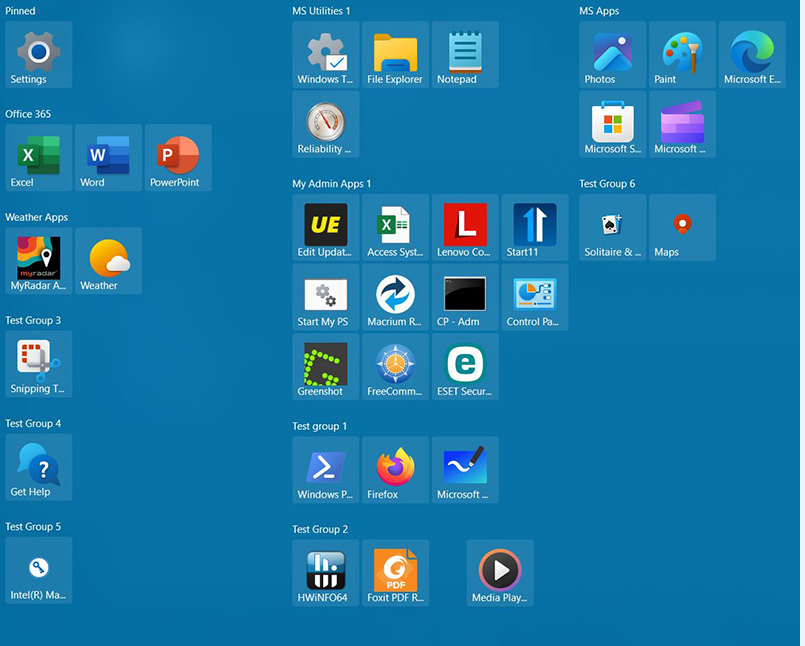
OK I found something. If I change the "Shortcut icons should be sized" from "Medium" to "Small", all the shrunken icons are miraculously converted to "medium". See "Test Group 5" and "Test Group 6".

JohnD

Reply #11 Top

I can not reproduce your issue, however, I have forwarded your problem/question to Stardock Support Team for their assistance. Please keep an eye on this thread for any updates. We appreciate your feedback and patience.

Basj,
Stardock Community Assistant

Reply #13 Top

I found how to get two lines for the name of the tile. I had set "Force icons to use more of the tile area when not a custom tile image" as "ON". When I turned that off, the second line showed up. The icon was smaller but that is OK. The name is more important than the icon. So I am good to go. Thanks for your help.

JohnD