Feature update/request.

Fence Grid and Boundary

Hi folks,

I wonder if I might request a couple of updates to fences please, if possible?

1. I have my rolled up fences arranged in a column or stack down the left hand side of my desktop. Could you possibly enable a way to align and space rolled-up fences so they are all neatly lined up on the desktop. To 'sort' fences alphabetically would also be great. I'm thinking something like an invisible grid of some type with an adjustable spacing value.

2. After installing the latest versions of a graphics driver, some individual icons on the desktop, not belonging to fences are redrawn/relocated behind rolled up fences. Could you code a boundary around the fences to prevent this?

Thanks for your time,
Ed.
 

3,192 views 4 replies
Reply #1 Top

Hello,
Sorry to hear you are having issues.

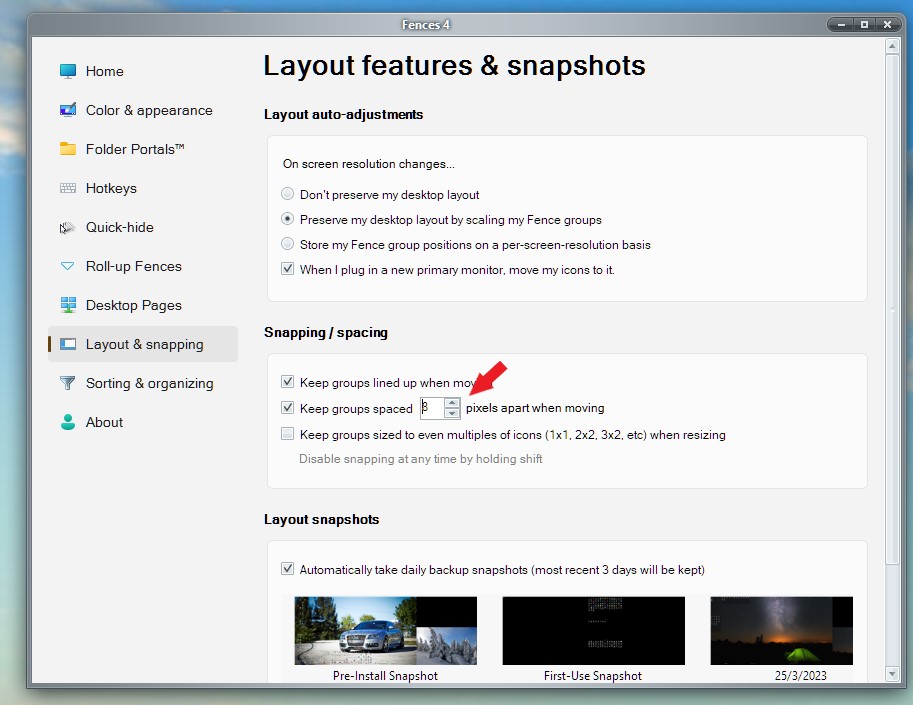
  • Have you tried the snapping/spacing function to get those Fences align properly?

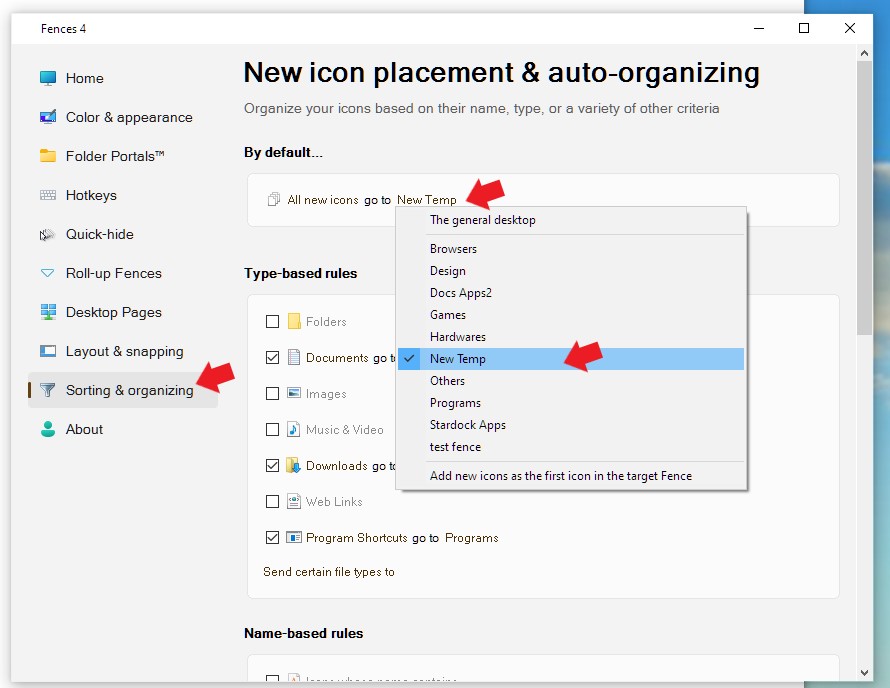
  • I believe it is best to move every icons into a Fence so you can use Fences to manage it. You can set a rule so that all new icons/document/files coming into desktop be auto move into a temporary Fences. Which you can manage it later.
  • To set up such Fences rules refer screenshot below as an example.


Thanks
Basj,
Stardock Community Assistant.

Reply #2 Top

Thanks Basj, I wasn't aware of these settings, but this setting is for icons within the fences, yes? I'm asking if the rolled up fences can be aligned and spaced relative to each other?  e.g. Draw a marquis around all the fences, right click and select align.

Regards,
Ed.

Reply #3 Top

Hello,
I have forwarded your request to the Stardock Support Team for their review and recommendations. Please keep an eye on this thread for any updates. We really do appreciate your feedback, Thanks

Basj,
Stardock Community Assistant.

Reply #4 Top

Thank you Basj, I appreciate your help.


Kind regards,
Ed.