Update Installs not seeming to actually update

I install updates OD says are available, but after installing & rebooting, OD still says I need to update

Title pretty much says it all. Object Desktop (OD) constantly shows "updates available" for Fences, Window Blinds 11, Groupy 2, Start 11.... And I go through the update, reboot my PC and when I open OD, it says I need to update the program I just (supposedly) updated.

Guys, check my account. I've been a Stardock customer for over a decade. I Founder/Supported GalCiv3 and Star Control Origins. I've had the OD subscription for, honestly, I'm not even sure how many years, but probably over a decade.

This problem is something that I have encountered for a couple of years now, but I just ignore it.

But frankly, I don't think that is a solution to the problem. Why should I ignore the program constantly telling me to update my software and then after doing so and rebooting, STILL being asked to update to the same version it asked me to update to just before?

Should I uninstall all my OD software and reinstall all the programs I use - which is: Start11, Curtains, Groupy/Groupy2 (for some reason, when I installed Groupy2, it installed Groupy), WindowBlinds, WindowFX, Fences, WindowBlinds11(as with Groupy, WindowBlinds installed when I installed WindowBlinds11), Deskscapes 11, IconPackager. SoundPackager 10, and SpaceMonger.

Currently, after having installed and rebooted for each of the requesting programs, I still have Start11, Fences, Groupy2, and WindowBlinds11 asking me to update. And yes, I checked the versions prior to each install, and the ones it's asking for now are the ones I supposedly just installed.

Finally, an honest and I think fair critique from a customer as long standing as I: Why do these programs require system reboots to complete at all? In years gone by, NVidia graphics cards updates would require the system to reboot, but for a couple of years now, they install completely new drivers without requiring a system reboot. The same is true for iTunes. In years past it needed reboots, now, no longer. 

Windows system updates I can understand. But why does each and every one of Stardock's Object Desktop programs require a system reboot? Please answer that question... I am utterly perplexed by this state of affairs.

Lastly, and I realize this is a long post, but I wish to express to you, Brad and all the fine people there, how much I love the products you produce. Games and software. I use/play 'em all. Heck, I even supported GalCiv4 on Epic Games Store as soon as it was announced (though, honestly, I don't understand why that was scrapped and GalCiv4: Supernova became a thing - if you are so inclined as to explain that, I love to know why. 

But please help with this install/update/reboot thing. Maybe I'm a bit too anal retentive about such things, but I like to keep my system as up to date as possible. And for a few years now, I've been most irritated by this issue of updating/rebooting/seeing update requests still in Object Desktop.

Thank you and may peace and prosperity be upon you and all those you hold dear.

           ~ Steven A. Mazzone

19,729 views 8 replies
Reply #1 Top

Hello,
Sorry to hear you are having issues. First, would like to convey Stardock gratitude for your enormous support. 

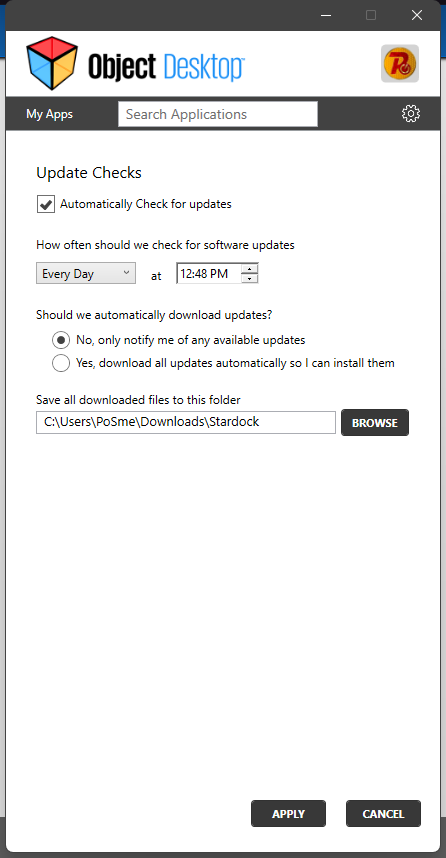
It is known that ODM have issue for not detecting software which is already up to date. I believe, the Dev team is still working on it. For now, you can turn off ODM update check and do the update check manually via your product account page or use the "check update button" within each individual software itself. To disable ODM update check refer to screenshot below.

No, you don't need to uninstall and reinstall all the software under OD package for this issue. As for rebooting. From what I understand and observed. Most of Stardock software work with Windows systems files. Hence, for it to work properly, the system needed to be rebooted, right after installation.

Thank you.
Basj,
Stardock Community Assistant.

Reply #2 Top

Similar issue. Constantly getting false update notifications. I have to open each app (or check their change logs) and see what the app says to be sure the notification isn't false. Otherwise, I end up 'endlessly' installing the same false update thinking that something is wrong with the installation. I had recenlty updated OD from a link a dev posted in another thread and it seemed the problem had stopped until this morning.

Reply #3 Top

If you click on your avatar in the top ribbon and then > choose downloads, then under Object Desktop choose View Indivdual downloads and click it, you'll get a list of all your software. From there, check the version numbers on your installed software vs. those available on the list.

I know this is very clunky, but there's no other way to check whether you're not up to date vs false notification...until they fix the app. In the meantime, disregard the Object Desktop app's notifications.

Reply #4 Top

A question to everyone not able to update...

Do you have a VPN running on your system? I ask this just out of curiosity. I had one running on my system for work because I needed to log in briefly, forgot to log off and didn't think about it at the time. After a bit of troubleshooting, I turned the VPN off and suddenly the updates went through normally.

This is JUST a suggestion to help out. It may or may not fix your issue but I figured since it indeed fixed the update issue I was having last month, I would share with you guys. If it doesn't work, I do hope you all get it figured out.

Reply #5 Top

Nope, no VPN. Nothing wrong with our machines. And I still don't get why it is is so hard to fix for such a long time.

Reply #6 Top

I do not, nor ever have, used a VPN. 

Seriously, why has it been a few years (at least) that this update issue in Object Desktop has not been fixed?

I appreciate the reply I was given about ignoring it - but that's what I have been doing for a really long time now. 

I'm what? A 10+ year subscriber? something close to that (if not more than that) at least. Please get it together.

Reply #7 Top

Hello Donnerjack2112,

Title pretty much says it all. Object Desktop (OD) constantly shows "updates available" for Fences, Window Blinds 11, Groupy 2, Start 11.... And I go through the update, reboot my PC and when I open OD, it says I need to update the program I just (supposedly) updated.
End of quote

There is a known issue with how ODM sees updates but that might not be what is at issue here.

If you go to:

\Downloads

If there is a 'Stardock' folder, delete it.  Close ODM (from the system tray) and check again.

Finally, an honest and I think fair critique from a customer as long standing as I: Why do these programs require system reboots to complete at all? In years gone by, NVidia graphics cards updates would require the system to reboot, but for a couple of years now, they install completely new drivers without requiring a system reboot. The same is true for iTunes. In years past it needed reboots, now, no longer. 
End of quote

This is not a Stardock software thing, its a 'How Windows PCs and memory \ file management works' thing. Basically, files get locked into processes and cannot be replaced unless nothing is using them.  

Perhaps the reason you are not seeing the need to reboot as much for other apps is that they can run in isolation. In contrast, our products (and the many others that act similarly) do interact \ integrate with core Windows systems - as you noted, those same systems Windows itself requires a reboot when they are updated by MS.

Lastly, and I realize this is a long post, but I wish to express to you, Brad and all the fine people there, how much I love the products you produce. Games and software. I use/play 'em all.
End of quote

But please help with this install/update/reboot thing. Maybe I'm a bit too anal retentive about such things, but I like to keep my system as up to date as possible. And for a few years now, I've been most irritated by this issue of updating/rebooting/seeing update requests still in Object Desktop.

Thank you and may peace and prosperity be upon you and all those you hold dear.
End of quote

Thank you very much for the kind words and support; means more than you could know.

Sean Drohan
Stardock Product Lifecycle Manager