How do I override Windowblinds 11 Taskbar with Start 11's custom texture/color

Alternatively: How do I FORCE the tray icon/dates to be black?

I would like to override a WindowBlinds skin's taskbar with a texture of my own, but when a WindowBlinds skin is in use the only option is "Using WindowBlinds Skin".

If this is not possible - is there at least a way I can FORCE the system-tray icons and date to be black? I have tried every combination of light/dark/custom modes, the accent-color toggles within WindowBlinds, and the 'disable small taskbar icons' trick. Some tray icons are black, some are white - the clock is always the opposite of whatever dark/light mode Windows is supposedly in - making it almost invisible.

3,987 views 6 replies
Reply #1 Top

Hello,
Sorry to hear you are having issues. You can mod the skin to use different taskbar texture using Skinstudio refer screenshot below.

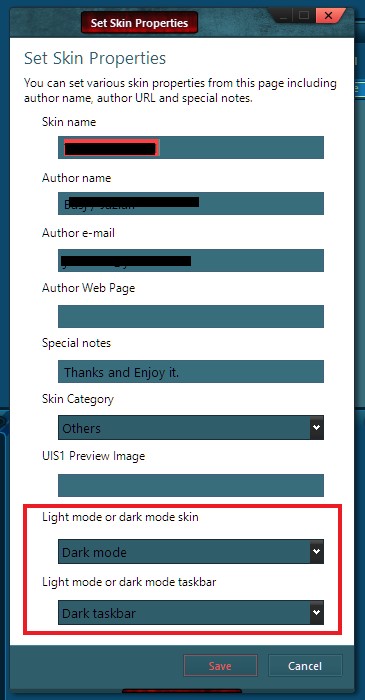
Or, you can change Skin property within Skinstudio to force the default color icons to be black or white. ie. Dark taskbar white icon. Light taskbar black icon. For clock and date text color. You will need to change it within Skinstudio check screenshot above.


Basj,
Stardock Community Assistant.

Reply #2 Top

Thank you! This certainly gives me a start.

I've encountered a new problem: All my taskbar images are 30px high, but the taskbar itself is ~43. The Taskbar Buttons scale appropriately, but the StartButton remains 30px, giving it some very wide margins. How do I 'lock in' the taskbar size to 30px? The only google results giving this information are from before 2004, and reference changing the text margins on the taskbar, which currently do not appear to affect the taskbar's height.

Reply #3 Top

You on Windows 10 or Windows 11?

Thank you,

Basj,
Stardock Community Assistant

Reply #4 Top

Windows 10. I am using SkinStudio11, WindowBlinds11, and Start11 with Win11 style taskbar/start-menu if that makes a difference. I also using the 'simple' format, but am willing to switch out for the advanced if that's needed for this, I just wanted to try and maintain compatibility for both 10 and 11. Thanks!

Reply #5 Top

Not sure about this. It best if you can post your question on Windowblinds/skinstudio in new thread in Windowblinds section so other with more technical know how on Windobblinds might try to help you there.

Thank you,

Basj,
Stardock Community Assistant

Reply #6 Top

Oh, good point, I forgot this was the Start11 section, thank you!