[Start11] [Suggestion] Add option to toggle line

It would be great to have the ability to toggle the line at the top of the taskbar because IMO the line takes away from the transparency effect. I've seen other taskbar control apps offer this toggle and I think it would be a nice addition here.

38,900 views 22 replies +1 Loading…
Reply #1 Top

Hello,
Sorry to hear you are having issues. Can you post a screenshot of the area you're referring to. Also provide us on your full Windows version number and Start11 version number installed.

Thanks
Basj,
Stardock Community Assistant.

Reply #2 Top

Hi Basj, to be clear I'm not having any issues, this is just a feature suggestion because by all accounts Start11 has been great. Attached is an image showcasing the aforementioned area -the thin grey horizontal line on the top of the taskbar is what I'm referring to.

Win 11 22H2
Start 11 1.39

Reply #3 Top

I don't see that line on my system.

What is your Windows 11 full version number?

Thank you,

Basj,
Stardock Community Assistant

Reply #4 Top

v 22621.1265

It makes sense that you aren't seeing the line, I should have clarified; enable "Blur the wallpaper under the taskbar", make sure you have taskbar transparency not at 0 or 100% & restart explorer.

Reply #5 Top

Hello,
I have forwarded your request to the Stardock Support Team for their review and recommendations. Please keep an eye on this thread for any updates. We really do appreciate your feedback, Thanks

Basj,
Stardock Community Assistant.

+1 Loading…
Reply #7 Top

Quoting KrazyLurt, reply 6

As a previous v1 user, I tested v2 trial and I have this line. Is there a way to remove it?
End of KrazyLurt's quote

Hello,
Sorry to hear you are having issues. Please post what you have on your system.

  1. Windows full version numbers. Please use Winver.exe
  2. Start11v2 version number.
  3. Screenshot of what you have on your system.
  4. Setting on taskbar transparency and Blur under wallpaper?

Thank you.
Basj,
Stardock Community Assistant.

Reply #8 Top

Windows 11 23H2  22631.3155

this happens only when maximized window

no transparency, blur or no blur doesnt matter


Reply #9 Top

Quoting basj, reply 7

Start11v2 version number.
End of basj's quote

Reply #11 Top

Quoting KrazyLurt, reply 8

no transparency, blur or no blur doesnt matter
End of KrazyLurt's quote

Quoting KrazyLurt, reply 10

tested on v2.05, v2.06
End of KrazyLurt's quote

I tested on v2.06 with Transparency set to 0% and no blur wallpaper under the taskbar. But, I don't get the line. Refer screenshot below.

Thank you,

Basj,
Stardock Community Assistant

Reply #13 Top

Also, your task bar is rgb 0 0 0, and with 0 0 0 I also do not get a line.

Try a taskbar above 6, 6, 6 and it appears, more notable the higher the dark grey, like 19, 19, 19

Reply #14 Top

If you check the OP posts he mentioned that taskbar at 0% solid ie. transparency full, which mean no matter what color I set on the taskbar, it will  be same as desktop. So even if I see taskbar at 19,19,19, it still nothing change on my system. BTW, this is on Windows 11 V23H2 OS Build 22631.3155.

Thank you,

Basj,
Stardock Community Assistant

Reply #16 Top

If you put 100% solid with 19,19,19 RGB Taskbar with Black background at 0,0,0 RGB, Obviously there will be a line there to show you the different of this two area. The OP was talking about something totally different here.

Thank you,

Basj,
Stardock Community Assistant

Reply #17 Top

That line was added by Microsoft, the taskbar didn't have that until a year or so ago. 

Applications like translucent taskbar have an option to disable that divider. I thought start11 might have that option or a disabled divider also. 

+1 Loading…
Reply #18 Top

Quoting KrazyLurt, reply 17

That line was added by Microsoft, the taskbar didn't have that until a year or so ago. 

Applications like translucent taskbar have an option to disable that divider. I thought start11 might have that option or a disabled divider also. 
End of KrazyLurt's quote

The divider should automatically vanish if you set your taskbar to completely transparent.

+1 Loading…
Reply #19 Top

You would think, but if you select the option to blur the wallpaper under the taskbar that doesn't seem to be the case

Reply #21 Top

Quoting KrazyLurt, reply 20

Yeah I know, I don't want transparent tb when maximized
End of KrazyLurt's quote

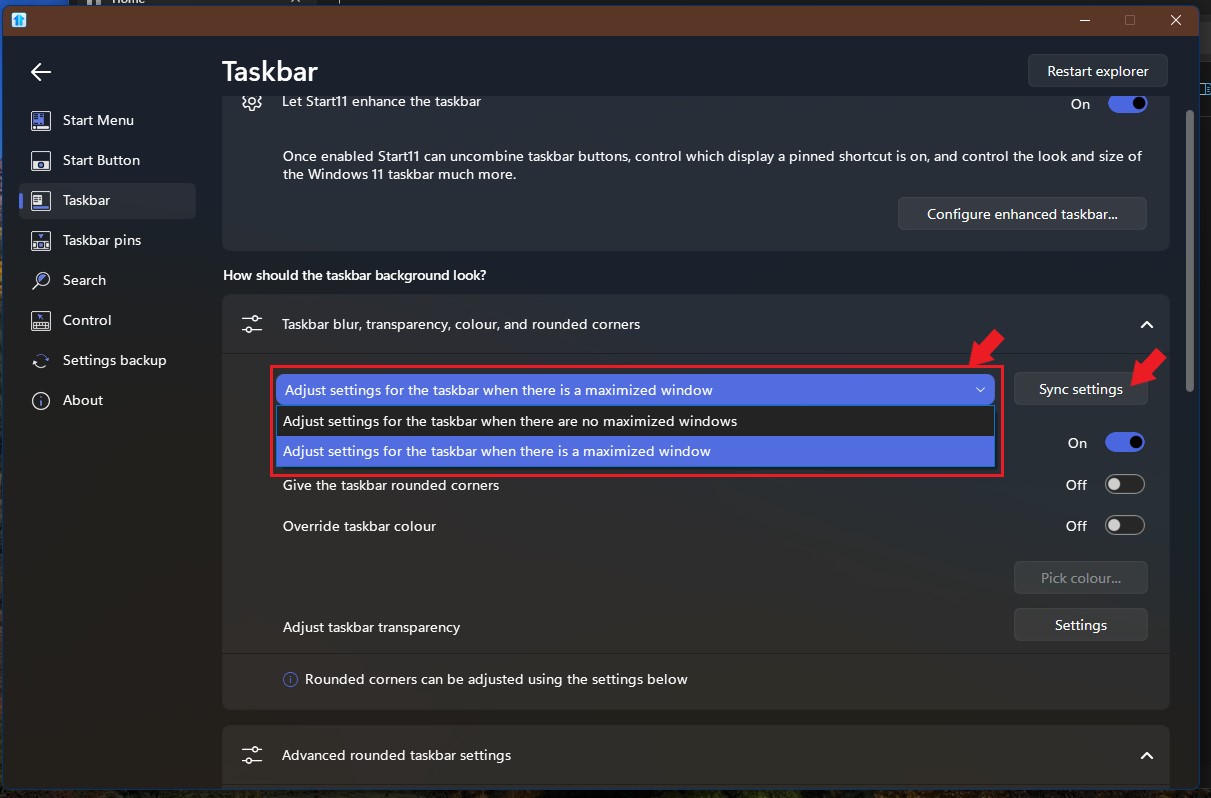
In Start11v2 you can have two states taskbar which you can set individually. One taskbar setting for Windows without any maximize windows. and another for taskbar with Maximized window.

Thank you,

Basj,
Stardock Community Assistant