Program/Files icons missing when using Start11 Search

https://imgur.com/a/eqXISlP

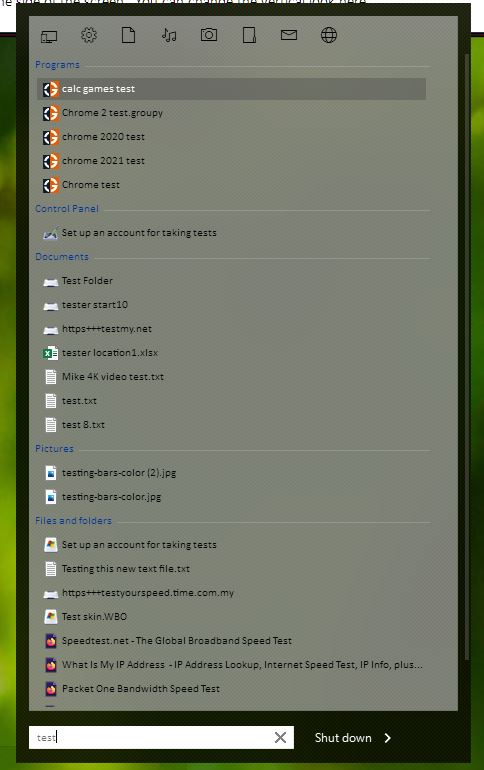
So as the title suggests, when I click on all programs and on the Start11 button icons are working normally, but when I search for programs or files there are no icons as you can see on the screenshots. I'm running the latest version 1.31.

Screenshots: https://imgur.com/a/eqXISlP

Is there a fix for this?

Thank you in advance!
2,372 views 4 replies
Reply #1 Top

Hello,
Sorry to hear you are having issues. I see the icons on my system. Need to know you on Windows 10 or 11? Also need to know its full version numbers. Use Winver.exe to get it. My Screenshot is from my Windows 10 system.

Thanks
Basj,
Stardock Community Assistant.

Reply #2 Top

Hi,

I'm on Windows 11:

Edition Windows 11 Pro

Version 22H2

Installed on ‎05-‎Oct-‎22

OS build 22621.819

Experience Windows Feature Experience Pack 1000.22636.1000.0


Reply #3 Top

Try this, uninstall Start11 V1.31, reboot immediately after, download the latest Start11 V1.34 Beta, reboot again, retest it and report back. To get Start11 V1.34 refer to the first post on this thread: https://forums.stardock.com/515472

Thank you,

Basj,
Stardock Community Assistant

Reply #4 Top

Hello,

Sorry for the late reply. I'm currently on the latest version 1.36, but through an update, not a clean install.

Btw my NVIDIA driver version is 526.47, but when I installed different ones, for some other performance reasons, sometimes the icons worked sometimes not.

I will try a clean reinstall.


EDIT: I did a clean reinstall via Revo Uninstaller Portable (cleans the registry and all of the leftover files), this setting (The Use old Start10 style search under the Seach submenu) seems to be the issue with the icons. When I disable it, all of the icons are displayed normally, but as soon as I turn it back on (I'm used to the classic look), the icons are no longer there.
