Multiplicity 3KVM installer needed on a USB

PC's not networked

I need a copy of the installer on USB as the 3 PC's I need to connect are in a secure lab environment, therefore not connected to the outside world and I cannot access my internal email on them, as well.
2,563 views 8 replies
Reply #1 Top

Hello,

I have forwarded your report to the Stardock support team for their review and recommendations.

Please keep an eye on this thread for any updates.

We really do appreciate your feedback, thanks.

Reply #2 Top

Update:

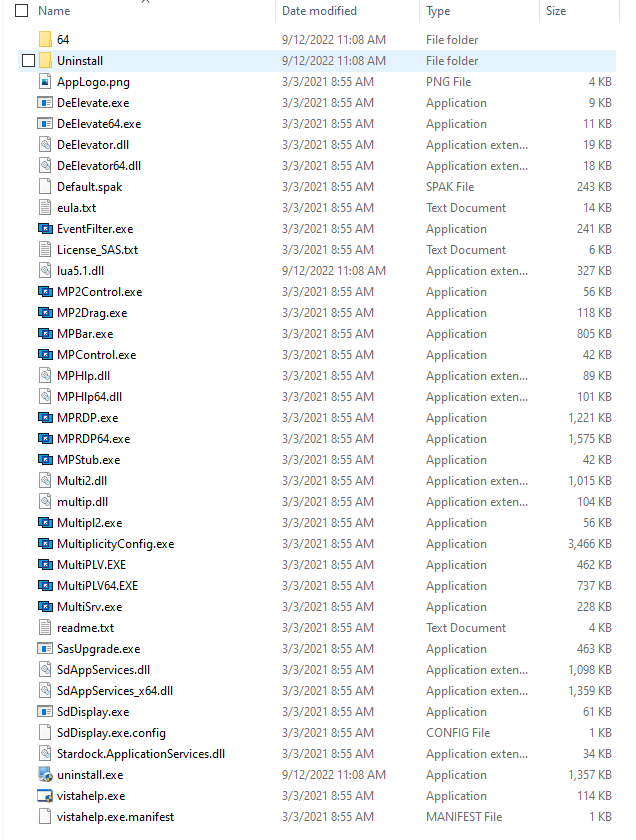
Copied all downloaded files to USB.  Good!  Cannot find an "Installer. exe" file.  Running the 3MB Configure.exe file, I get the notice "Multiplicity not fully installed.  Do you want to install it?'  I select YES, I get request for permission.  I select YES, I get a pinwheel for 10-seconds and nothing else happens.  Full installation never begins.

What am I missing?

screenshot

Reply #4 Top

Why didn't you copy the installer that you downloaded to the USB?

Paul Scroggins
Associate Technical Support Analyst

Reply #6 Top

Quoting waferguy, reply 5

I copied the entire download, exact.  I didn't omit an install.exe file

I double checked
End of waferguy's quote

No, the installer you would download from Stardock, not a copy of already installed software, which looks like what you have done


Paul Scroggins
Associate Technical Support Analyst

Reply #7 Top

Recap:

Our PCs needing Multiplicity installation are not networked to the the outside, so I can't do direct download from email.  The Stardock emailed download was to my work email laptop,...then all files were copied to USB to try to install on the 3 isloated PC's needing Multiplicity.  

Reply #8 Top

Yes, the Stardock emailed download, copy that from your work laptop to the USB, not what you are copying, you can't copy from an already installed program.

It should be a single file named Multiplicity3_setup_sd.exe

Paul Scroggins
Associate Technical Support Analyst