Disappearing fences

Where'd they go?

I'm about at the point where I'm ready to not bother with these apps any longer.
Always seems to be something.
This is the 4th time I've tried fences and this is not the first time this has happened.

Step 1 - have a desktop full of icons
Step 2 - Oh, I'll install Fences - let's organize them!
Step 2.5 - Fences lumps all shortcuts together in a couple of categories - mostly apps.
Step 3 - Create new Fences by left click, drag, create Fence here,
Step 4 - Meticulously drag icons into the fences
Step 5 - rearrange fences to suit your taste.
Step 6 - Somewhere in all that I'll guarantee an entire area will disappear taking the desktop shortcuts with it.

This is a Win10 system with Ryzen 7, 32 gb RAM and a Asus ROG Crosshair VIII Hero mobo and GTX 1050 Ti video card.
 

4,615 views 4 replies
Reply #1 Top

Hello,

Sorry to hear you are having issues.

More info please ,

Full numbered version of Windows ? ( use winver.exe for that info )

Fences version ( on the Fences Config screen click on about for the version # )

One other thing on the Config screen click on Layout and Snapping tab

for shapshot layouts you can restore too - try that ?


AzDude
Stardock Community Assistant

Reply #2 Top

Quoting AzDude, reply 1

Full numbered version of Windows ? ( use winver.exe for that info )
End of AzDude's quote

21H2 Build 19044.1766

Fences version ( on the Fences Config screen click on about for the version # )
End of quote

I uninstalled it but I just installed today and it was version 4 - I assume Latest & Greatest since OD downloaded it.


One other thing on the Config screen click on Layout and Snapping tab
for shapshot layouts you can restore too - try that ?
End of quote

As I said I uninstalled it.  I did look at all the layout options and changed a few - nothing brought the MIA back.
I even tried show and hide desktop

Reply #3 Top

Hello,
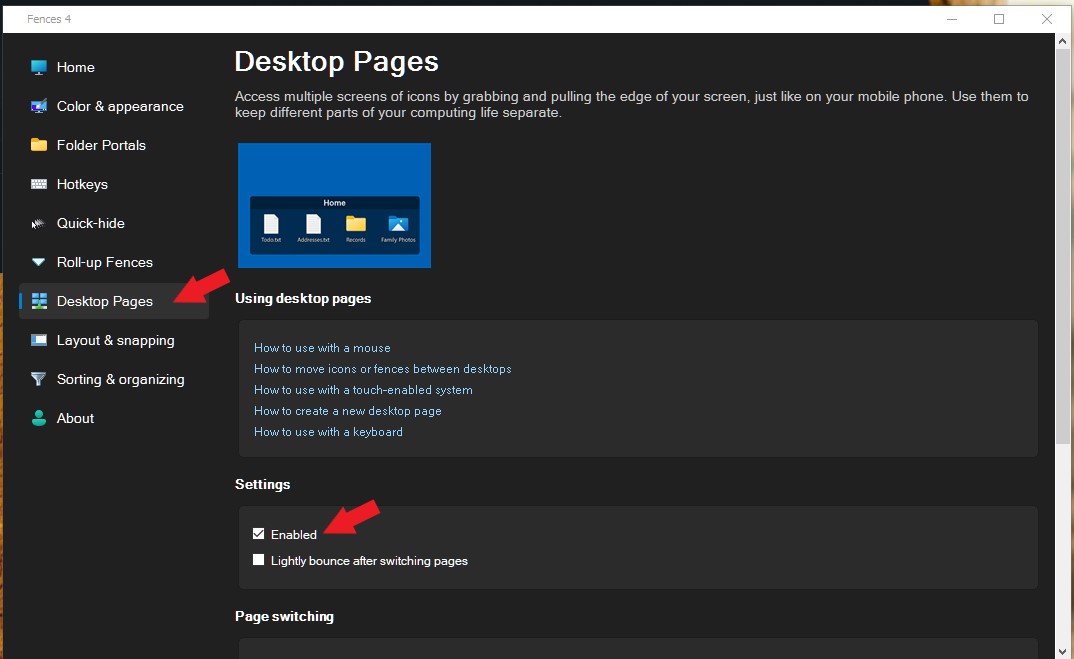
Sorry to hear you are having issues. Missing from desktop, all of the fences and Icons? Try check your other Fences desktop page. If you drag an icon or a Fence across your left or right most edge of your screen, Fences will automatically create a new Fences desktop page. You can learn how to navigate desktop page or disable it all together. Refer to screenshot below. Try that and report back.

Thanks
Basj,
Stardock Community Assistant.

Reply #4 Top

Quoting basj, reply 3

Hello,
Sorry to hear you are having issues. Missing from desktop, all of the fences and Icons? Try check your other Fences desktop page. If you drag an icon or a Fence across your left or right most edge of your screen, Fences will automatically create a new Fences desktop page. You can learn how to navigate desktop page or disable it all together. Refer to screenshot below. Try that and report back.

Reduced 78%
Original 1074 x 659


Thanks
Basj,
Stardock Community Assistant.

End of basj's quote

I'll try it but the two that disappeared were NOT the fences being dragged.
It may be a few days - I have work to do.