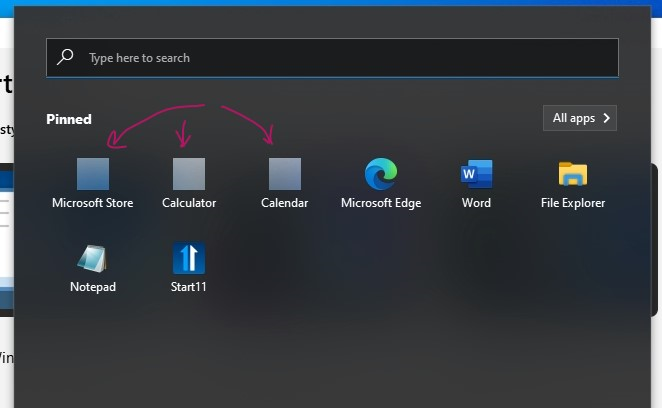
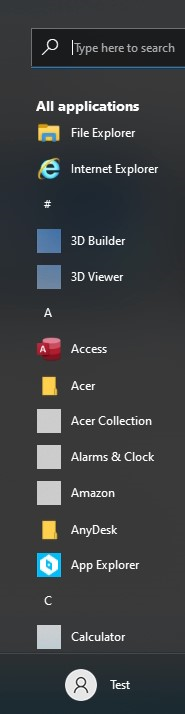
Start11, v. 1.24 causes winapps to all be solid dark squares on Windows 10 OS

Windows 10 and Start11 problem

I saw that Start11, v. 1.24 is being advertised for win10 OS now.  I bought a 5 device lic. for Start11, v. 1.24.

I can't use it on my small laptop as it makes all the default windows apps become a solid brown square (with the program name underneath) such as calc, calendar, camera, store, photos, etc.  Winver: Win10 v. 21H2, bld. 19044.1806 and a 32bit laptop.

Background: Works fine on my Windows 10, Lenovo Yoga, 64Gig, i7, x64bit laptop, Winver: Windows 10 v. 21H2, bld. 19044.1806. 

But it fails to work on my Acer One S1003, Adam CPU (x5-z8350), 32Gb, 2Gb Ram, x32bit.  Winver: Win10 v. 21H2, bld. 19044.1806. This is the same OS build as on the x64 machine except that it is on x32 bit machine.   It installs fine and otherwise works ok *except that all the windows apps are dark brown squares* - no image.  [The brown color is probably related to my beach scene background].

What I tried: Note: I rebooted between *every* step of installing and uninstalling, etc., throughout the following!

First removed Start10, v. 1.97, installed Start11, v. 1.24, noticed problem; uninstalled Start11 with RevoUninstaller, reinstalled Start10 - all was again fine with Start10, uninstalled Start 10 with Revo, reinstalled Start11 - same problem.

Used Stardock's Purgestartall.bat file and removed Start11, reinstalled it again - same problem.  Purged it again.

With Start11 gone, I ran the PowerShell command to restore and re-register all win apps:  "Get-AppxPackage | foreach {Add-AppxPackage -register "$($_.InstallLocation)\appxmanifest.xml" -DisableDevelopmentMode}"; reinstalled Start11 - same problem. 

Ran the PowerShell command again but with Start11 installed this time - same problem; purged it again.

Reinstalled Start10, v. 1.97 and all is fine again - all icons show their respective images, none are brown squares. 

Stopped and concluded Start11, v.1.24.  is not working correctly with all Windows 10 systems.

Also note: I have only office and a very few tame apps on the Acer since it is only 32Gigs.  Office, Sumatra, RevoUninstaller, Anydesk, Ccleaner, VPN Unlimited (not running during any of this).  AND, I have all of those and much more on the Lenovo x64 which is working fine with Windows 10 and Start11, v. 1.24, so software contention is not a factor. 
4,806 views 14 replies
Reply #1 Top

Hello,
Sorry to hear you are having issues. Please try, uninstall Start11 V1.24, reboot (important). Install Start11 V1.25 beta, should be available in your product page. Reboot and retest it. Report back here.

Thanks
Basj,
Stardock Community Assistant.

Reply #2 Top

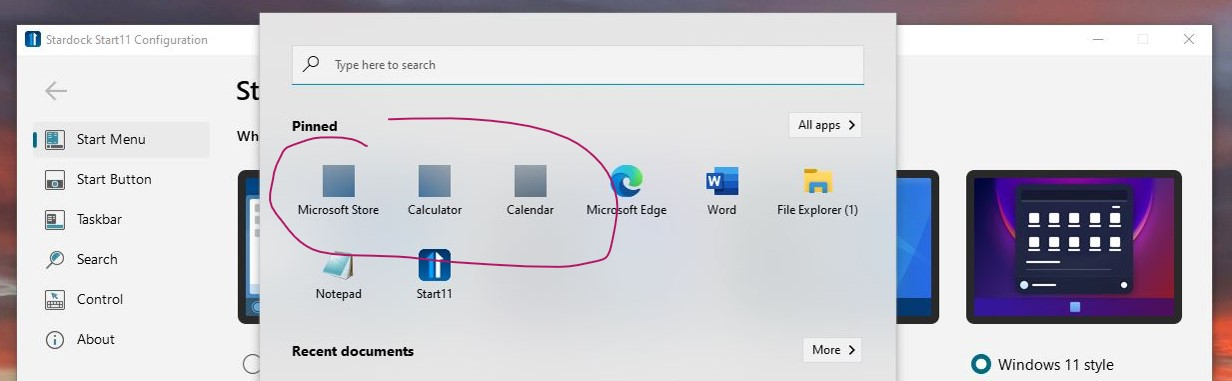
 I uninstalled, rebooted, reinstalled, and rebooted with the v. 1.25 beta version and here is the screen shot of the results.  Showing the problem I detailed previously. 

Reply #4 Top

I pointed out in my original reported comments that the Acer One S1003 has a much small *subset* of the *SAME* programs that are on the Lenovo i9 laptop with Start11 working fine - in other words there is no software contention causing this problem ... I did your chore of doing the clean boot in a new user environment and here are screen captures to illustrate how once again Start11 will not function correctionally on that 32-bit Acer laptop.


Reply #5 Top

Hello,
I have forward your problem/question to Stardock Support Team for their assistance. Please keep an eye on this thread for any updates. We appreciate your feedback and patience.

Basj,
Stardock Community Assistant

Reply #6 Top

Try setting the Display Scaling to 100% and see if the icons appear correctly.

Also try the Windows 10 Style menu in Start 11 and see if that changes anything.

Do the icons appear correctly in Windows 10 Settings>Apps & Features app list?

Reply #7 Top

The scaling was 100% (I resized the screen captures for better fit in these uploads).  AND, yes I tried all the Start11 screen format options. This is a problem for all modes once Start11 is 'on'  -- as soon as it is off the Windows default menu shows everything fine.

Reply #8 Top

If I had to guess, I would say it probably has something to do with the processing power and only having 2GB of RAM. You're asking a lot from this older device just to run this version of the OS. I would just stick with Start 10 if it works okay. I doubt seriously that you will find a remedy to your issue with Start 11.

Reply #9 Top

Hello,

Sorry to hear you are having trouble.

If you Ctrl + Click the Start11 menu, thus getting the native Windows one, do they show correctly in it?

Sean Drohan
Stardock Support Manager


Reply #10 Top

Yes, as I mentioned - the native windows menu is fine.  Please realize, I don't have this on my laptop anymore. I've told you the complete story...if you can't fix the code, that's fine.  I can't spend more time putting it on, taking it off, reinstalling and configuring start10, etc.  Perhaps my little laptop is missing key software like it lacks the pyqt5 plugins, etc.  Don't worry about it.  But Stardock might want to advertise that it works on *most* windows 10 platforms (instead of suggesting it works on *all*.

Reply #11 Top

Quoting slankton, reply 10

But Stardock might want to advertise that it works on *most* windows 10 platforms (instead of suggesting it works on *all*.
End of slankton's quote

It 'can' work on all - we just need to find out why it was not on yours...  

If you ever want to work on it again, please let us know - we would be happy to do so.

Sean Drohan
Stardock Support Manager

Reply #12 Top

Yes, it is easy to point the problem at the end user...and I'd be happy to discover it on my end (beta tested for MS for 22 years back in the day) ... but I have 3 ACER ONE laptops 32-bit with Win10's latest updates (not insider builds):  one 32Gb S1002, one 32Gb S1003, and one 64Gb S1003.  Each one exhibits the same result I've been discussing and showing.  We eliminated program contention, SFC problems, and DISM component store and image problems as you saw in my posts.  Nothing exotic is installed among the very few programs on them.  (Oh, and as I mentioned all the same programs, and more are on the Lenovo x64 i7 win10 that works fine with Start11.)  Coincidence? End user error?  If you can think that you overlook an examination of the program itself. 

Reply #13 Top

My gut says the issue is this bit "32bit laptop"

I wouldn't be surprised if you are the only person to run Start11 on such a platform as 32 bit isn't an option for Windows 11 and the bulk of the users will be on that platform.

We will investigate further on a Windows 10 32 bit install to see if we can reproduce it next week.

Reply #14 Top

Quoting slankton, reply 12

Yes, it is easy to point the problem at the end user...
End of slankton's quote

I am sorry if I offended you. I meant no disrespect. I was simply suggesting that your issue was probably related to the 32bit OS and RAM configuration. As Neil stated above, they have not tested Start 11 on a 32bit system. If it can be done, I am willing to bet the development team will make it happen for you.