
Option for Closing Single Window instead of Close All Windows

With the most recent update there is only an option to Close All Windows when right clicking on the taskbar. I would be great if there was an option to close a single window. I have pretty much no use for the Close All Windows option

Windows 11 w/ Start 11


Windows 10
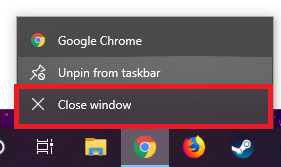
I Cannot right click to close windows in taskbar. How to fix ? thank - Windows  10 Forums

55,393 views 21 replies +3 Loading…
Reply #1 Top

Hello,
I have forward your request to the Stardock Support Team for their review and recommendations. Please keep an eye on this thread for any updates. We really do appreciate your feedback, Thanks

Basj,
Stardock Community Assistant.

Reply #2 Top

Hi, I am getting huge problem with closing all window, I need closing single window.

Any update with this thread?

Reply #3 Top

Hello,

Sorry to hear you are having issues.

What version of Windows ?

Version of Start11 ?


AzDude
Stardock Community Assistant

Reply #4 Top

Edition Windows 11 Pro

Version 21H2

Installed on ‎26-‎Jun-‎22-‎Sun

OS build 22000.739

Experience Windows Feature Experience Pack 1000.22000.739.0


Start11 version 1.24


There is no option to close single window, we need a single closing window.


Currently this option for the start11:


But we need this one:


Reply #5 Top

Hello,

I have forwarded your report to the Stardock support team for their review and recommendations.

Please keep an eye on this thread for any updates.

We really do appreciate your feedback, thanks.

Reply #6 Top

Quoting barkat530, reply 4

There is no option to close single window, we need a single closing window.
End of barkat530's quote

Please see:

https://forums.stardock.com/513173/get;3856333

Sean Drohan
Stardock Product Lifecycle Manager

Reply #7 Top

If you hold shift when you right click it opens the old menu which does in fact have the ability to close a single window. 
Closing a single window is a feature that should absolutely be incorperated into Start11.

Reply #8 Top

+1. I click the "close all windows" several times a week by accident. It would be so nice to have an option to close just the one I clicked on.

Reply #9 Top

Is there any way this can get incorporated into Start11? I have accidentally closed so many windows this past week while copying files that it is becoming really frustrating. 

Reply #10 Top

Hello,


Prospective buyer here. This is a deal breaker for me. I have only used Start11 for less than a day and not having the option to close one window is a major drawback. Please consider implementing this feature a priority.


For now, I will uninstall Start11 and keep an eye on future updates.


Thanks

Reply #13 Top

I dont understand why this still isnt a feature in this product as it is avaiable in others.

Reply #14 Top

As a recent Start11 adoptee, this one is a major problem for me too. My main reason for getting Start11 was to split out the individual task bar buttons for each window because I despise the grouped window behavior. Start11 has done that, the windows are now split out on the task bar but the job is only partially done, the right click menu treats it as tho the windows are all still grouped!

Please urgently change the Close menu item to close just the selected window, not ALL windows.

(Sorry, posted in the old thread first by mistake)


Reply #15 Top

I forgot to mention:


This is example of current one, it right now says "close all window". But if you can put a "close current window" here and loses all other app specific buttons that app creates, I'm totally fine with it. I ONLY need "close this window".

Reply #16 Top

A competing product has the ability to close only the window you select and I would prefer to use start11 but only having the closeall windows drives me to distraction. Why Windows 11 is this way is weird.

Reply #17 Top

Quoting aj_low, reply 16


A competing product has the ability to close only the window you select and I would prefer to use start11 but only having the closeall windows drives me to distraction. Why Windows 11 is this way is weird.

End of aj_low's quote

I actually found a free product that achieves the same results. Although I would still prefer to use Start11 to enjoy other benefits as well :)

Reply #18 Top

Just came here to express the same frustration as many others. The inability to close a single Window kind of defeats the purpose of this whole app (I assume most people buy it to re-enable the "never-combine" feature from Windows 10). Does somebody want to point me towards one of these other programs mentioned that enable this ability?

+1 Loading…
Reply #19 Top

Quoting dd0x6, reply 18

Just came here to express the same frustration as many others. The inability to close a single Window kind of defeats the purpose of this whole app (I assume most people buy it to re-enable the "never-combine" feature from Windows 10). Does somebody want to point me towards one of these other programs mentioned that enable this ability?
End of dd0x6's quote

Shift+Right Click....

Sean Drohan
Stardock Product Lifecycle Manager

Reply #20 Top
Quoting sdRohan, reply 19


Shift+Right Click....

Sean Drohan
Stardock Product Lifecycle Manager

End of sdRohan's quote


This isn't fluid and would require unnecessary steps to be taken whereas other similar tools have it down already to be done more "naturally" just with the click of the right button (as it always has and should've been). If many windows are open in taskbar, it would require user to enter this keyboard combination numerous times to close every single window separately which is just unpractical and not user friendly. Especially with the Program Preview image popping every time you scroll over a program which just kind of makes everything jumbled up and feels unclean.

Will the close single window option come to the Start11 soon? I feel it is all that's left to make the tool perfect...

+1 Loading…
Reply #21 Top

Quoting eitrana, reply 20


Quoting sdRohan,


Shift+Right Click....

Sean Drohan
Stardock Product Lifecycle Manager


This isn't fluid and would require unnecessary steps to be taken whereas other similar tools have it down already to be done more "naturally" just with the click of the right button (as it always has and should've been). If many windows are open in taskbar, it would require user to enter this keyboard combination numerous times to close every single window separately which is just unpractical and not user friendly. Especially with the Program Preview image popping every time you scroll over a program which just kind of makes everything jumbled up and feels unclean.

Will the close single window option come to the Start11 soon? I feel it is all that's left to make the tool perfect...

End of eitrana's quote


+1 x 100