Start 11 Disappeared Also

Now, all of a sudden my Start 11 taskbar crashed and missing and will not restart. I will reboot my pc but not sure why this happened.

2,826 views 6 replies
Reply #1 Top

I tried to reboot and it opens and crashes then I tried to uninstall and reboot and now the start 11 taskbar shows but it's not right and it's not even installed. I am confused over this. Also start menu showed 2 Start 11, one with broken icon after I updated it from latest. I've never had any issues with your software before so this is all surprising. There are also issues with start button and typing for suggestions and the windows search bar locks up with Start 11. Lots of bugs it seems.

Reply #2 Top

Quoting bill82, reply 1

I tried to reboot and it opens and crashes then I tried to uninstall and reboot and now the start 11 taskbar shows but it's not right and it's not even installed. I am confused over this. Also start menu showed 2 Start 11, one with broken icon after I updated it from latest. I've never had any issues with your software before so this is all surprising. There are also issues with start button and typing for suggestions and the windows search bar locks up with Start 11. Lots of bugs it seems.
End of bill82's quote

I am going to recommend you uninstall Start11, REBOOT and then reinstall Start11 1.2 (or 1.22 beta)

None of that is normal.

Reply #3 Top

I uninstalled Start 11, still another Start 11 is in start menu. Start 11 taskbar still shows even though it is not installe, not the Windows 11 default task bar.

I reinstalled Start 11, removed all settings, updated Start 11 and issues persist. Taskbar clock is still missing. I tried a different taskbar i.e. Windows 7 and the start menu theme is all off, it shows some program files shaded and strange. 

Thanks but that was not much help, why does the taskbar not revert to Windows 11?

Reply #4 Top

Quoting bill82, reply 3

I uninstalled Start 11, still another Start 11 is in start menu. Start 11 taskbar still shows even though it is not installe, not the Windows 11 default task bar.

I reinstalled Start 11, removed all settings, updated Start 11 and issues persist. Taskbar clock is still missing. I tried a different taskbar i.e. Windows 7 and the start menu theme is all off, it shows some program files shaded and strange. 

Thanks but that was not much help, why does the taskbar not revert to Windows 11?
End of bill82's quote

I think we might need some screenshots here of what you are seeing.

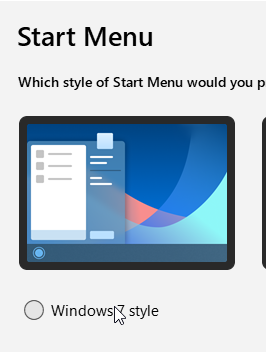
We do not offer a Windows 7 taskbar?

Reply #5 Top

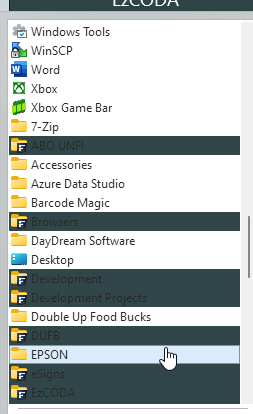
Umm, Windows 7 Style - see how some start menu folders are shaded. I am ok 


Reply #6 Top

Quoting bill82, reply 5

Umm, Windows 7 Style - see how some start menu folders are shaded. I am ok 


End of bill82's quote

Ahh thats the start menu not the taskbar hence the confusion.

Start11 is applying the colour you have manually applied to your Fences which are in the start menu.  If you disable the "Show desktop and Stardock fences folders" option under all programs list in settings those will go away.