Start 11 Start Menu stuck up after Waking Laptop from sleep

The Start 11 Menu on Windows 11 is stuck Open after waking from Sleep.

Win 11 Pro with latest updates and latest Start 11 Updates

Clicking on Start Button does nothing. Clicking on Stuck Menu, greys Menu, then crashes the Taskbar and resets all. Repeats every time waking from Sleep.

Also when clicking on Start button Menu Programs pane sometimes comes up blank and then ~10 to 20 seconds later Populates.

Any remedy?

4,125 views 8 replies
Reply #3 Top

Hello,

I have forwarded your report to the Stardock support team for their review and recommendations.

Please keep an eye on this thread for any updates.

We really do appreciate your feedback, thanks.

Reply #4 Top

Hello,

Sorry to hear you are having trouble.

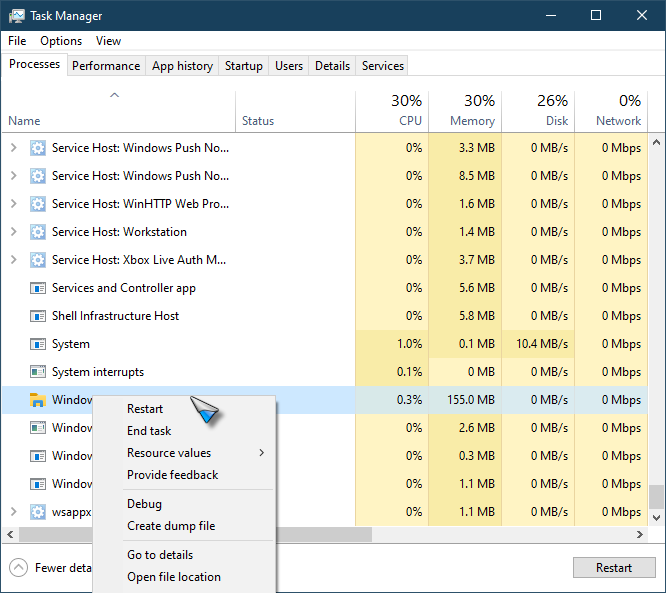
While we cant seem to reproduce that (nor do we have any like reports that I can see), if you restart Windows Explorer when that happens:

Does that fix it?

Sean Drohan
Stardock Support Manager

Reply #5 Top

Thanks and Update

Was not positive I did the Purge you mentioned so I went thru the Purge procedure and fresh download re-install again.

New Symptoms: Now the Computer will not go to Sleep - Just goes to the Lock Screen. When Clicking on the lock screen (no password as I require and return to Start Menu but now with Circulating ring (wait) after a minute or two Clicked the Circling ring on the Start Menu and it still goes dim Grey and Resets the Back Ground, Icons and Task Bar.

I still can bring up the Windows 11 Start Menu and put the computer to sleep with its Power Options.

So something is wrong with Start 11 Power Option to Sleep.

Reply #6 Top

Hi, I'm having a similar problem with Start11 V2
when my pc is woken from sleep the time is stuck from when i put it to sleep
The small up arrow on the right hand side of the taskbar, where the running programs are located, does not function.
The only way to fix it is to restart explorer, which is a major inconvenience as it results in some running programs having to be restarted.
hopefully this can be fixed in an update soon
thanks

edit: after restarting explorer just now it hasn't fixed it this time, a restart will be required this time

Reply #7 Top

Quoting EmuAL, reply 6

Hi, I'm having a similar problem with Start11 V2
when my pc is woken from sleep the time is stuck from when i put it to sleep
The small up arrow on the right hand side of the taskbar, where the running programs are located, does not function.
The only way to fix it is to restart explorer, which is a major inconvenience as it results in some running programs having to be restarted.
hopefully this can be fixed in an update soon
thanks

edit: after restarting explorer just now it hasn't fixed it this time, a restart will be required this time
End of EmuAL's quote

Start11 does not provide the popup on the right hand side to access tray icons.  This is an OS provided feature.

If restarting explorer didn't fix it then odds are this is a bug in the OS not Start11 causing it to stop working.

Reply #8 Top
 
Quoting Neil, reply 7

Start11 does not provide the popup on the right hand side to access tray icons.  This is an OS provided feature.

If restarting explorer didn't fix it then odds are this is a bug in the OS not Start11 causing it to stop working.

End of Neil's quote


ok thanks for the help