Start11 Beta - Taskbar moves to top of screen when resuming after sleep or turning off monitor

I'm using the beta of Start11 (1.16) and when I resume my computer from sleep, access it via RDP or turn the monitor back on, the Start11 taskbar moves to the top of monitor. It's not the top, about 10 pixels away. It's really annoying as there is no way of getting it to move back short of signing in and out again.

It is great to have drag and drop and task bar labels back again, please fix this so I can continue using Start11!
2,009 views 2 replies
Reply #1 Top

Hello,
Sorry to hear you are having issues. Need to know more on your system.

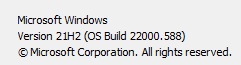
  1. Windows 10 or 11? And its full version numbers. Please use Windows "Winver.exe" to get that.
  2. Does the taskbar move back to its original location if you do the Explorer restart? (https://www.howtogeek.com/198815/use-this-secret-trick-to-close-and-restart-explorer.exe-in-windows/ : Note: I personally use the batch file method something similar to what listed there)

Thanks
Basj,
Stardock Community Assistant.

Reply #2 Top

The issue hasn't happened since I read your post but will monitor and try a restart and report back. My exact windows version is