Start11 1.16 beta: toolbar buttons only active on desktop where program is running

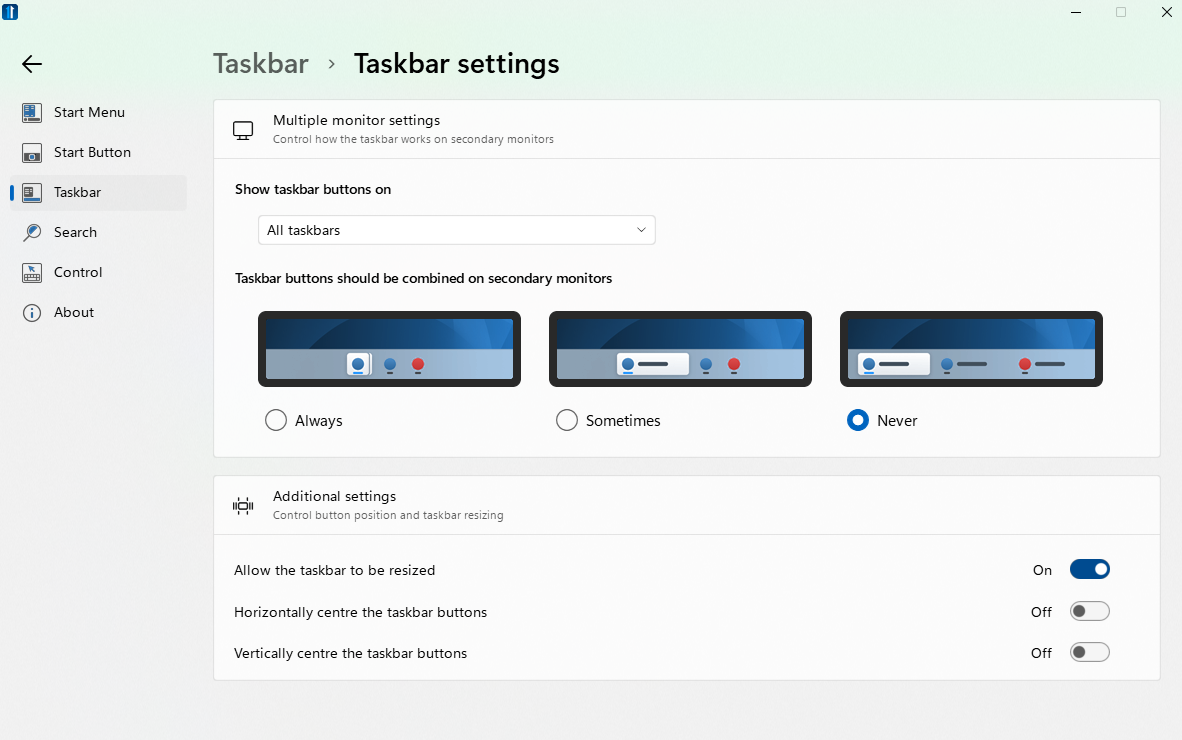
Multiple monitor / multiple desktops / Show taskbar buttons on "all taskbars"

I have multiple desktops: mail is on one, browser on another, python IDE on a third. If the python desktop is active, the browser icons are not visible on either taskbar. If the browser desktop is active, the python IDE icon is not visible. Therefore, I can't switch to another program by clicking on an icon in taskbar.

Windows 11 21H2
3,042 views 5 replies
Reply #1 Top

Hello,

I have forwarded your report to the Stardock support team for their review and recommendations.

Please keep an eye on this thread for any updates.

We really do appreciate your feedback, thanks.

Reply #2 Top


I have multiple desktops: mail is on one, browser on another, python IDE on a third. If the python desktop is active, the browser icons are not visible on either taskbar. If the browser desktop is active, the python IDE icon is not visible. Therefore, I can't switch to another program by clicking on an icon in taskbar.

Windows 11 21H2

Reduced 70%
Original 1182 x 740


End of quote

That sounds like things are working as designed?

If you switch desktops then the icons on the taskbar relate to the windows on that desktop only.  Thats how it works in Windows 10 and how it works in Windows 11 with the native taskbar.

The All taskbars bit is for multiple monitors, not multiple desktops.

Reply #3 Top

My experience of Win 10 and Win 11 with the native taskbar is different from yours. You say, "the icons on the taskbar relate to the windows on that desktop only." In my experience of Win 10 & 11, the icons in the taskbar remain the same regardless of which desktop is active. Hence in native Windows, following the setup which I mentioned in my original post, when the "mail" desktop is active, I can see the icon for the Python IDE in the taskbar and can switch to the "Python" desktop by clicking on the IDE icon.

If the only icons that are visible on the taskbar are those from the programs that are active on the current desktop, then in order to switch programs, I have to first bring up the all desktop view (Win + Tab), guess on which desktop the desired program or desired browser tab is active, then click on that desktop. It's doable, but I found it annoying (strictly personal preference - YMMV) and felt better overall giving up the ungroup feature, which I like. I'm only mentioning this because you were soliciting feedback on the ungroup feature - I really enjoy what you guys are doing with customizing the UI.

Thanks

Reply #4 Top

Quoting fred14, reply 3

My experience of Win 10 and Win 11 with the native taskbar is different from yours. You say, "the icons on the taskbar relate to the windows on that desktop only." In my experience of Win 10 & 11, the icons in the taskbar remain the same regardless of which desktop is active. Hence in native Windows, following the setup which I mentioned in my original post, when the "mail" desktop is active, I can see the icon for the Python IDE in the taskbar and can switch to the "Python" desktop by clicking on the IDE icon.

If the only icons that are visible on the taskbar are those from the programs that are active on the current desktop, then in order to switch programs, I have to first bring up the all desktop view (Win + Tab), guess on which desktop the desired program or desired browser tab is active, then click on that desktop. It's doable, but I found it annoying (strictly personal preference - YMMV) and felt better overall giving up the ungroup feature, which I like. I'm only mentioning this because you were soliciting feedback on the ungroup feature - I really enjoy what you guys are doing with customizing the UI.

Thanks
End of fred14's quote

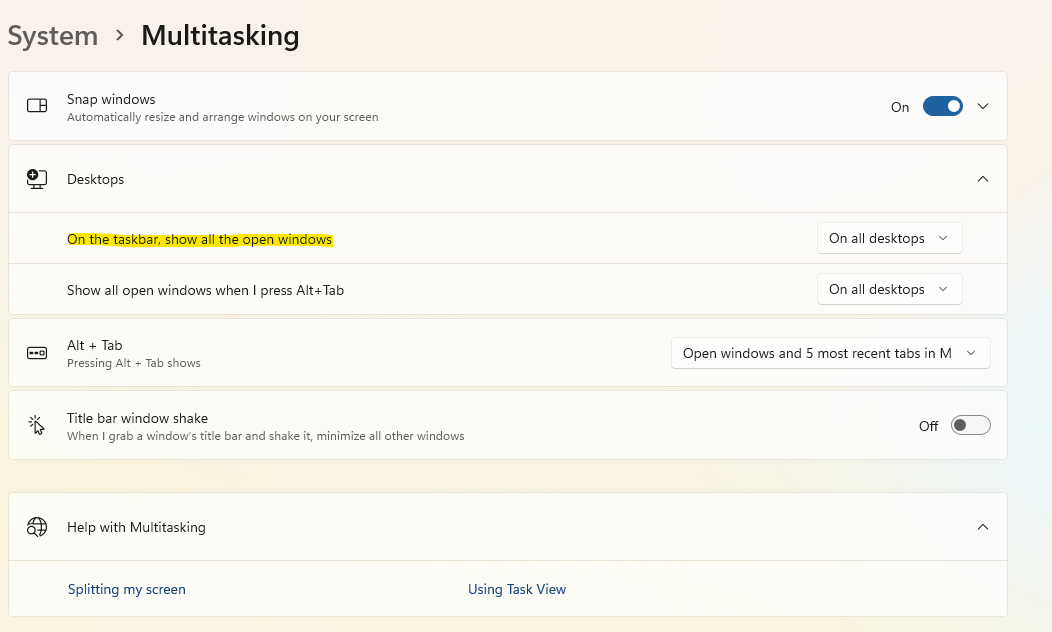
I think I see whats up here.

The OS default is to only show the entries for the windows on the current desktop.

There is a setting to change this, but it defaults to as Start11 works.  I imagine you have changed this which is why you are seeing different  behaviour.

I will have to see if we can support this or not as it complicates a few things.

Reply #5 Top

I found the setting that causes program icons ("all the open windows") to appear on all desktops. This is the behavior that I would like to co-exist with your wonderful ungroup feature. I understand if it's not possible to support.