
WindowBlinds changes the color of controls under applications made using Clickteam Fusion
Radio buttons, trackbars etc. all change to system colors
 Stardock Forums
I am having a problem with all the applications developped under the authoring tool Clickteam Fusion, when they use non-standard colors for Windows standard UI controls. This problem MIGHT also be present in applications developped with other tools but off the top of my head I can't remember any that uses such custom colors to test it.
The problem is that WindowBlinds force all the standard Windows UI controls of such applications to use Windows' system colors.
If the application is skinned by WindowBlinds, even if I set it as "Only skin this application titlebar", all of the control colors revert to system colors (as defined by the system-wide WB skin). Whereas if I check "Ignore this application and do not skin it" in WB Per-application settings, non-standard colors are displayed fine.
Here are screenshots to make it clearer:
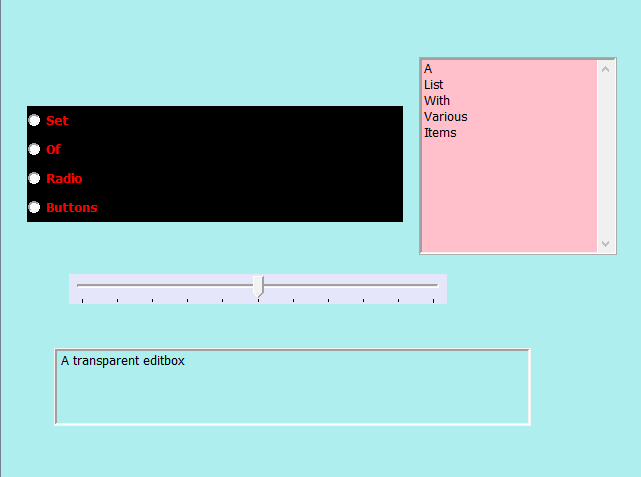
Above is an example app as it is supposed to appear, and how it appears if I tell WB to completely ignore it.
Below is the exact same app, but skinned by WB (even when told to only skin the Titlebar)
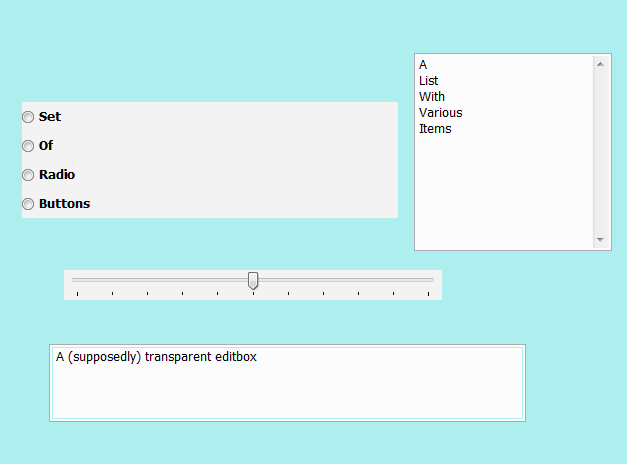
The problem does not appear to be skin-related: all skins yield the same result.
It may be WB-related or it may be Fusion-related, or a little bit of both. Again the main trouble is that I don't know of any application developped using a different solution that use such custom-colors in its UI. But if anyone know of such an app I'll be happy to try.
Either way, I don't think it should happen that way, and I think it didn't in the past.