WindowBlinds skins not skinning certain portions of the desktop

Right clicking

I just noticed that none of my WindowBlinds skins are skinning the right click portion of the skin. Where you right click on the desktop. The color scheme looks correct but it is not actually being skinned along with the rest of the theme. I made a screen capture of it but I'm not sure how to attach it.

6,090 views 5 replies
Reply #1 Top

Hello,
Sorry to hear you are having issues. Need to know.

  1. You on Windows 7,8,10 or 11? And its full version numbers.
  2. Windowblinds version numbers.
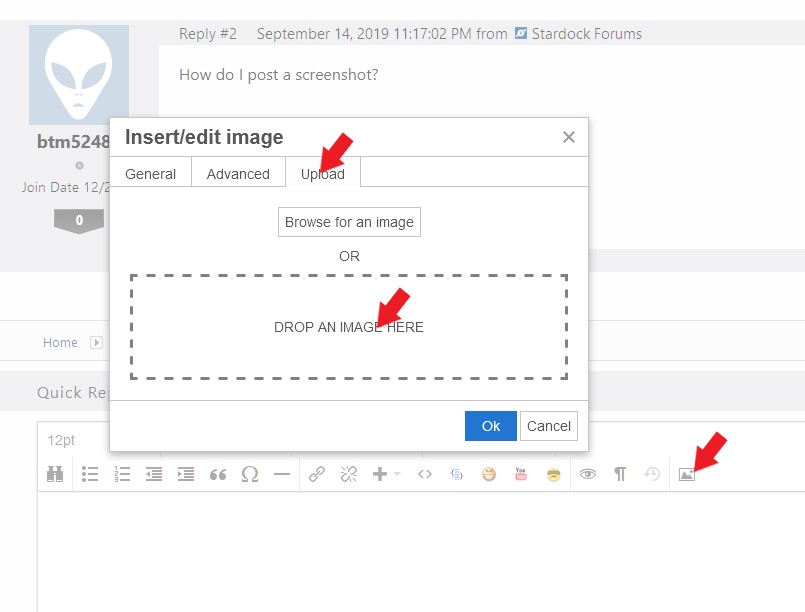
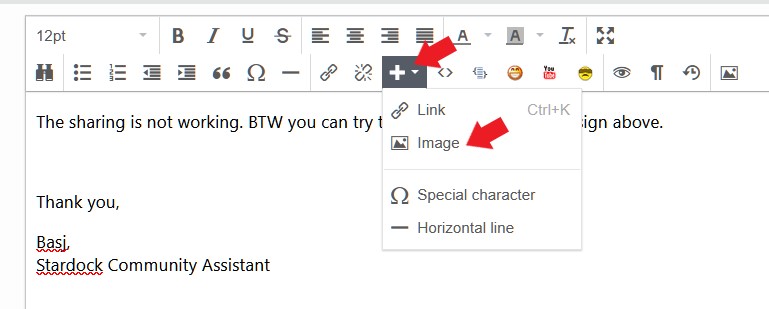
  3. A screenshot will help. Refer screenshot below to actach screenshot.

or


Basj,
Stardock Community Assistant.

Reply #3 Top

Windows 10, version 21H2 os build 19044, 1526

WindowBlinds 10.89 (064 - Windows 10 Edition) - 64 bit OS

Reply #4 Top

Thanks for the screenshot. Yes, that is very known issue, for Windowblinds on Windows 10. Microsoft has change Windows 10 and make it so that Windowblind can no longer skin that part.

Thank you,

Basj,
Stardock Community Assistant

Reply #5 Top

Quoting basj, reply 4

Thanks for the screenshot. Yes, that is very known issue, for Windowblinds on Windows 10. Microsoft has change Windows 10 and make it so that Windowblind can no longer skin that part.

Thank you,

Basj,
Stardock Community Assistant
End of basj's quote

Okay, I guess that answers that. Thanks for the response, Basj.