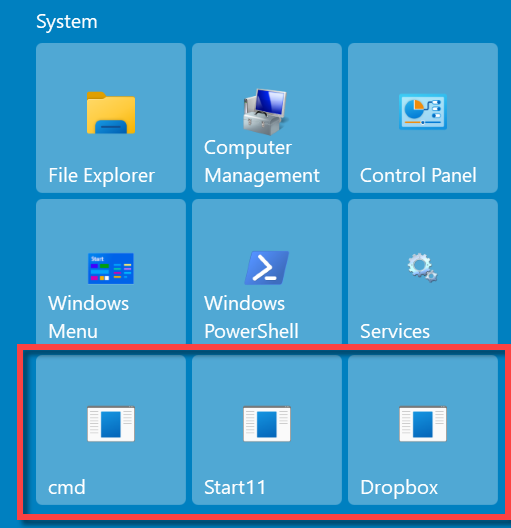
Some applications shortcut icons in Start11 have turned into blank icons

Start11 blank icons

Some applications shortcut icons in Start11 have turned into blank icons. The issue is only in the Start11 Start Menu and Taskbar. The same shortcut on the desktop looks normal. This is happening for several apps. The sample in the screenshots is NotePad++

21,317 views 22 replies
Reply #1 Top

Hello,

Sorry to hear you are having issues.

Version of Windows ( use winver.exe for that info ) ?

version of Start11 ?


AzDude
Stardock Community Assistant

Reply #2 Top

These are some of the things that I have tried outside of Start11. But no luck. There was an update for Start11 but that also did not help. 

After each of these steps, the system was rebooted. 

Dism /Online /Cleanup-Image /ScanHealth

Dism /Online /Cleanup-Image /RestoreHealth

sfc /scannow

Deleted the ‘IconCache’ file and restarted Windows Explorer

https://allthings.how/how-to-fix-blank-icons-in-windows-11/#:~:text=Delete%20the%20Icon%20Cache%20File,blank%20icon%20will%20be%20restored.

Unfortunately, these steps did not help. 

Reply #3 Top

Windows 11 (current on patches) 

Start11 latest version (in an effort to fix the issue I updated it but no luck) 

Reply #4 Top

Quoting EddieJ300, reply 3

Windows 11 (current on patches)
End of EddieJ300's quote

Hello,
Sorry to hear you are having issues. Need the full version numbers please, something from Winver.exe like screenshot below. So we know you're not on some review/beta version of Windows 11.

Thanks
Basj,
Stardock Community Assistant.

Reply #7 Top

If the taskbar is showing the problem and you are not using the option in Start11 to control the taskbar (which defaults to off and is new in 1.15 beta) then the issue will be a problem with icons in the OS itself rather than Start11.

By the looks of it the issue is linked to icon size which would point to a cache issue.

Have you installed anything which might alter icons?

Reply #8 Top

I have not installed any apps for modifying icons. I did have a trial of Fences for a short time. 

Reply #15 Top

I am having this exact same problem -- two program icons are "blank" (WinRAR and Plex Media Server). When I pin those programs, they remain blank. I've tried reinstalling the affected apps, clearing the icon cache, restarting explorer -- all the normal stuff. I'm using the latest versions of Windows 11 and Start11. The only thing that works is disabling Start11.

Reply #16 Top

Quoting mrdmmagic, reply 15

I am having this exact same problem -- two program icons are "blank" (WinRAR and Plex Media Server). When I pin those programs, they remain blank. I've tried reinstalling the affected apps, clearing the icon cache, restarting explorer -- all the normal stuff. I'm using the latest versions of Windows 11 and Start11. The only thing that works is disabling Start11.
End of mrdmmagic's quote

The most likely explanation would be a corrupted icon cache.  Start11 is probably using a different icon size than other places so the bad icon isn't being loaded up elsewhere.

The original post in this thread showed it on both the Start11 menu (which Start11 paints) and the taskbar which in the version of Start11 they were using is not painted by Start11.

Are these Windows store apps or downloaded from the developers website?

Reply #17 Top

Both are downloaded from the developer's websites.

Reply #19 Top

I stopped using Start11 because of it.

 
Reply #20 Top

Try this.. 

1) Uninstall Start11

2) Clear the Icon Cache

3) Reboot

4) Reinstall Start11 using the latest release 


Reply #21 Top

We do not believe this initial thread post to be a problem caused by Start11, but a problem with the OS icon cache.

This is because the initial post showed the problem on the Taskbar and Start menu, but Start11 did not have the taskbar features at the time so it couldn't be Start11.

The only icon issue we are aware of is for the taskbar only for Start11 1.25 on Windows 11 when you have the enhanced taskbar on and some pinned items may have the wrong icon, but never a blank icon like this.  This is cleared up with an explorer restart and is resolved in 1.26 which is coming soon.

Generally speaking if you get an icon like that it is probably a broken cache which is an OS level issue.  Windows 11 seems especially prone to this.

Reply #22 Top

Clearing the icon cache seemed to fix the problem.  Thanks.

+1 Loading…