Start11 Pin Webducument to Win10 Startmenü

Hi,

is it possible to pin a Webdocument to Start 11 Startmenü?
I can't find anything, seems impossible at this time.

Steam creates Desktop "Link" that are no real Links to an Executable, they create a weblink
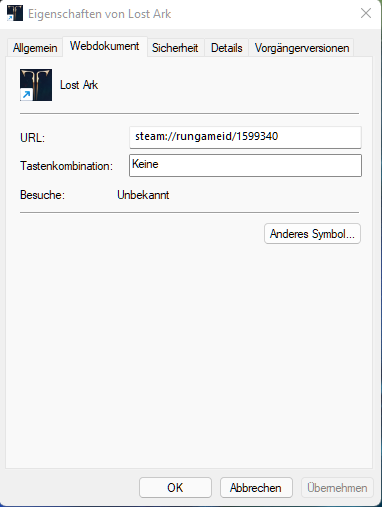
It really would be nice if Start11 could make it possible to create a shortcut.
By now I'm using Start11 1.11, Startmenu is Windows 10 Style.

System-Info:
Windows 11 Enterprise (22000.527)
32GB RAM
Ryzen 3600
RTX 3070

2,695 views 7 replies
Reply #1 Top

Hello,
I have forward your problem/question to Stardock Support Team for their assistance. Please keep an eye on this thread for any updates. We appreciate your feedback and patience.

Basj,
Stardock Community Assistant

Reply #2 Top

By itself I have not yet found an option for this.

However, if you happen to have fences 4 you can add webdcuments to a fence on your desktop and then choose the option "insert fence" into the start menu. The links in fences will then show up on the start 11 menu.

Personally, I have a whole list of webdocuments done this way.

Reply #3 Top

Try this. Drop a copy of your shortcut into "C:\ProgramData\Microsoft\Windows\Start Menu\Programs" and then restart Windows Explorer. After the restart go to the Start11 Start Menu "All Apps" and see if your shortcut is there. If it is, just pin to Start11.

Reply #4 Top

Quoting pelaird, reply 3

Try this. Drop a copy of your shortcut into "C:\ProgramData\Microsoft\Windows\Start Menu\Programs" and then restart Windows Explorer. After the restart go to the Start11 Start Menu "All Apps" and see if your shortcut is there. If it is, just pin to Start11.
End of pelaird's quote

Why the icon is missing (for me) is a concern, that will work:

https://cdn.stardock.us/support/uploads/2022-02-21_10-26-32.mp4

Sean Drohan
Stardock Support Manager

Reply #5 Top

Quoting sdRohan, reply 4


Quoting pelaird,

Try this. Drop a copy of your shortcut into "C:\ProgramData\Microsoft\Windows\Start Menu\Programs" and then restart Windows Explorer. After the restart go to the Start11 Start Menu "All Apps" and see if your shortcut is there. If it is, just pin to Start11.


Why the icon is missing (for me) is a concern, that will work:

https://cdn.stardock.us/support/uploads/2022-02-21_10-26-32.mp4

Sean Drohan
Stardock Support Manager

End of sdRohan's quote

In your video it's a little confusing. After you add the shortcut, you need to restart Windows Explorer and then from the All Apps section of the Start11 menu, find the shortcut and pin to Start11. It works for me and the icon is good.

Reply #6 Top

Quoting pelaird, reply 3

Try this. Drop a copy of your shortcut into "C:\ProgramData\Microsoft\Windows\Start Menu\Programs" and then restart Windows Explorer. After the restart go to the Start11 Start Menu "All Apps" and see if your shortcut is there. If it is, just pin to Start11.
End of pelaird's quote

- edit

Thanks Pelaird, I tested your method... On my second attempt this method does in fact work

Reply #7 Top

Quoting pelaird, reply 3

Try this. Drop a copy of your shortcut into "C:\ProgramData\Microsoft\Windows\Start Menu\Programs" and then restart Windows Explorer. After the restart go to the Start11 Start Menu "All Apps" and see if your shortcut is there. If it is, just pin to Start11.
End of pelaird's quote

Very nice, this really did the trick.

Thanks a lot =D

Although it would of course be nicer if it would work programmatically ;-)