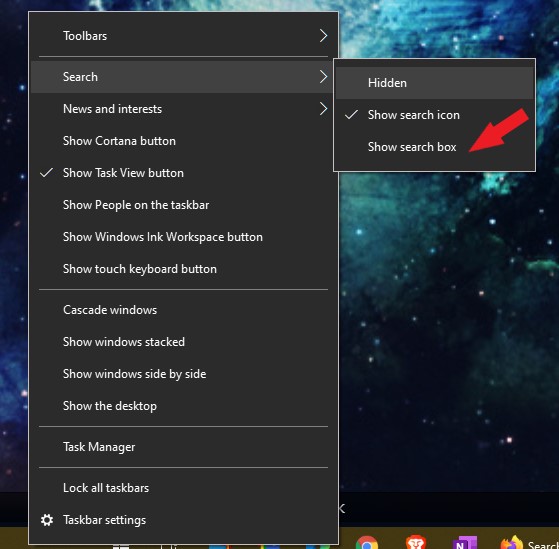
Search box

How can I get rid of this now redundant search box?

 

Also, how can I set the width of the open program buttons on the task bar?

 

Thanks


2,217 views 3 replies
Reply #1 Top

Hello,
Sorry to hear you are having issues. Need more details on your system

  1. Windows 7,8,10 or 11? And its version numbers. Please use Windows own Winver.exe to get that numbers.
  2. What Stardock software you have installed? Start10? Start11? Windowblinds? Curtains? etc.
  3. Any other relevant details to your questions.

Thanks
Basj,
Stardock Community Assistant.

Reply #2 Top

Windows 10 ver 20H2 OS build 19042-1466

Installed: Start10 and Windowblinds.


This is a new PC. I have several Stardock licenses that I will have to transfer to the new machine-how do I do that?

Reply #3 Top

For Windows 10 you can disable search box by right click on the taskbar -> Search-> Un-check "Show search box"

For the second part, as far as I know, there is not such setting to change that.

Thank you,

Basj,
Stardock Community Assistant