Feature request Start 11: Option to to show/hide icon text labels
Please. an option to to show/hide icon text labels on the Windows 11 style menu.
Hello,
I have forwarded your report to the Stardock support team for their review and recommendations.
Please keep an eye on this thread for any updates.
We really do appreciate your feedback, thanks.
I second that request.
Hello,
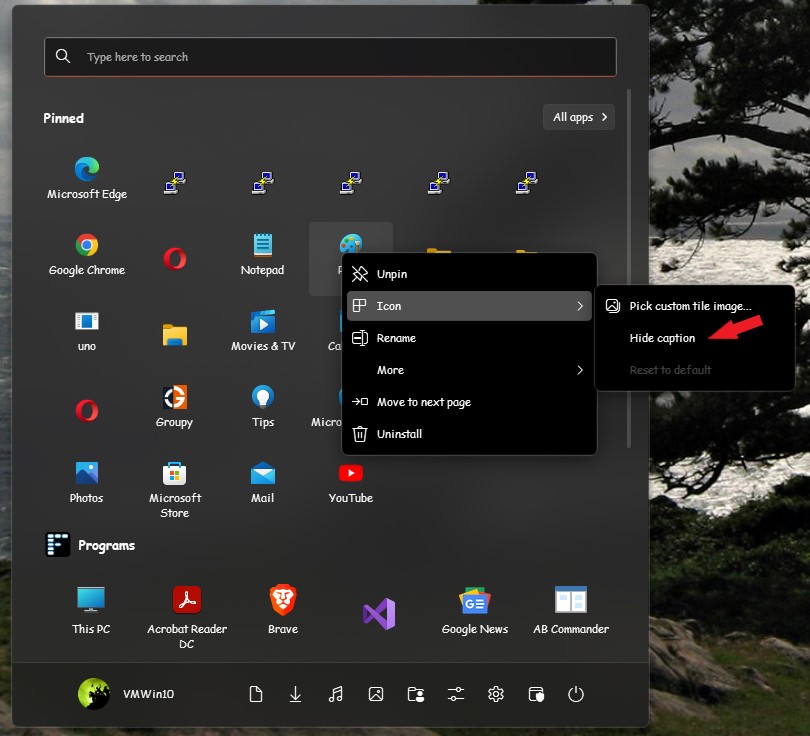
I believe there is an option to hide it (Hide caption) refer screenshot below. Just need to right click on each icon -> icon -> hide caption.

Thanks
Basj,
Stardock Community Assistant.
While this option does work one thing I would like to see is the icon retain it's centered position with the exception of all icon labels hidden within the group.
For example a group with 4 icons the icons will not match position wise if only 1 to 3 labels are hidden. This is because Start11 uses the icon and label when centering the "item". When the label is hidden it no longer takes it's space into account while positioning. This works fine when all labels are either visible or hidden but when labels are mixed (some visible others hidden) the overall affect is some icons will appear lower (the hidden label ones) than others (the ones with visible labels).
perhaps consider using the label area in position calculations even when hidden (simply don't draw the text) unless all labels in the group are hidden (then don't use label area at all) would look more uniform.
Yes, I noticed that too. My guess is Start11 needed to redraw/rreset itself once we do the "Hide caption" thingy. Anyway I have forward your problem/question to Stardock Support Team for their assistance. Please keep an eye on this thread for any updates. We appreciate your feedback and patience.
Basj,
Stardock Community Assistant
: )
Welcome Guest! Please take the time to register with us.