Start11 - Feature requests

Currently using latest version of Start11 on Windows 11:

Would be nice to have these features:

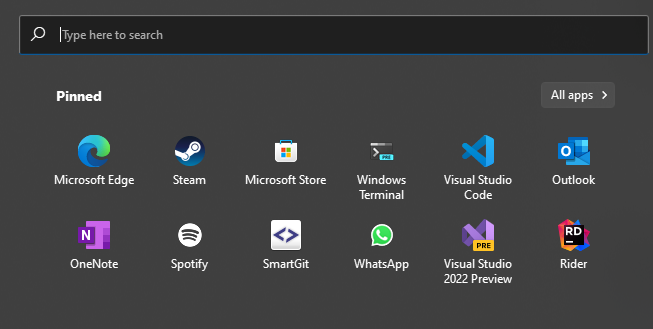
  • Ability to normalize icon size in Windows 11 style. Some pinned apps have greater sizes and some have smaller sizes.
    • Also, my Spotify icon seems to turn grey when using Start11, while Windows 11 default is green.
  • Add the Micah/Translucent style to the context menus
  • Add the Micah/Translucent style to pinned apps for the Windows 10 start menu.
  • Add the ability to segment the taskbar (i have added a screenshot)
  • Persist pinned programs when switching between styles.
    • My pinned items on the Windows 11 style does not move to the Windows 10 style etc... They all have their own pins.


Icon sizes while using Start11 with Windows 11 style:
Segmented taskbar:

3,888 views 5 replies
Reply #1 Top

Hello,
I have forward your request to the Stardock Support Team for their review and recommendations. Please keep an eye on this thread for any updates. We really do appreciate your feedback, Thanks

Basj,
Stardock Community Assistant.

Reply #2 Top

I also have this problem with the icons sizes.  Most are medium size but some are very tiny.  I could not find a way to increase the size.

Also, is there a way to remove the text associated with pinned programs?

Reply #3 Top

The ability to have direct control over the size of icons would be appreciated. Beyond that the option to change the icon would be hugely helpful as well.

Reply #4 Top

I LOVE the variety of start menu options included with start11, really cool having the new start menu on Windows 10 : ) Any hopes up seeing the windows 8/8.1 metro start screen brought over? I see windows 10/11 has the full screen option but they're two entirely different start menus : )

Reply #5 Top

I'm going to ask the obvious, as I think Stardock specializes in this specific type of request: To have the ability to move the taskbar (not just the icons) to the left side of the screen. There's a lot of reasons to need to do this: The top of my list is that most web pages (this one included) are written for a 4x3 monitor. If you maximize the browser window, the left and right sides give the screen 2/3rds white space that doesn't have anything in it. This means that the space vertically on a monitor is more valuable than horizontally. If 2/3rds of the screen is blank, then if the taskbar is on the left, it is taking up some of this unused space. If it's on the bottom (or top), it's decreasing the amount of information that I can can see. Second point - the taskbar is occupying more pixels on the screen when it is at the bottom or top than on the left. This decreases space that can be otherwise used for productivity. Start 11 is probably the best place to put this if it's not going to be a separate program.

I thought of a possible work-around using Fences, but it would require two things: 1) The taskbar would have to be able to be hidden or turned off; and 2) It would require that the non-shortcut items be able to be iconified (i.e. Start, Search). You can then create a vertical single-icon fence along the left side, and put in the shortcuts that would be on the taskbar.
