WindowBlinds 10 and Brave Browser - a custom skin issue

Hello, I would like to report a bug where any WindowBlinds 10 skin applied to Brave manages to "freeze" the browser so to say, forcing me to use Task Manager in order to kill the browser's process itself. It happens the moment I try to download something via the browser and the "Save As" window pops up - as soon as I drag the cursor outside of the aforementioned window, the entire browser just stops responding to any form of clicking. It is a quite frustrating issue, and I'd like to request a solution/fix if possible. (By the way I have not tested whether the issue is present when using other browsers. Regardless, I would prefer not to be forced to switch browsers.)

Here is a link to a GIF, in which the issue is demonstrated: https://i.imgur.com/W4TBXyY.gif

Regards
11,356 views 7 replies
Reply #1 Top

Hello,
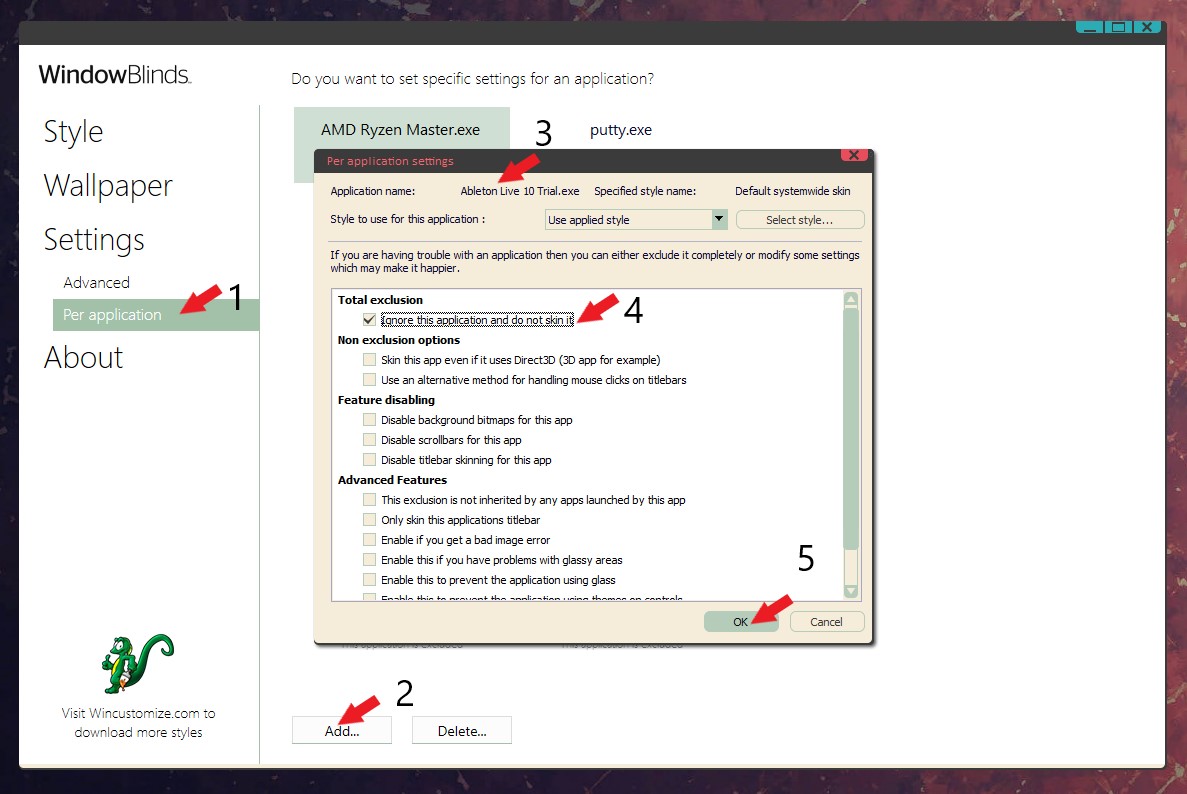
Sorry to hear you are having issues. If the browser has change and make it incompatible with Windowblinds. It is best to exclude it from Windowblinds so that Windowblinds do not skin it.

To exclude a program from Windowblinds: Use the screenshot below as guide.


Thanks
Basj,
Stardock Community Assistant.

Reply #2 Top

I'll give a second report on this one. I just installed it fresh (never previously installed), went & tried to download a file, moved the mouse around & it froze. I was able to kill the affected process thread & it started working again.

Reply #3 Top

Thanks for sharing. I have been able to kill just the "Save As" window without closing the browser itself, but it seems like you need to do so every time browser freezes after you drag the cursor outside of the window area, which is quite inconvenient. Oh well, let's hope there will be a bugfix soon.

Reply #4 Top

So no fix or anything, just exclude it & move on?

Reply #5 Top

Hello,

I have reported the issue to Support and Dev, so far no news on it. I'll remind them again on it.

Thank you.

Basj,

Stardock Community Assistant.

Reply #6 Top

Quoting basj, reply 5

Hello,

I have reported the issue to Support and Dev, so far no news on it. I'll remind them again on it.

Thank you.

Basj,

Stardock Community Assistant.
End of basj's quote

Ok, sounds good, thank you.

Reply #7 Top

Well, over a month & still nothing.


Either way, I just updated Brave & ran the test again & it doesn't seem to be hanging anymore. Though there still seems to be no way to get skins to work with it.
