Start11 - taskbar transparency not taking effect

Hi,

I have recently purchased Start11 and am running version 0.5 on Windows 11 Build 22000.132.

The taskbar transparency settings are not working for me - I still have a plain white/grey taskbar. Please see screenshot below which shows that I have correctly set the Transparency slider and that the preview window (at the top of the Start 11 settings window) suggests that my settings are correct. But you'll also see that my taskbar stubbornly remains white/grey!

Any suggestions on how to resolve, or any further info required to troubleshoot?

Thanks,

Fork.

Start 11 Transparency settings

7,976 views 8 replies
Reply #1 Top

Have you disabled the option in the operating system to allow transparency effects?

You can access that setting from Personalisation -> Colours in Windows settings.

If disabled anything that uses blur will appear solid.

If so you can disable blur in Start11 for the taskbar or turn on the transparency effects in the OS.

This is a recent change in Windows 11 and in the future the UI will detect that setting and warn you about that when on Windows 11.

Reply #2 Top

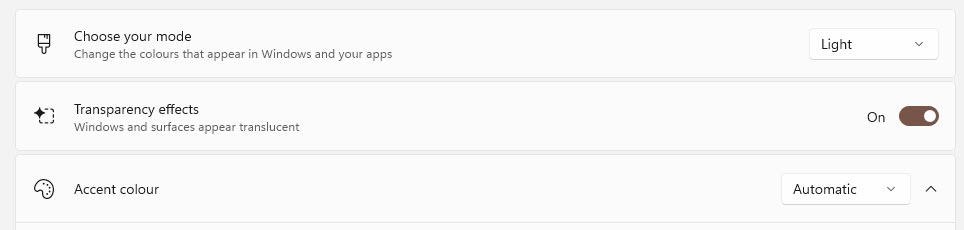
Thanks for the suggestion. I've double-checked and can confirm that Transparency is enabled in Settings:

Windows Settings - Personalisation - Colours

Reply #3 Top

What happens if the slider is set to say 5%?

Reply #5 Top

Unfortunately 5% has no effect (nor any other percentage value). The preview window looks correct at the top of the Start11 Configuration window, but the Taskbar itself simply doesn't ever change.

Reply #6 Top

What if you disable the blur option?

Reply #7 Top

Perfect! That's cracked it - thanks Neil.

For clarity (pardon the pun...) I had to set "Blur the wallpaper under the taskbar" to OFF, and I also had to set the taskbar transparency to 5%.

If I set "Blur the wallpaper..." and set the taskbar transparency to 0% then I get a solid dark green colour. But set it to 5% and it works as expected:

Start11 Taskbar transparency

Reply #8 Top

I need to bump this old thread.  I'm having the same problem of not being able to make the taskbar transparent in Windows 11.  It may just be a problem with settings, but so far I haven't found the right combination in the OS, Start11 and WindowBlinds to make it work.  If someone who has it working could post a simple list of settings to toggle On or Off I would appreciate it.  Thanks, and happy new year!

2nd Edit:  The problem came back.