Stardock Announces Start11 - Get into the Beta Today

Beta version of Start11 goes live today

Stardock Restores Classic Start Menu in Windows 11
Beta version of Start11 is live today


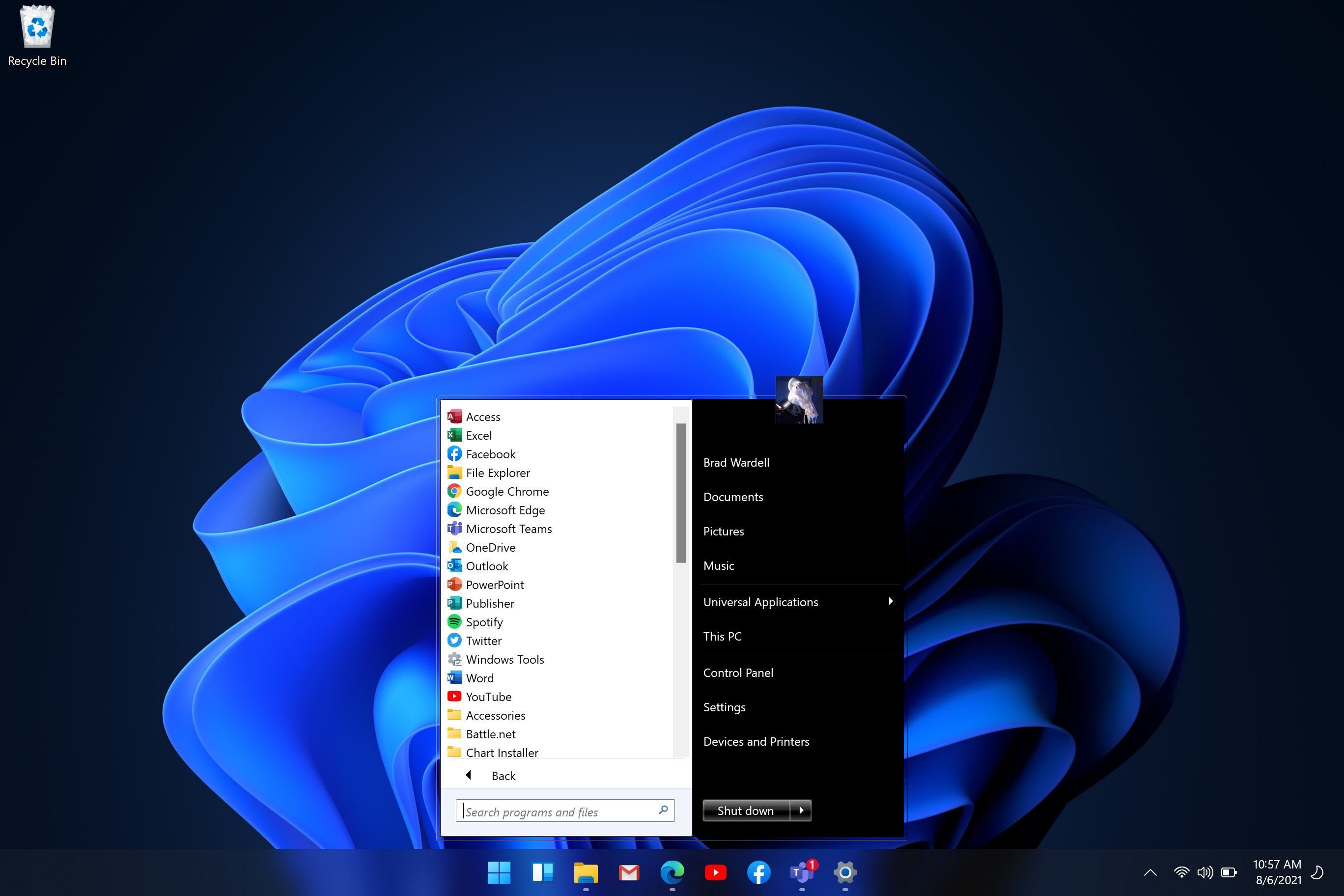
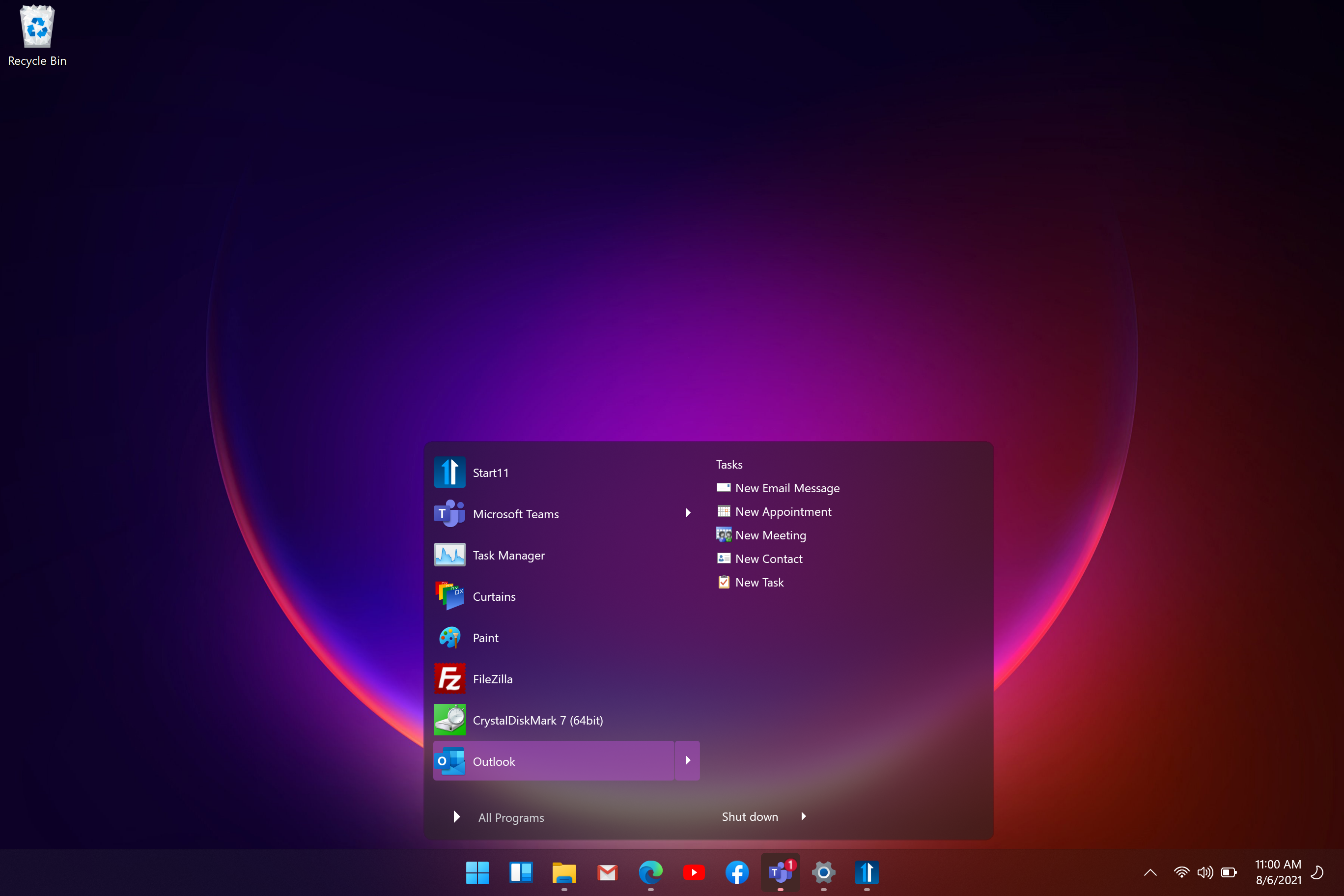
Stardock announced Start11, a program that allows users to customize the Windows Start menu. As with previous editions of the StartX products, Start11 allows users to restore the Start menu to appears as it does in previous versions of Windows as well as customize it to their liking. The beta version is now available at Stardock’s homepage. 

“This first beta is designed to regain some of the lost functionality in the current Windows 11 Start menu,” said Brad Wardell, Stardock CEO. “We have a lot of exciting new features planned to make the Start menu not just more accessible but also more useful to companies and power users.” 

The first beta of Start11 is compatible with Windows 11 and Windows 10, supports moving the start button to the middle or to the left, makes visible many subtle Windows features, and provides a new configuration UI that allows extensive customization. 


“The new UI has been designed to support future Start menu designs,” said Wardell. “Start8 and Start10 focused on restoring previous versions of the Start menu. Start11 will be extending this to support a host of new Start menu ideas such as the concept of pages, tabs, minimalism, and features for our enterprise customers.” 


Join the Start11 Beta Today for $4.99
Users who buy into the beta will get the full release free.

Own 
Start8 or Start10
 We've got special upgrade pricing just for you.
Start11
Start11

Start11
Start11
Start11


89,878 views 34 replies
Reply #1 Top


compatible with Windows 11 and Windows 10
Running Windows 10, the start menu button area & system tray turns pitch black, so unusable for me.

Reply #2 Top

Quoting JanOscar, reply 1


compatible with Windows 11 and Windows 10

Running Windows 10, the start menu button area & system tray turns pitch black, so unusable for me.

Are you running it with a WB or curtains style?

Reply #3 Top

Quoting Neil, reply 2

Are you running it with a WB or curtains style?
I am running it with WB.

Reply #4 Top

I'll wait until WindowBlinds 11 is out. Until then, I see no need for Start 11.


Join the Start11 Beta Today for $4.99
Users who buy into the beta will get the full release free.

Own 
Start8 or Start10
 We've got special upgrade pricing just for you.   This reads like paid upgrade?
Reply #6 Top

Downloaded it, and installed it on my Insider Beta edition (Win 11), and seems to be running fine, so far, will put it to the test. 

Reply #7 Top

That was quick. Windows 11 is looking better already!

Reply #8 Top

I noticed on my Insider Beta Edition of Win 11, on Start11 Beta, there's no way to expand the start menu into columns like in Start10 settings, am I missing something?

Never mind, I've found the settings.... :blush:  ;P  

Reply #9 Top

Installed it again from the administrator account and it seems to be working now.

Reply #10 Top

Quoting don5318, reply 8

I noticed on my Insider Beta Edition of Win 11, on Start11 Beta, there's no way to expand the start menu into columns like in Start10 settings, am I missing something?

Never mind, I've found the settings.... :blush:  ;P  

As the settings screen has changed somewhat you might find a few settings are not where they used to be.

+1 Loading…
Reply #11 Top

Quoting RedneckDude, reply 4

I'll wait until WindowBlinds 11 is out. Until then, I see no need for Start 11.
What the hell, I went for it on one of my Windows 11 rigs. Works well so far.  I'll love it more with a WB loaded.

Reply #12 Top

So curious as I'm no developer...with Win 10, what's the limitation of getting the Start Menu to move over to the center? Is it something that absolutely cannot be done or hasn't been found/programmed in yet? And yes, I understand it's a new feature in Win 11; I'm just fascinated in all the modifications Stardock has made to Windows over the years so was wondering if it could ever be done with Win 10.

Reply #13 Top

Well, it should be possible. I know if you have a start button on an ObjectDock dock, you get a floating start menu wherever the button resides.  Seems I vaguely remember a program out there somewhere that moves icons to the center, dunno about the start menu.

Reply #14 Top

Running great here, makes Win11 1 step better. 

Couple of questions: Couldn't not find a area to change the start orb? Is that feature going to be coming back?

I also could not find the section to adjust the height of the start menu ( ie: number of items ) / or how to add/remove items to the left side of start menu.


He he : found the setting much better now.


Reply #15 Top

Quoting Supergrovercmstorm, reply 14

Running great here, makes Win11 1 step better. 

Couple of questions: Couldn't not find a area to change the start orb? Is that feature going to be coming back?

I also could not find the section to adjust the height of the start menu ( ie: number of items ) / or how to add/remove items to the left side of start menu.


He he : found the setting much better now.


Yes, they're hidden away, took me some searching to find those items. :rofl:  |-)  

Reply #16 Top

"Pin to Start..." still says >"(Start 10)" ;-)


Reply #17 Top

Quoting c242, reply 16

"Pin to Start..." still says >"(Start 10)" ;)


It seems we missed the one in general explorer windows.  On the start menu it says (Start11) correctly.

Reply #18 Top

Will you be able to change the Start button icon with our own with Start11 later on just as you could with Start10 or is it like hard coded with the new taskbar which means that the customization is very limited?

Thanks!

Reply #19 Top

Quoting Preath, reply 18

Will you be able to change the Start button icon with our own with Start11 later on just as you could with Start10 or is it like hard coded with the new taskbar which means that the customization is very limited?

Thanks!

For now on Windows 11 it will use the OS button.  On Windows 10 it remains as it is with Start10 with the ability to change the icon as you wish.

We will assess closer to release if providing other options is viable.  The issue is the button moves as part of an animation when in centre mode as apps open / close and the most basic way to do a custom button would look pretty poor in that situation.  It is less of an issue for left aligned start buttons as it never moves.

Reply #20 Top

Since my old rig does not meet the current minimum hardware requirements to install Windows 11 and I'm not going to build a new one, is there anything about Start 11 that will benefit a rig running Win10 and Start 10? I'm assuming Start 11 is meant for Windows 11 only to be honest. Am I wrong in that assumption? 

Reply #21 Top

Quoting SamEVO, reply 20

Since my old rig does not meet the current minimum hardware requirements to install Windows 11 and I'm not going to build a new one, is there anything about Start 11 that will benefit a rig running Win10 and Start 10? I'm assuming Start 11 is meant for Windows 11 only to be honest. Am I wrong in that assumption? 

As the beta moves on there should be significant changes over Start10 on Windows 10.

Reply #22 Top

Okaaayyye. Can't thank you enough, Stardock. Once again, you make Windows usable. I've got it on Win 11 beta and will soon try it out on Windows 10.

signed,

Lifelong Customer

Reply #23 Top

I'm running the Insider Beta 11, So far, Start11 is working fine.

Reply #24 Top

As the beta moves on there should be significant changes over Start10 on Windows 10.


Thanks for the info, Neil. 

Reply #25 Top

Quoting elvee, reply 23

I'm running the Insider Beta 11, So far, Start11 is working fine.
Levant!!  Long time no see! Good to see you!
