Problems with File Explorer
Using Start10 ver 1.96
When using file explorer and try to create a folder and try to rename it I get a blank screen
If I open the folder again I see "new folder" and then usually I can rename it

Stardock will be closed starting on November 26th and we will be returning November 30th. We will be monitoring support tickets and forums but expect delays in responses during this time.
Using Start10 ver 1.96
When using file explorer and try to create a folder and try to rename it I get a blank screen
If I open the folder again I see "new folder" and then usually I can rename it

Where are you trying to create a new folder?
I am a little unclear on the link to Start10 here.
[quote quoting="post"]
Using Start10 ver 1.96
When using file explorer and try to create a folder and try to rename it I get a blank screen
If I open the folder again I see "new folder" and then usually I can rename it

[quote who="Neil Banfield" reply="1" id="3807112"]
Where are you trying to create a new folder?
I am a little unclear on the link to Start10 here.
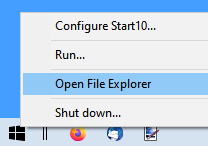
I click on the little window on the lower left then click on "Open File Explorer" that brings up File Explorer
If I right click on a folder (sub-directory) on one of my drives then try to create a new folder (sub-directory) by right clicking "new" and selecting "folder" then try to give it a name the screen goes blank. When I open the folder again I have a folder called "New folder". Then I can select it and rename it. This only happens while using Start10. Without Star10 running I can create a new folder and name it in the same operation.
Hello,
Sorry to hear you are having issues. I can't reproduce this on my system. Could give us more details on steps you did to make it happen. A video capture would be best and post its link here.
Thanks
Basj,
Stardock Community Assistant.
Welcome Guest! Please take the time to register with us.
Select a reason for giving karma:
You're about to visit an external site:
Sign up here to get the latest news, updates, and special offers delivered directly to your inbox.