Is Tiles 1.6 downloadable? I'm asking because I have serials for Tiles 1.6 unused, but don't activate Tiles 2

Is there any way to use serials for 1.6 on 2

Is it typical for version upgrades to be incompatible with serials from other version? I'm asking because, we'd like to know how to proceed with registering a Tiles 2, or is there a way to replace it with 1.6 so that we can make use of the serials we had paid for? Will serials bought for Tiles 2 be incompatible when it is decided that a release will be Tiles 3?

Thank you

3,091 views 6 replies
Reply #1 Top

Hello,
From what I know, if you purchased a stand alone product, you should still have download link for that product from your Stardock Account https://store.stardock.com/myaccount/products . But, if you was on ObjectDesktop package, than you do not have it under your account. Unless you renew your subscription, which should now come with Tiles 2.0.

Yes, serial bought under tiles V1 not compatible for V2 and so should be V2 keys not working for V3.

Thanks
Basj,
Stardock Community Assistant.

Reply #2 Top

Thanks -

From my downloads page, it gives an option for:

Version: 1.20

File Size: 11.8 MB

File Name: Tiles_setup_sd.exe

although on another PC I have 1.6.

Is 1.2 the latest available version with the serial I have for it? Would a serial for V1 activate any subversion (such as 1.6)? If so, is there any way to get the most recent V1 (that may be greater than 1.6)?


Thank you

Reply #3 Top

Are you sure you have a 1.6 on another computer?  The latest 1.x version is 1.2.

Reply #4 Top

I'm pretty sure. When I can next check it, I can confirm.

It is in fact in 1.2 - 

Thank you for your help!

Reply #5 Top

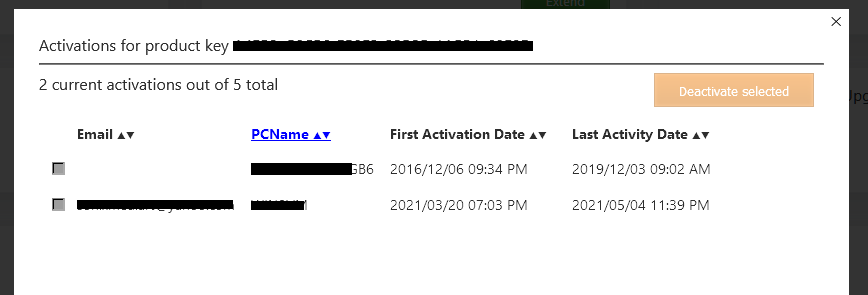
As a follow up question, do you offer the ability yet as with the Office Desktop software to show which PC's each Tiles (if bought on its own for $9.99 rather than in the suite) were activated on - and do you know how many activations a serial activates?

Also, to change from Tiles V1 to V2, would we just install V2 and would it uninstall V1 (or do we need to uninstall V1 then install V2)?


Thanks again-

Reply #6 Top

Hello,

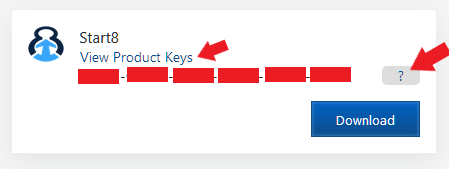
For stand alone produce you can manage activation via https://store.stardock.com/myaccount/products and by clicking on the "View Product Keys". Your product keys will appear and a "?" button next to it. Press the "?" button, and the something like the second screenshot should appear.


For the V2 over V1 install. It is best to uninstall the older version first before the newer one.


Thank you,

Basj,
Stardock Community Assistant