Sorting of downloaded files on the desktop in multi-monitor

Sorting of downloaded files on the desktop in multi-monitor

Sorting of downloaded files on the desktop in multi-monitor

3.08 is not ok, the download file always put in monitor-1, not primary monitor that i setting.

could you fix this bug?

when I remove fences, the file always put in primary monitor.
8,778 views 7 replies
Reply #1 Top

Hello,
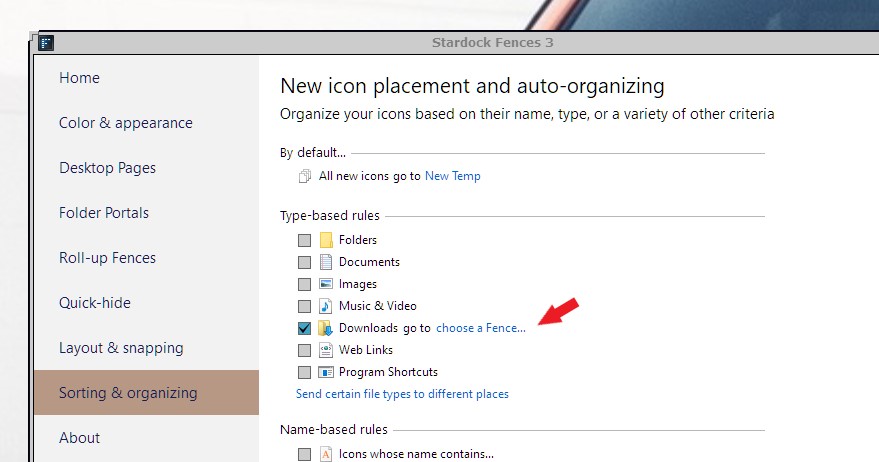
Sorry to hear you are having issues. You can create a Fence and set the Fences rule so all download files be send to this Fence and place that Fence in your primary monitor.


Basj,
Stardock Community Assistant.

Reply #3 Top

I don't get it. You can not create a Fences and place it on your primary monitor? And set that Fence to receive all the download files in there?

Thank you,

Basj,
Stardock Community Assistant

Reply #4 Top

It's not easy for everyone.

I can create a fence and put this fence at the primary monitor.

for a normal user, if the default fence can put all default download files at windows primary monitor as well.

thanks your guideline

Reply #5 Top

I know that is not ideal. And I do believe that the issue will be resolve soon. If you interested, you can join in the Fences 3.1 tester and see if your issue get resolve with that version. You can sign up here : https://forums.stardock.com/504549

Thank you,

Basj,
Stardock Community Assistant

Reply #7 Top

You can apply for it, just post in that thread for invitation from Support. Do just like those others did and Support will send you an invite if he think you're suitable for it.

Thank you,

Basj,
Stardock Community Assistant