Loose icons always stacking on my desktop, how to fix that?

Hello!

Since I installed and configured Fences, all the new icons or files that I add to my desktop (and do not want in Fences) stack themselves at the exact center of my two screen set ups, it's really annoying and I can't find the answer elsewhere and I tried to fix it but it was unsuccessful.


Does someone have the answer ? Thanks a lot in advance, I added a screenshot to show the issue :

thanks and have a great evening/day!

4,286 views 3 replies
Reply #1 Top

Hello,
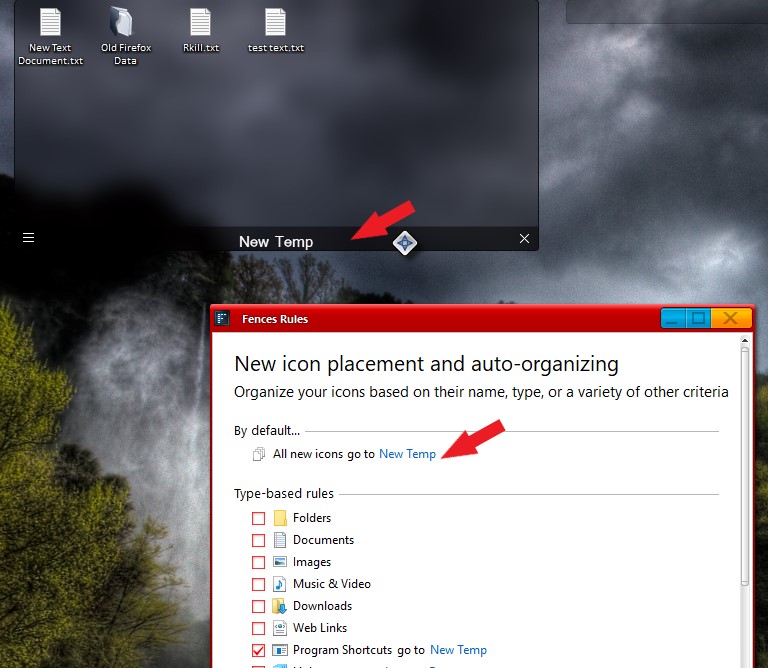
Sorry to hear you are having issues. This is known issue and hopefully will be address soon. As temporary solution. You can create a New Fence and set Fence rule for it so that all new icons send into Desktop will be send there. Something like screenshot below.


Basj,
Stardock Community Assistant.

Reply #2 Top

Thank you for your answer and the temporary fix,

However I would like to have loose icons on my desktop, I hope that this issue will be fixed in a next update!

Take care

Reply #3 Top

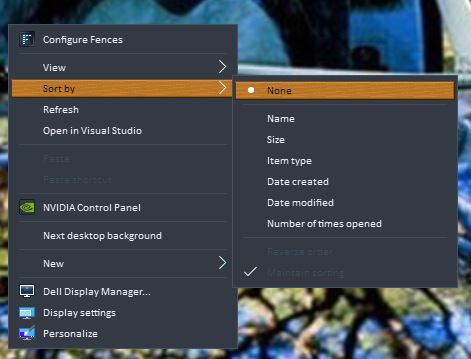
Or you can try set the desktop icons sorting to none.

Thank you,

Basj,
Stardock Community Assistant