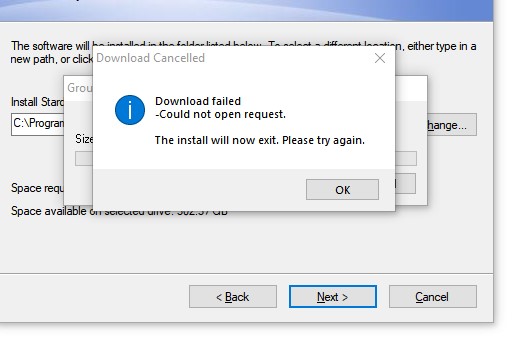
Cannot install "Fences3-sd-setup" on Windows 10

Clues please. Windows 10 and Malwarebytes.

This is the trial version. I am certainly willing to pay - but this is not a good start. I have looked at the Help messages but most seem to address folk who use Windows Defender as their prime protection. Google has a Malwarebytes incident listed within the last week.

Might this be my problem.
9,159 views 13 replies
Reply #1 Top

Hello,
Sorry to hear you are having issues. Need to know on your system you're trying to install.

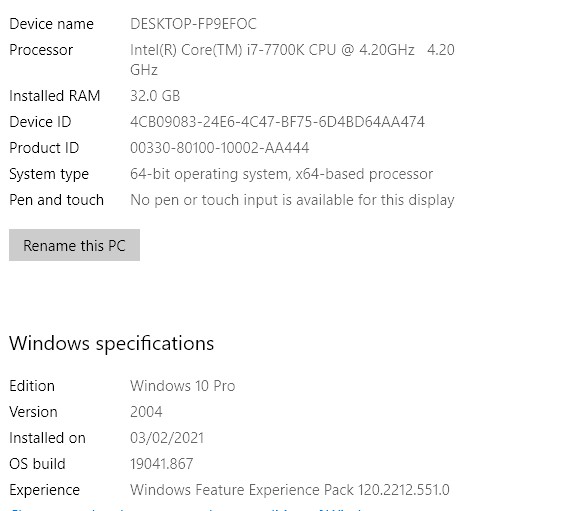
  1. Windows version, please use Window's Winver.exe for full version numbers.
  2. CPU on your system, Intel, AMD or ARM (Snapdragon).

Thanks
Basj,
Stardock Community Assistant.

Reply #3 Top

Hello,

  1. Any specific reason you're not updating to the latest official Windows 10 version 20H2?
  2. Are installing Fences into other location than its default location?
  3. Have you try installing without Malwarebytes turn on?

Thanks
Basj,
Stardock Community Assistant.

Reply #4 Top

Basj,

No reason for 1. I see it is there to install. I tend to wait a week for updates but I'll upload it tomorrow. I have an important Zoom shortly and I don't want to mess up my PC.

2. No. I am letting it do what it wants.

3. I have turned off the four live checks in Malwarebytes. I'll try turning it off altogether in a minute.

Tony


Reply #5 Top

Basj,

The problem was that box, ready ticked, for Groupy.

With that box empty the software installs. What am I missing?

Tony


Reply #6 Top

Basj,

How do I get back to the screen pattern I had.

I let the automatic mode have a go and it has made a real mess. I turned off Fences.

How can I turn it on again and not get the pattern it made?

Tony


Reply #7 Top

Most probably, your security software is blocking Fences from working properly.

Thank you,

Basj,
Stardock Community Assistant

Reply #8 Top

Baji


"The problem was that box, ready ticked, for Groupy.


With that box empty the software installs. What am I missing?"

Reply #9 Top

I don't really understand what you're saying, please elaborate more.

Thank you,

Basj,
Stardock Community Assistant

Reply #10 Top

You said you did not understand my last message.


With the tick in the box I got the loading problem. Remove it and the software installs.

My question was as to what Groupy was needed for and what would I miss without it.

My later question was to how I could remove the 'automatic' grouping that I activated when I got Fences to install. For me it was a complete mess and I wanted to go back to my original screen pattern so I could build new rectangles. You did not tell me so I have uninstalled the system.

I don't mind trying again but I do need to know how I can get back control of my screen if I don't like what Fences is doing.

Tony


Reply #11 Top

Hello again,

Thanks for clearing that up. No, you do not need to have Groupy install to have Fences to work. Groupy is totally different application from Stardock. You can refer here for more information on Groupy : https://www.stardock.com/products/groupy/.

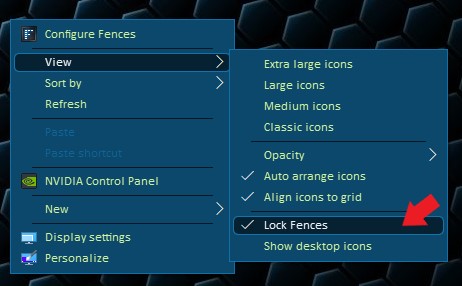
To remove the fences that automatic grouping. You can just click on the "X" that appear on that Fence titlebar to remove that Fence and all your icons in it will drop out to your desktop. If the "X" does not appear. You might need to unlock your Fences first. Refer to my screenshot below. Remove that "Lock Fences" Tick.

Try that and report back here if you need more assistance.

Thank you,

Basj,
Stardock Community Assistant

Reply #12 Top

Thanks Basj,

All is clear now.

I have just revived my version of Desktop OK. I will see if that is good enough for me. If not I will buy a copy of Fences.

Thanks again.

Tony


Reply #13 Top

Great, glad to hear that.

Thank you,

Basj,
Stardock Community Assistant