Issue with custom Start Icon sizing

automatically adjust wrongly

Hi,

I have multiple monitors with various resolutions. It seems like the png icons don't behave well on different resolutions. 
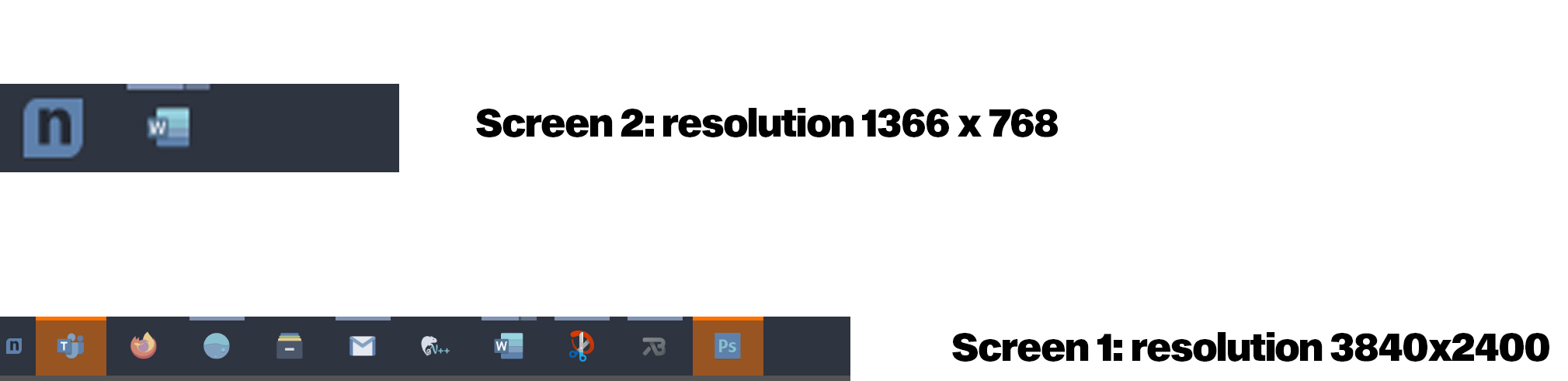

At first, I thought, it is my custom icon, but all icons which come with Start10 behave the same way. I can fix the small sizing issue on a higher resolution screen (screen 1) by increasing the size of the png icon file but then the screen with the lower resolution (screen 2) will have the icon stretching over and will overflow my taskbar (it becomes enormous) and the overflowing bits get cut off. 

So it is more of an issue of the png image is not getting stretched to 100% of the available height of the taskbar. Is there a way to fix this?


thanks.

3,846 views 6 replies
Reply #1 Top

Hello,
Sorry to hear you are having issues. Need more information on your system.

  1. Windows version, please use Winver.exe to get Windows full version numbers.
  2. Start versions.
  3. Details on your monitors. Resolutions and Scaling applied on it (100%, 125% 200% etc etc)

Thanks
Basj,
Stardock Community Assistant.

Reply #2 Top

Quoting basj, reply 1

Hello,
Sorry to hear you are having issues. Need more information on your system.


    1. Windows version, please use Winver.exe to get Windows full version numbers.


    1. Start versions.


    1. Details on your monitors. Resolutions and Scaling applied on it (100%, 125% 200% etc etc)


Thanks
Basj,
Stardock Community Assistant.

End of basj's quote


Hi, thanks for the quick prompt reply. See details below.


1. Windows 10 Version 20H2 (OS build 19042.804)

2. Start10 version 1.96

3. Primary Screen: 3840 x 2400 - 250% scale, Secondary Screen: 1366x768 - 100% scale

Reply #3 Top

Hello,

I believe the issue is there for your 250% scale. Turning it down, should have improve it. Anyway, I have forward your problem/question to Stardock Support Team for their assistance. Please keep an eye on this thread for any updates. We appreciate your feedback and patience.

Basj,
Stardock Community Assistant

Reply #4 Top

The scaling might be an issue for Start10 itself, but unfortunately, I need that scaling on a high-resolution screen as otherwise everything too small for me to work with. I've been using my 4K screen for more than a year and no other application had the issue with the current display settings. 

However, looking at the png behaviour on my taskbar, it should really always set to the height of the first row of the taskbar or its width along with the logic of whichever is smaller to support users with vertical and horizontal taskbar setup. Also, this is something to think about as more and more 11 and 13inch laptops are released with at least 4k screens which means the scaling will be set to similar levels as mine on those small displays.

Thanks and looking forward to your solution. 

Reply #6 Top

No, no news yet.

Thank you,

Basj,
Stardock Community Assistant