Start 10 does not display all the icons in a particular Fence

Start 10 does not integrate properly with Fences

The latest version of Start 10 and Fences are installed on my Win 10 desktop. All appear to work properly except the icons listed in the Start 10 Fences folders are not complete. Only about half the icons in a particular Fence show up under the associate Start 10 Fences folder. I can find no pattern to which icons are left out and multiple settings in both Fences and Start 10 result in the same problem. 

A screen shot of an example with the Graphics Fence is shown below. Note there are actually 14 icons in the Graphics fence (on the left) but there are only 7 icons shown under the Graphics Fence folder in Start 10 (on the right).


3,886 views 11 replies
Reply #1 Top

Hello,
Sorry to hear you are having issues. Just to be sure, need to know.

  1. Windows 10 installed version, please use Winver.exe for full Windows version numbers.
  2. Fences version.
  3. Start10 version.

Thanks
Basj,
Stardock Community Assistant.

Reply #2 Top

Are you able to export the keys from the registry here : HKEY_CURRENT_USER\Software\Stardock\Fences\Icons

and post a link to the file (or post the contents of the file here)

Reply #3 Top

Win10 version = 20H2

Start 10 version = 1.96  About indicates no updates available

Fences version = 3.0.9.11 About indicates no updates available

Reply #4 Top

I am not comfortable posting the contents of the registry file on a public forum. Can you explain what you are looking for in the registry that might explain the problem?

Thanks

Bill

Reply #5 Top

Quoting wperkins, reply 4

I am not comfortable posting the contents of the registry file on a public forum. Can you explain what you are looking for in the registry that might explain the problem?

Thanks

Bill
End of wperkins's quote

There is almost certainly something about the data in the registry for the missing icon entries which is causing them to be missed.  Perhaps you could find one of the icons thats missing from the list and just post the line for that one if that would make you more comfortable?

Reply #6 Top

I just noticed another interesting issue. I changed the font color (from white to black) in the "Sound" fence but the text color remains white in the "Sound" fence folder in Start 10. It appears that Fences and Start 10 are not coupled properly and that Start 10 does not follow changes in Fences. (i.e. font color changes,  added programs in the Fence, etc.)

Thanks

Bill

Reply #7 Top

The photo of a section of the registry shows data for eight icons. The first "CutOut 8" is in the Photos fence but does not appear in  the "Photos" fence folder in Start 8. The following 5 CyberLink icons appear in the "Video" fence but do not appear in  the "Video" fence folder in Start 8. 

Thanks for your effort in trying to resolve this issue. Bill

Reply #8 Top

I have the same problem.  All my fences appear in the Start10 menu, but some of the shortcuts do not show up in Start10.  I have purged and reinstalled Fences using the instructions found elsewhere in the forums, and I have uninstalled and reinstalled Start10.  No change.

Was there ever a resolution to this problem?

Reply #9 Top

Paul

Sadly I have received no further inputs from Stardock or members of the community and the exact problem I described previously, continues thru an upgrade to Start 10. I'm very disappointed since the ability to see the icons in various fences is the only reason I purchased Start 8/10 in the first place. If the "view fences as folders" feature worked as advertised it would make Start 10 really useful. As it stands I still have it installed but really never use it.

Bill

Reply #10 Top

Specific case of this issue:

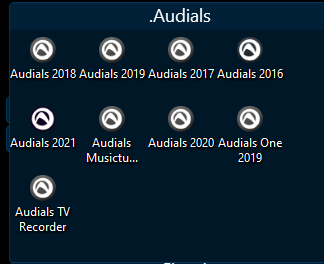
I have Fence named ".Audials".  

The corresponding Start10 entry for the Fence shows only two items:

  •   Audials 2018
  •   Audials One 2019

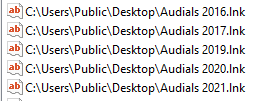
Looking at the registry under Computer\HKEY_CURRENT_USER\SOFTWARE\Stardock\Fences\Icons there are two sets of entries:

and

So Fences is showing all 7 links, while Start10 is showing only the last two.

Fences displays links for C:\Users\Public AND C:\Users\[username].

Start10 displays links only for C:Users\[username].

I don't honestly know why some of my links are Public and others are linked to [username], but this is clearly an inconsistency between Fences and Start10.  AKA, a bug.

Reply #11 Top

Do you have Start10 set to show folders in the tree all together or in the list alphabetically sorted with apps too?