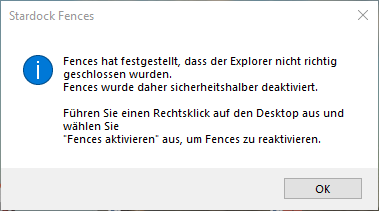
Enable fences, Reactivate Fences?

Hello my dears,

my fences can no longer be activated?

Get this message at startup:


"Fences was therefore deactivated to be on the safe side.

Right click on the desktop and select "Activate fences" to reactivate fences. "

________

"This option does not work and reinstallation brings the same error message?"


Do you have a solution for me please? My english is not good enough, i translate everything with google! Sorry!


Thank you for your help in advance.


Kind regards. Shrek, real Name Ronald.

7,729 views 9 replies
Reply #1 Top

Hello,
Sorry to hear you are having issues. Please try deactivate using this guide : https://forums.stardock.com/486311/accounts-and-activation-support-faq#deactivateproduct and try to install and activate it again. Report back.4

Thanks
Basj,
Stardock Community Assistant.

Reply #2 Top

Hello,

unfortunately I didn't manage it, I don't speak English. I could not deactivate Fences3 because the specified path was not found; I inserted this under Windows 10 pro: Fences 3:

"C: \ Program Files (x86) \ Stardock \ Fences3 \ SdDisplay.exe" -deactivate -prodID = 2628 -prodName = "Fences3" -company = "Stardock" -prodVer = "2.90"


That did not work, then I tried to start a new activation on Steam, the activation key was not accepted there?


I'm going to uninstall Fences3 and wait for your response.

many thanks for your help!

Kind regards.

Ronald

Reply #3 Top

Need to know you bought Fences from Steam or direct from Stardock.com?

Thank you,

Basj,
Stardock Community Assistant

Reply #4 Top

Ich habe es über Steam gekauft! Steam bietet keinen Support für Fences3 an, helfen können nur Sie wenn Sie wünschen??
Danke für ihre Hilfestellung 


I bought it through Steam! Steam does not offer support for Fences3, only you can help if you want?

Thanks for your help

Ronald


Reply #5 Top

Hello,

I have forwarded your report to the Stardock support team for their review and recommendations.

Please keep an eye on this thread for any updates.

We really do appreciate your feedback, thanks.


AzDude
Stardock Community Assistant

Reply #6 Top

Hello,

Sorry to hear you are having trouble.

Post a screenshot of what you are seeing, the prompt.

Sean Drohan
Stardock Support Manager

Reply #7 Top

Fences Reaktivieren ?

Hallo,

leider war ich Gesundheitlich nicht auf den Posten und konnte mich nicht darum kümmern.

Der Screenshot Zeigt die Meldung von "Stardock Fences3". Aktivieren geht nicht kann mir

bitte jemand Helfen, Neuinstallation hat keine Auswirkung es ist immer der gleiche Fehler?

Vielen Dank im Voraus

MfG. Ronald

Hello, unfortunately my health was not up to date and I couldn't take care of it. The screenshot shows the message from 'Stardock Fences3'. Activation does not work Can someone please help me, reinstallation has no effect it is always the same error? Thanks in advance

Kind regards. Ronald

Reply #8 Top

Quoting S, reply 7

MfG. Ronald

Hello, unfortunately my health was not up to date and I couldn't take care of it. The screenshot shows the message from 'Stardock Fences3'. Activation does not work Can someone please help me, reinstallation has no effect it is always the same error? Thanks in advance

Kind regards. Ronald
End of S's quote

The error you posted is not an activation one but an error for use.  When we see it, it is almost always in a corporate environment where WebSesne \ Forcepoint is being used.  Is that the case for you?

Sean Drohan
Stardock Support Manager

Reply #9 Top

Tut mir leid das kenne ich nicht  (where WebSesne \ Forcepoint is being used) , ich bin ein Privatanwender?


Ronald