Passcode showing as invalid characters

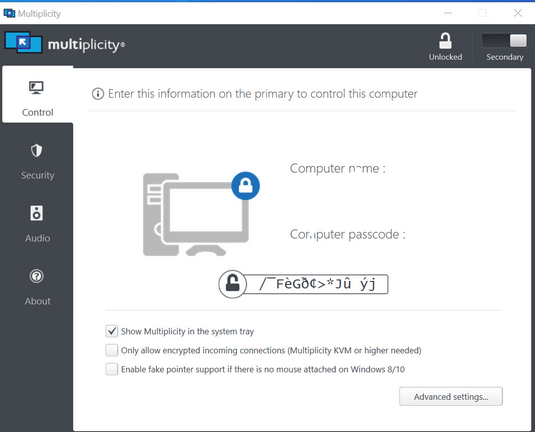
Installing on a windows 10 laptop and setting up as a secondary computer gives me this garbage passcode. I have tried changing it through the security tab but the primary one keeps saying its connecting but i have the wrong passcode. When I change the passcode it just gives me some new garbage and never shows what I set. I tested on another laptop windows 7 and the install gives a normal passcode. This is working on another win10 laptop same hardware/build. I have tried uninstalling several times but no luck.
 

4,339 views 4 replies
Reply #1 Top

Hello,

I have forwarded your report to the Stardock support team for their review and recommendations.

Please keep an eye on this thread for any updates.

We really do appreciate your feedback, thanks.


AzDude
Stardock Community Assistant

Reply #2 Top

Well...I can't tell you why it was broken but I just went back to it and it's working now and displaying the configured passcode correctly.

Before when it was giving me garbage the whole show passcode button was messed up. it didn't show "click to show passcode" it showed the garbage and when you clicked it, the garbage changed.

So now when I went back in it was showing the click to show correctly. I clicked it and it showed garbage. I then went to the change passcode and changed it. Going back to the show passcode it then displayed the new passcode when clicked. I was then able to get it to connect.

I guess you can close this out with the support team. I guess it just needed some time.

Reply #3 Top

Quoting Dascomb, reply 2

Well...I can't tell you why it was broken but I just went back to it and it's working now and displaying the configured passcode correctly.

Before when it was giving me garbage the whole show passcode button was messed up. it didn't show "click to show passcode" it showed the garbage and when you clicked it, the garbage changed.

So now when I went back in it was showing the click to show correctly. I clicked it and it showed garbage. I then went to the change passcode and changed it. Going back to the show passcode it then displayed the new passcode when clicked. I was then able to get it to connect.

I guess you can close this out with the support team. I guess it just needed some time.
End of Dascomb's quote

Were you under a non-admin account when it was failing?

Sean Drohan
Stardock Support Manager

Reply #4 Top

No, same user the whole time. It's a user with admin rights that can install software and run as administrator