Fences trial

Hi there, am reading mixed reviews about Fences, so want to give it a go myself, but it seems there is no trial version?


Thanks.

5,319 views 11 replies
Reply #2 Top

Found it, thanks. However, it doesn't seem to work. Have created some fences, put the short-cuts in them, but after a restart some remain empty. Now I understand the mixed reviews.

Reply #3 Top

Hello again,

Need to know is the empty fences a portal fences or normal Fences? Do you have OneDrive desktop Sync turned on?

And would also like to know more on your setup.

1) Windows version. Please use Winver.exe for full Windows version numbers.

2) More details information on those shortcuts created and gone missing after reboot.

Thank you,

Basj,
Stardock Community Assistant

Reply #4 Top

Thanks, seems to be working now. Will test-drive a couple of more days and then purchase.


Do you also sell the icon-packs separately?

Reply #6 Top

Quoting basj, reply 3

Hello again,

Need to know is the empty fences a portal fences or normal Fences? Do you have OneDrive desktop Sync turned on?

And would also like to know more on your setup.

1) Windows version. Please use Winver.exe for full Windows version numbers.

2) More details information on those shortcuts created and gone missing after reboot.

Thank you,

Basj,
Stardock Community Assistant

End of basj's quote

They disappeared again. Not happy.


Normal fences, have configured a couple of them, and yes, OneDrive is syncing.


It's normal fences with

1. Windows 10 version 2004

2. What info do you need? They're located in normal fences and predominately internet/intranet links.


Reply #7 Top

Quoting Mandatory_plus, reply 6

and yes, OneDrive is syncing.
End of Mandatory_plus's quote

Please review this thread : https://forums.stardock.com/501085

Thank you,

Basj,
Stardock Community Assistant

Reply #8 Top

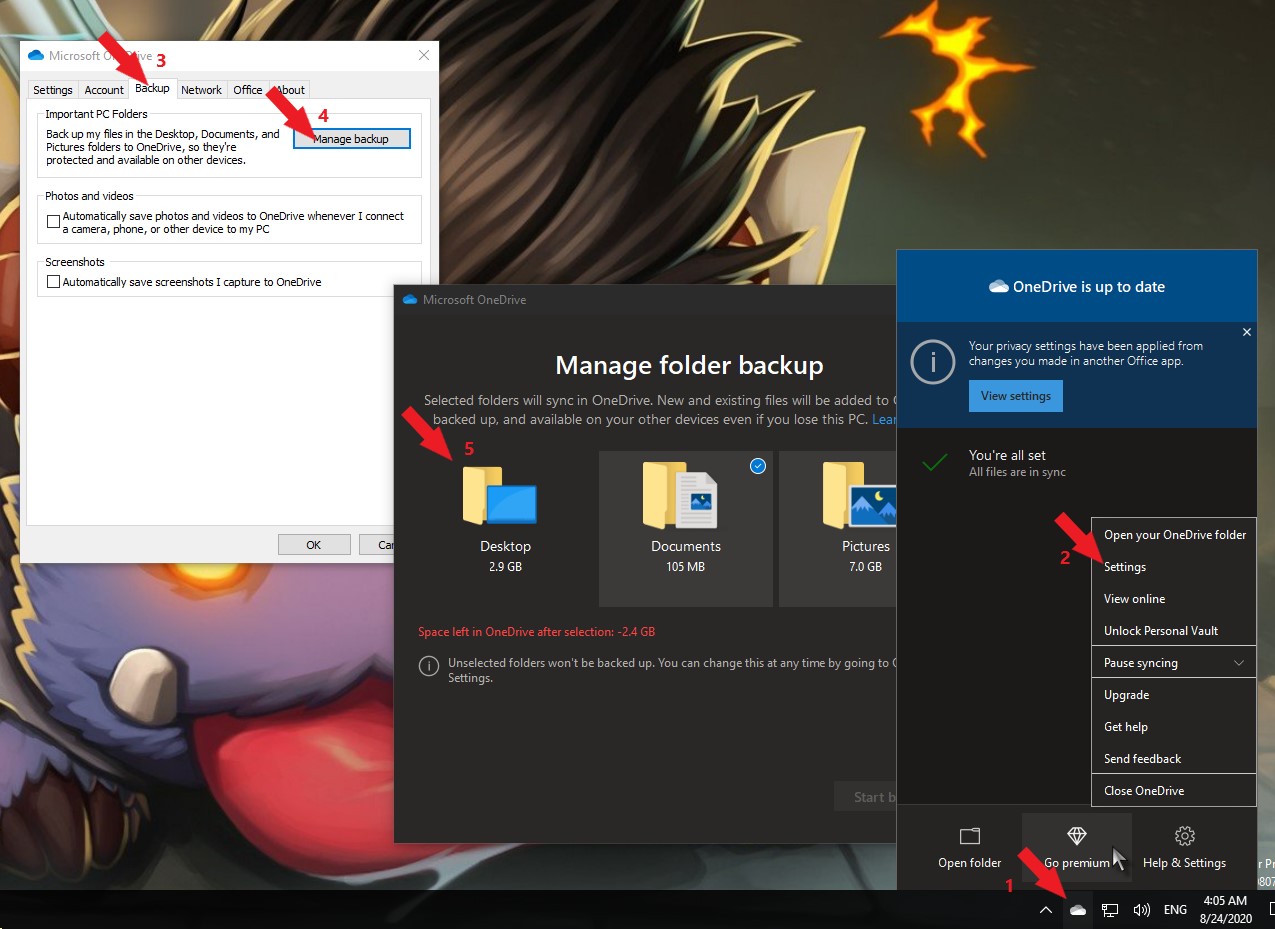
Will move the icons one more time, not sure how to switch off syncing for the desktop.

Reply #9 Top

Quoting Mandatory_plus, reply 8

Will move the icons one more time, not sure how to switch off syncing for the desktop.
End of Mandatory_plus's quote

I believe there are few guides on that online. Please try by googling for it.

Thank you,

Basj,
Stardock Community Assistant

Reply #10 Top

There are guides on how to disable the whole syncing process, not for only the desktop, which renders this useless.

Reply #11 Top

Hope this help.

Thank you,

Basj,
Stardock Community Assistant