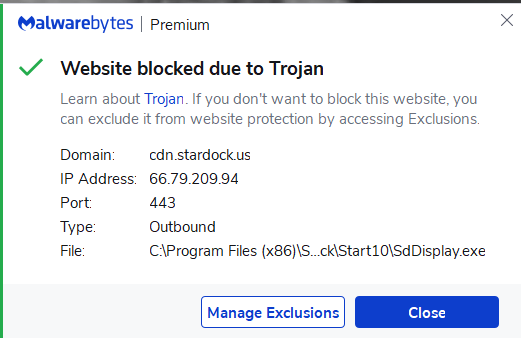
start10 update blocked by malwarebytes
I can't seem to download or install the latest Start10 V1.9 update. It and Stardock website link is being flagged and blocked by Malwarebytes. Can anyone confirm this problem and/or solution?
I just got the message also. Malware
Hello,
I have forwarded your report to the Stardock support team for their review and recommendations.
Please keep an eye on this thread for any updates.
We really do appreciate your feedback, thanks.
AzDude
Stardock Community Assistant
Hello,
Sorry to hear you are having trouble.
It's a false positive - you can proceed with confidence.
Sean Drohan
Stardock Support Manager
Hello
I am familiar with the term 'false positive" having worked with TSA's vetting operations in a past history. This is an OK answer for just me, not the majority of my customers I'm sure will be calling me.
Is there a collaboration between Stardock and Malwarebytes to resolve this?
I insist on my customers subscribing to Malwarebytes. They all are using Start10 I installed on their computers as well. I guarantee the majority will have no clue what this means and what to do. That has always been my experience with end-users. I just checked -- I have over 300 local customers I've installed Start10 on their computers.
Do you have any direction 'short of excluding the "cdn.stardock.us" website in Malwarebytes, if any? Just leave the current version they have installed until a fix is in place?
On a very positive note - kudos -- your Start10 program literally eliminated a lot of anxiety for my customers when Microsoft pushed out Windows 10 with too much too soon.
Respectfully,
Will
This is what I did:
Opened Malwarebytes Premium
Clicked on Allow List
Selected Add
Selected Add a Website
Entered cdn.stardock.us
Click Done
Above steps allowed me to access stardock website and download program update. (I may have had to exclude the program as well...can't remember now), but everything is working ok now.
Thanks john6541 -- thanks for the reply although I was familiar with the process. Correct, did not need to exclude the program as well.
And yes that's what I had to do for a couple customers initially when 1.91 was release -- until I realized it is a common issue all around. I'm hoping to not get flooded with answers to my customers.
Be safe
Have any reported to you that they too have seen the same?
This was passed on to our internal development team - it will be looked into.
There is also the general osmosis that happens with such AV apps - that the more the app / location is seen, it automatically / naturally is allowed.
Thank you for the report and patience.
Update: I contacted them. The block should be released shortly - within the hour of this post.
Sean Drohan
Stardock Support Manager
YOU ROCK sdRoHan
Yes to your answer -- several customers of mine are asking what to do. Not sure they know where the power on button is at times -- if you get my drift of the urgency here.
.
Thanks again.
There is a power button?
Sorry for the delay and trouble.
Sean Drohan
Stardock Support Manager
Welcome Guest! Please take the time to register with us.