[BUG] with desktop pages and fences on same position

I just deleted all my shortcuts

Hello, there's some bug in Fences with desktop pages. I'm talking about desktop pages from Fences, not from Windows. I have 2 desktop pages. Both have 1 fence with same position and on same monitor. I stored some temporary files on left page in fence #1 and software shortcuts on right page in fence #2. I wanted to delete everything from fence #1 now, so I selected everything inside fence with mouse and pressed Ctrl+Delete. But this somehow also selected eveything in fence #2. So everything was deleted from fence #2 as well.

Also there's a problem with dragging files between those 2 fences. I can't drag and drop anything from one fence to another because they are placed in same position, but on a different desktop pages.

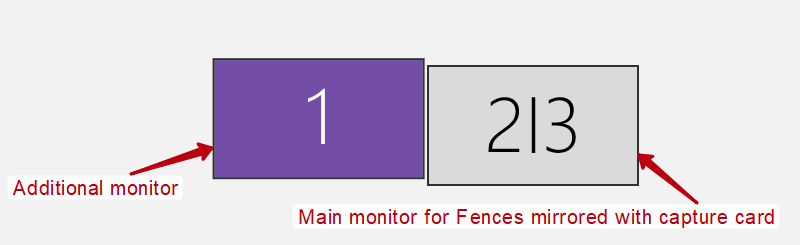
Maybe this bug related to my monitors setup, so I attached screenshot. I'm using only one (main) monitor for Fences and it also mirrored with capture card - AVerMedia Live Gamer Extreme.
4,217 views 4 replies
Reply #1 Top

Hello,

I have forwarded your report to the Stardock support team for their review and recommendations.

Please keep an eye on this thread for any updates.

We really do appreciate your feedback, thanks.

AzDude
Stardock Community Assistant

Reply #2 Top

Hello,
Sorry to hear you are having issues. Need to understand something.

1) Fences Desktop pages 1 and 2. Is both setup on monitor 1 with same items? i.e Icon1 in Desktop page 1 also appear in Desktop page 2?

2) Also need to know system setup.

I) Windows version (Please use Winver.exe for full version numbers)

II) Fences version.

III) Monitor setup : Resolution on each monitor, scaling applied if any, connection type HDMI/DP/DVI/VGA/USB etc.

Thanks

Basj,
Stardock Community Assistant.

Reply #3 Top

1) No, each fence have different unique content. One fence on page 1 had some temporary documents, second fence on page 2 had software shortcuts. Pages 1 and 2 is both setup on monitor 2|3 as on screenshot in first post. And both fences on different pages have same position, that's important.

2)

  • Windows 10 1803. Build 17134.1069
  • Fences 3.0.9.11
  • Both monitors have 1920x1080 resolution. No scaling in Windows. Main monitor (#2) with Fences connected via DVI-D -> DVI-D. Additional monitor (#1) connected via DVI-D -> HDMI. And capture card (#3) connected via HDMI -> Display Port.


Reply #4 Top

Just for testing, please try, connect Monitor 2 direct to your PC and test it without using the capture card. This will narrow down if there is actually a compatibility issue with the capture card or not.

Thank you,

Basj
Stardock Community Assistant.