Fences Disappear for No Reason

This has happened several times before that for no apparent or related reason while using different software all the fences and and attached icons disappear for no reason... Clicking to get it back does not work. Only fix is to reboot the computer when this happens. 

I am running version 3.0.9.11

Additional tweeks, have all selected

Roll up Fences and Quick hide are "NOT" enabled.

I do run multilple Monitors (5)

For what ever reason, this is totally random and happens about once every 2 or 3 weeks without warning.


This is the paid version of Fences

6,769 views 6 replies
Reply #1 Top

Hello,

I have forwarded your report to the Stardock support team for their review and recommendations.

Please keep an eye on this thread for any updates.

We really do appreciate your feedback, thanks.

AzDude
Stardock Community Assistant

Reply #2 Top

Hello,

Sorry to hear you are having trouble.

Roll up Fences and Quick hide are "NOT" enabled.
End of quote

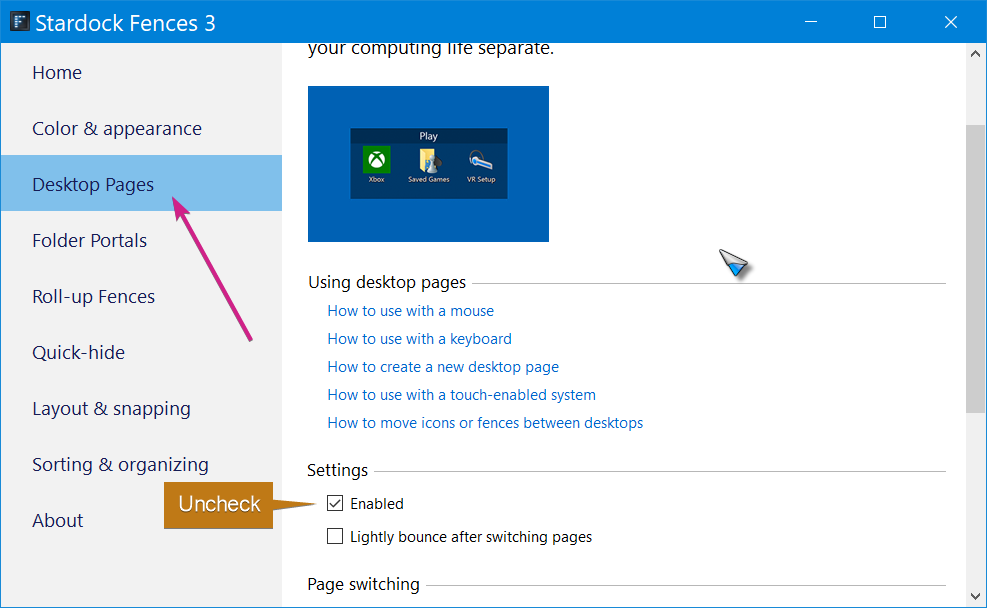
Quickhide is not the only thing that can make it appear that they are gone: Desktop pages is something else you want to test / disable.

You may also want to check this:

https://cdn.stardock.us/support/uploads/2019-09-10_14-07-50.png

Sean Drohan
Stardock Support Manager

Reply #3 Top

I checked the image that you said an I have "Auto Arrange Icons" and I do have "Show Desk Top Icons" selected..

Reply #4 Top

Quoting sparkie951, reply 3

I checked the image that you said an I have "Auto Arrange Icons" and I do have "Show Desk Top Icons" selected..
End of sparkie951's quote

Right, and you can see your icons now, yes, there is no problem currently correct?

Again, you are also going to want to turn off Desktop Pages:

Sean Drohan
Stardock Support Manager