Color
inactive title bar color
Windows 10, Fero skin, How do I change the color of all inactive window title bars instead of default grey?
inactive title bar color
Windows 10, Fero skin, How do I change the color of all inactive window title bars instead of default grey?
You mean Aero skin right, not Fero?
The Aero skin cannot be modified,
NO I mean FERO
Tom
https://www.wincustomize.com/explore/windowblinds/8746/
Sorry links don't seem to work for me.
Ahhh, OK, thanks. Never heard of it, sorry. In that case he would need to open the skin in SkinStudio and change the title bar image to what he wants it to be.
Hello,
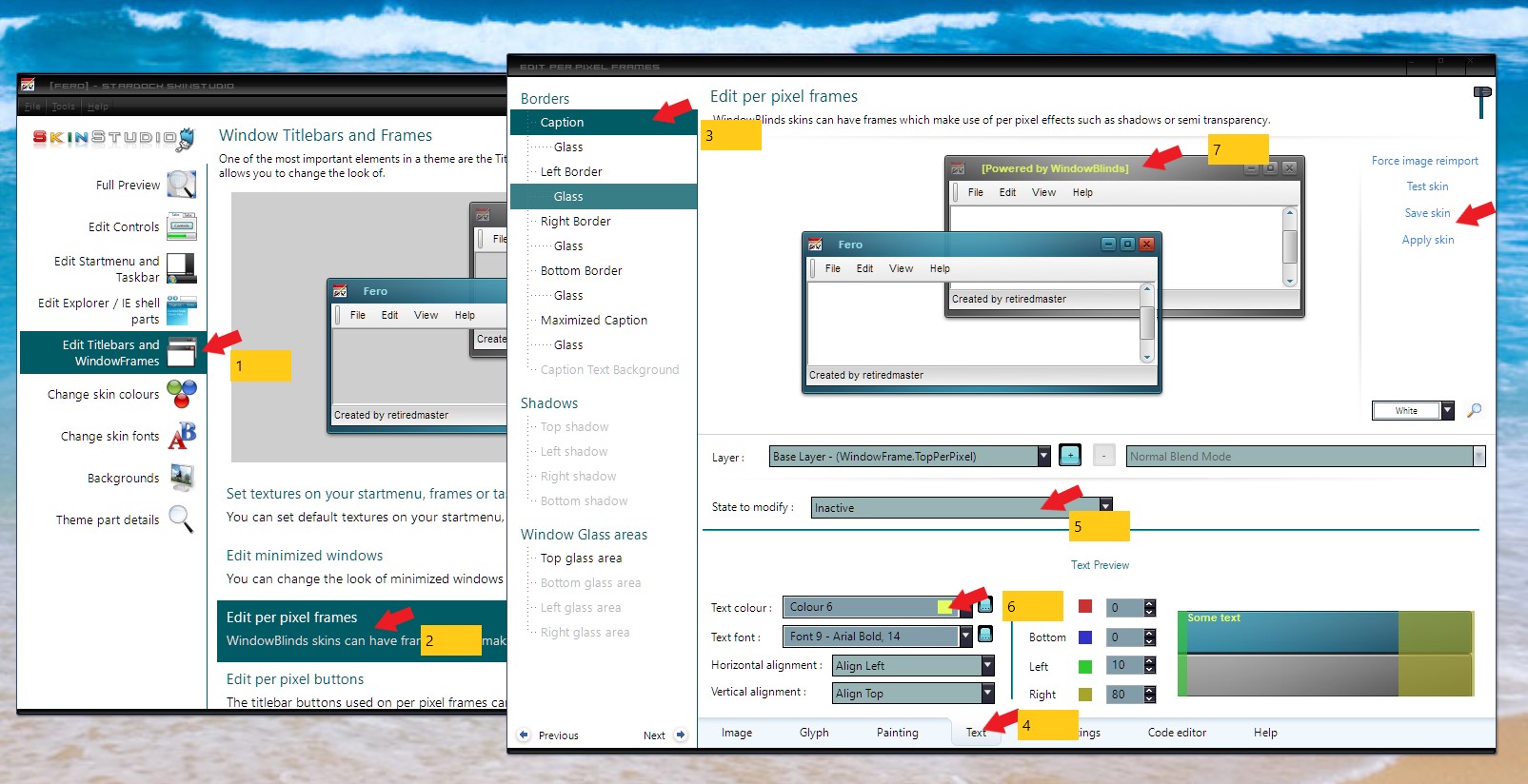
As mentioned above you will need to use the skinstudios for that. Just follows the numbers in the screenshot for it.
Edit: I might misunderstood you. This is for Inactive title text from gray to something else..
For the frame itself you will need to change the Image area.
Let us know if you need more assistance.
Thanks
Basj,
Stardock Community Assistant.
Welcome Guest! Please take the time to register with us.